Configure the access to the resources e.g. servers
Responsible for operating system hardening of the servers
Ensure the disk volume has been encrypted
Determine the identity and access permissions of specific resources
ooo
Who should take care of security?
In companies where they up and run services/application on the cloud, the responsible teams have to have enough knowledge about the security on the cloud.
Developers and Enterprise architect
Ensure cloud services they use are designed and deployed with security.
DevOps and SRE Teams
Ensure security introduced into the infrastructure build pipeline and the environments remain secure post-production.
InfoSec Team
Secure systems
In which step of the project the security have to be applied?
Scenario: Suppose you are a developer for a board game company. A product line produced by your company has recently become popular. The volume of requests from your retail partners to your inventory API is growing quickly: much faster than the rate that your inventory actually changes. You’d like your API to respond to requests rapidly without incurring load on your API. You use Azure API Management to host your API. You’re considering using an API Management policy to cache compiled responses to requests.
Api management for changing the behaviore of the api without changing the code
it exposes apis of a company for the api customers
it is used for api inventory
<policies>
    <inbound>
        <base />
 # it means first the policy of the higher level is applied
        <check-header name="Authorization" failed-check-httpcode="401" failed-check-error-message="Not authorized" ignore-case="false">
        </check-header>
    </inbound>
    <backend>
        <base />
    </backend>
    <outbound>
        <base />
        <json-to-xml apply="always" consider-accept-header="false" parse-date="false" />
    </outbound>
    <on-error>
        <base />
    </on-error>
</policies>
policies for
restricting access e.g. Check Http Header, Limit call rate by subscription, Limit call rate by key, Restrict caller Ips, Policies for Authentication, Cross domain policies, Transformation policies
Cross domain policies
Cross domain requests are considered a security threat and denied by browsers and APIs
Cross-Origin Resource Sharing (CORS), use the CORS policy
Some AJAX code, which runs on the browser, uses JSON with padding to make cross-domain calls securely. Use the JSONP policy to permit clients to use this technique
Caching policies
better performance for caching the compiled responses
Advanced policies
apply a policy only when the response passes a specific test, use the Control flow policy
Use the Forward request policy to forward a request to a backend server
To control what happens when an action fails, use the Retry policy
The Send one-way request policy can send a request to a URL without waiting for a response
If you want to store a value for use in a later calculation or test, use the Set variable policy to persist a value in a named variable
we can use vary-by tags/attributes in cache-lookup-value policy.
vary-by-query-parameter (tag): if all users have to see same price/result for a specific product, then we have to set vary-by-query-parameter to partnumber. APIM groups the requests based on partnumber.
vary-by-developer (attribute): becase vary-by-developer=”false”, APIM understands that different subscriptions key doesn’t alter the response. if this attribute is true, APIM serves a response from the cache only if it was originally requested with the same subscription key.
If a header can make a significant difference to a response, use the <vary-by-header> tag
you want to avoid the cache being cleared when the API Management service is updated.
you want to have greater control over the cache configuration than the internal cache allows
You want to cache more data than can be store in the internal cache.
if you use apim with consumption pricing tier, then you have to use external cache. because this pricing tier follows the serverless designprincipal and we should use it with serverless web apis, and it has no internal cache.
API keys / subscriptions (query string / header parameter)
The default header name is Ocp-Apim-Subscription-Key, and the default query string is subscription-key.
client certificate
Scenario: Suppose you work for a meteorological company, which has an API that customers use to access weather data for forecasts and research. There is proprietary information in this data, and you would like to ensure that only paying customers have access. You want to use Azure API Management to properly secure this API from unauthorized use.
Scenario: Businesses are extending their operations as a digital platform by creating new channels, finding new customers, and driving deeper engagement with existing ones. APIM provides the core competencies to ensure a successful API program through developer engagement, business insights, analytics, security, and protection. You can use APIM to take any backend and launch a full-fledged API program based on it.
Use Subscription key to secure access to an API
Azure api management service helps to expose the apis
developers musr subscrib the api / product (these are two different scope)
used to secure the api / product with a subscription key / API key
preventing denial of service attacks (DoS) by using throttling
or using advanced security policies like JSON Web Token (JWT) validation
Enabling independent software vendor (ISV) partner ecosystems by offering fast partner onboarding through the developer portal
we can define who can access api through the api gateway (only customers who have subscribed to your service can access the API and use your forecast data, by issuing subscription keys)
# how you can pass a key in the request header using curl
curl --header "Ocp-Apim-Subscription-Key: <key string>" https://<apim gateway>.azure-api.net/api/path

# example curl command that passes a key in the URL as a query string
curl https://<apim gateway>.azure-api.net/api/path?subscription-key=<key string>

# If the key is not passed in the header, or as a query string in the URL, you'll get a 401 Access Denied response from the API gateway.

# call without subscription key
curl -X GET https://[Name Of Gateway].azure-api.net/api/Weather/53/-1
# output
{ "statusCode": 401, "message": "Access denied due to missing subscription key. Make sure to include subscription key when making requests to an API." }

# call with subscription key as header
curl -X GET https://[Name Of Gateway].azure-api.net/api/Weather/53/-1 \
  -H 'Ocp-Apim-Subscription-Key: [Subscription Key]'

# output : {"mainOutlook":{"temperature":32,"humidity":34},"wind":{"speed":11,"direction":239.0},"date":"2019-05-16T00:00:00+00:00","latitude":53.0,"longitude":-1.0}
Use client certificates to secure access to an API
used to provide TLS mutual authentication between the client and the API gateway
allow only requests with certificates containing a specific thumbprint (through inbound policies)
TLS client authentication, the API Management gateway can inspect the certificate contained within the client request for the following properties
Property
Reason
Certificate Authority (CA)
Only allow certificates signed by a particular CA
Thumbprint
Allow certificates containing a specified thumbprint
Subject
Only allow certificates with a specified subject
Expiration Date
Only allow certificates that have not expired
two common ways to verify a certificate
Check who issued the certificate. If the issuer was a certificate authority that you trust, you can use the certificate. You can configure the trusted certificate authorities in the Azure portal to automate this process.
If the certificate is issued by the partner, verify that it came from them. For example, if they deliver the certificate in person, you can be sure of its authenticity. These are known as self-signed certificates.
apim consumption tier
this tier is for serverless APIs e.g. azure functions
in this tier for using client certificate must explicitly enable it APIM Instance > custom domains > Request Client Certificate: Yes
check thumbnail of a client certificate in policies
# Every client certificate includes a thumbprint, which is a hash, calculated from other certificate properties

<choose>
    <when condition="@(context.Request.Certificate == null || context.Request.Certificate.Thumbprint != "desired-thumbprint")" >
        <return-response>
            <set-status code="403" reason="Invalid client certificate" />
        </return-response>
    </when>
</choose>
Check the thumbprint against certificates uploaded to API Management
n the previous example, only one thumbprint would work so only one certificate would be validated. Usually, each customer or partner company would pass a different certificate with a different thumbprint. To support this scenario, obtain the certificates from your partners and use the Client certificates page in the Azure portal to upload them to the API Management resource. Then add this code to your policy:
Create Self-Signed Certificate [Source] and use in APIM
# create a private key and certificate
pwd='Pa$$w0rd'
pfxFilePath='selfsigncert.pfx'
openssl req -x509 -sha256 -nodes -days 365 -newkey rsa:2048 -keyout privateKey.key -out selfsigncert.crt -subj /CN=localhost

# convert the certificate to PEM format
openssl pkcs12 -export -out $pfxFilePath -inkey privateKey.key -in selfsigncert.crt -password pass:$pwd
openssl pkcs12 -in selfsigncert.pfx -out selfsigncert.pem -nodes

# When you are prompted for a password, type Pa$$w0rd and then press Enter.

# Get the thumbprint for the certificate
Fingerprint="$(openssl x509 -in selfsigncert.pem -noout -fingerprint)"
Fingerprint="${Fingerprint//:}"
echo ${Fingerprint#*=}

# output is hexadecimal string without any accompanying text and no colons
curl -X GET https://[api-gateway-name].azure-api.net/api/Weather/53/-1 \
  -H 'Ocp-Apim-Subscription-Key: [Subscription Key]'

# output : return a 403 Client certificate error, and no data will be returned.
Expose multiple Azure Function apps as a consistent API by using APIM
Combine multiple Azure Functions apps into a unified interface by importing them into a single Azure API Management instance.
Scenario: Suppose you work for an online store with a successful and busy web site. Your developers have written the business logic for the site as microservices in the form of Azure Functions. Now, you want to enable partners to interact with your online store from their own code by creating a web API that they can call over HTTP. You want to find an easy way to assemble your functions into a single API.
In your online store, you have implemented each part of the application as a microservice – one for the product details, one for order details, and so on. A separate team manages each microservice and each team uses continuous development and delivery to update and deploy their code on a regular basis. You want to find a way to assemble these microservices into a single product and then manage that product centrally.
use Azure Functions and Azure API Management to build complete APIs with a microservices architecture
Microservices has become a popular approach to the architecture of distributed applications
we can develop distributed systems with serverless architecture e.g. azure function
Azure Batch: Azure Batch is an Azure service that enables you to run large-scale parallel and high-performance computing (HPC) applications efficiently in the cloud.
High-performance computing (HPC)
MPI: Message Passing Interface
Workflow: Business processes modeled in software are often called workflows.
Design-first approach: include user interfaces in which you can draw out the workflow
Azure compute: is an on-demand computing service for running cloud-based applications
List the created virtual machines in your subscription
open-port
Open a specific network port for inbound traffic
restart
Restart a virtual machine
show
Get the details for a virtual machine
start
Start a stopped virtual machine
stop
Stop a running virtual machine
update
Update a property of a virtual machine
# Create a Linux virtual machine
az vm create \
  --resource-group [sandbox resource group name] \
  --location westus \
  --name SampleVM \
  --image UbuntuLTS \
  --admin-username azureuser \
  --generate-ssh-keys \
  --verbose # Azure CLI tool waits while the VM is being created.
    # Or
  --no-wait # option to tell the Azure CLI tool to return immediately and have Azure continue creating the VM in the background.

# output
{
  "fqdns": "",
  "id": "/subscriptions/<subscription-id>/resourceGroups/Learn-2568d0d0-efe3-4d04-a08f-df7f009f822a/providers/Microsoft.Compute/virtualMachines/SampleVM",
  "location": "westus",
  "macAddress": "00-0D-3A-58-F8-45",
  "powerState": "VM running",
  "privateIpAddress": "10.0.0.4",
  "publicIpAddress": "40.83.165.85",
  "resourceGroup": "2568d0d0-efe3-4d04-a08f-df7f009f822a",
  "zones": ""
}

  # generate-ssh-keys flag: This parameter is used for Linux distributions and creates
  # a pair of security keys so we can use the ssh tool to access the virtual machine remotely.
  # The two files are placed into the .ssh folder on your machine and in the VM. If you already
  # have an SSH key named id_rsa in the target folder, then it will be used rather than having a new key generated.

# Connecting to the VM with SSH
ssh azureuser@<public-ip-address>

# for exit
logout

# Listing images
az vm image list --output table

# Getting all images
az vm image list --sku WordPress --output table --all # t is helpful to filter the list with the --publisher, --sku or –-offer options.

# Location-specific images
az vm image list --location eastus --output table
Pre-defined VM sizes
Azure defines a set of pre-defined VM sizes for Linux and Windows to choose from based on the expected usage.
Type
Sizes
Description
General purpose
Dsv3, Dv3, DSv2, Dv2, DS, D, Av2, A0-7
Balanced CPU-to-memory. Ideal for dev/test and small to medium applications and data solutions.
Compute optimized
Fs, F
High CPU-to-memory. Good for medium-traffic applications, network appliances, and batch processes.
Memory optimized
Esv3, Ev3, M, GS, G, DSv2, DS, Dv2, D
High memory-to-core. Great for relational databases, medium to large caches, and in-memory analytics.
Storage optimized
Ls
High disk throughput and IO. Ideal for big data, SQL, and NoSQL databases.
GPU optimized
NV, NC
Specialized VMs targeted for heavy graphic rendering and video editing.
High performance
H, A8-11
Our most powerful CPU VMs with optional high-throughput network interfaces (RDMA).
# get a list of the available sizes
az vm list-sizes --location eastus --output table

# output
MaxDataDiskCount    MemoryInMb  Name                      NumberOfCores    OsDiskSizeInMb    ResourceDiskSizeInMb
------------------  ------------  ----------------------  ---------------  ----------------  ----------------------
                 2          2048  Standard_B1ms                         1           1047552                    4096
                 2          1024  Standard_B1s                          1           1047552                    2048
                 4          8192  Standard_B2ms                         2           1047552                   16384
                 4          4096  Standard_B2s                          2           1047552                    8192
                 8         16384  Standard_B4ms                         4           1047552                   32768
                16         32768  Standard_B8ms                         8           1047552                   65536
                 4          3584  Standard_DS1_v2 (default)             1           1047552                    7168
                 8          7168  Standard_DS2_v2                       2           1047552                   14336
                16         14336  Standard_DS3_v2                       4           1047552                   28672
                32         28672  Standard_DS4_v2                       8           1047552                   57344
                64         57344  Standard_DS5_v2                      16           1047552                  114688
        ....
                64       3891200  Standard_M128-32ms                  128           1047552                 4096000
                64       3891200  Standard_M128-64ms                  128           1047552                 4096000
                64       3891200  Standard_M128ms                     128           1047552                 4096000
                64       2048000  Standard_M128s                      128           1047552                 4096000
                64       1024000  Standard_M64                         64           1047552                 8192000
                64       1792000  Standard_M64m                        64           1047552                 8192000
                64       2048000  Standard_M128                       128           1047552                16384000
                64       3891200  Standard_M128m                      128           1047552                16384000

# Specify a size during VM creation
az vm create \
    --resource-group learn-5d4bcefe-17c2-4db6-aba8-3f25d2c54844 \
    --name SampleVM2 \
    --image UbuntuLTS \
    --admin-username azureuser \
    --generate-ssh-keys \
    --verbose \
    --size "Standard_DS5_v2"

# Get available VM Size
# Before a resize is requested, we must check to see if the desired size is available in the cluster our VM is part of.
az vm list-vm-resize-options \
    --resource-group learn-5d4bcefe-17c2-4db6-aba8-3f25d2c54844 \
    --name SampleVM \
    --output table

# Resize an existing VM
az vm resize \
    --resource-group learn-5d4bcefe-17c2-4db6-aba8-3f25d2c54844 \
    --name SampleVM \
    --size Standard_D2s_v3
This will return a list of all the possible size configurations available in the resource group. If the size we want isn’t available in our cluster, but is available in the region, we can deallocate the VM. This command will stop the running VM and remove it from the current cluster without losing any resources. Then we can resize it, which will re-create the VM in a new cluster where the size configuration is available.
# List VMs
az vm list

# Output types
az vm list --output table|json|jsonc|tsv

# Getting the IP address
az vm list-ip-addresses -n SampleVM -o table
# output
VirtualMachine    PublicIPAddresses    PrivateIPAddresses
----------------  -------------------  --------------------
SampleVM          168.61.54.62         10.0.0.4

# Getting VM details
az vm show --resource-group learn-5d4bcefe-17c2-4db6-aba8-3f25d2c54844 --name SampleVM
# we could change to a table format, but that omits almost all of the interesting data. Instead, we can turn to a built-in query language for JSON called JMESPath.
# https://jmespath.org/


# Adding filters to queries with JMESPath
{
  "people": [
    {
      "name": "Fred",
      "age": 28
    },
    {
      "name": "Barney",
      "age": 25
    },
    {
      "name": "Wilma",
      "age": 27
    }
  ]
}

# poeple is an array
people[1]
# output
{
    "name": "Barney",
    "age": 25
}


people[?age > '25']
# output
[
  {
    "name": "Fred",
    "age": 28
  },
  {
    "name": "Wilma",
    "age": 27
  }
]

people[?age > '25'].[name]
# output
[
  [
    "Fred"
  ],
  [
    "Wilma"
  ]
]

# Filtering our Azure CLI queries
az vm show \
    --resource-group learn-5d4bcefe-17c2-4db6-aba8-3f25d2c54844 \
    --name SampleVM \
    --query "osProfile.adminUsername"

az vm show \
    --resource-group learn-5d4bcefe-17c2-4db6-aba8-3f25d2c54844 \
    --name SampleVM \
    --query hardwareProfile.vmSize

az vm show \
    --resource-group learn-5d4bcefe-17c2-4db6-aba8-3f25d2c54844 \
    --name SampleVM \
    --query "networkProfile.networkInterfaces[].id"

az vm show \
    --resource-group learn-5d4bcefe-17c2-4db6-aba8-3f25d2c54844 \
    --name SampleVM \
    --query "networkProfile.networkInterfaces[].id" -o tsv

# Stopping a VM
az vm stop \
    --name SampleVM \
    --resource-group learn-5d4bcefe-17c2-4db6-aba8-3f25d2c54844

# We can verify it has stopped by attempting to ping the public IP address, using ssh, or through the vm get-instance-view command.
az vm get-instance-view \
    --name SampleVM \
    --resource-group learn-5d4bcefe-17c2-4db6-aba8-3f25d2c54844 \
    --query "instanceView.statuses[?starts_with(code, 'PowerState/')].displayStatus" -o tsv

# Starting a VM
az vm start \
    --name SampleVM \
    --resource-group learn-5d4bcefe-17c2-4db6-aba8-3f25d2c54844

# Restarting a VM
az vm start \
    --name SampleVM \
    --resource-group learn-5d4bcefe-17c2-4db6-aba8-3f25d2c54844
    --no-wait

# Install NGINX web server
# 1.
z vm list-ip-addresses --name SampleVM --output table

# 2.
ssh azureuser@<PublicIPAddress>

# 3.
sudo apt-get -y update && sudo apt-get -y install nginx

# 4.
exit

# Retrieve our default page
# Either
curl -m 10 <PublicIPAddress>
# Or
# in browser try the public ip address

# This command will fail because the Linux virtual machine doesn't expose
# port 80 (http) through the network security group that secures the network
# connectivity to the virtual machine. We can change this with the Azure CLI command vm open-port.

# open oprt
az vm open-port \
    --port 80 \
    --resource-group learn-5d4bcefe-17c2-4db6-aba8-3f25d2c54844 \
    --name SampleVM

# output of curl command
<!DOCTYPE html>
<html>
<head>
<title>Welcome to nginx!</title>
<style>
body {
    width: 35em;
    margin: 0 auto;
    font-family: Tahoma, Verdana, Arial, sans-serif;
}
</style>
</head>
<body>
<h1>Welcome to nginx!</h1>
<p>If you see this page, the nginx web server is successfully installed and
working. Further configuration is required.</p>

<p>For online documentation and support please refer to
<a href="http://nginx.org/">nginx.org</a>.<br/>
Commercial support is available at
<a href="http://nginx.com/">nginx.com</a>.</p>

<p><em>Thank you for using nginx.</em></p>
</body>
</html>
An availability set is a logical grouping of two or more VMs
keep your application available during planned or unplanned maintenance.
A planned maintenance event is when the underlying Azure fabric that hosts VMs is updated by Microsoft.
to patch security vulnerabilities,
improve performance,
and add or update features
When the VM is part of an availability set, the Azure fabric updates are sequenced so not all of the associated VMs are rebooted at the same time.
VMs are put into different update domains.
Update domains indicate groups of VMs and underlying physical hardware that can be rebooted at the same time.
Update domains are a logical part of each data center and are implemented with software and logic.
Unplanned maintenance events involve a hardware failure in the data center,
such as a server power outage
or disk failure
VMs that are part of an availability set automatically switch to a working physical server so the VM continues to run.
The group of virtual machines that share common hardware are in the same fault domain.
A fault domain is essentially a rack of servers.
It provides the physical separation of your workload across different power, cooling, and network hardware that support the physical servers in the data center server racks.
With an availability set, you get:
Up to three fault domains that each have a server rack with dedicated power and network resources
Five logical update domains which then can be increased to a maximum of 20
Your VMs are then sequentially placed across the fault and update domains. The following diagram shows an example where you have six VMs in two availability sets distributed across the two fault domains and five update domains.
Scenario: Imagine that you work for a domestic shipping company. Your customers use one of the company’s websites to manage and check the status of their shipments. This website is deployed to virtual machines and hosted on-premises. You’ve noticed that increased usage on the site is straining the virtual machines’ resources. However, you can’t adjust to load fluctuations without manually intervening and creating or deallocating virtual machines.
Scale set is for scalable applications ( automatically adjust to changes in load while minimizing costs with virtual machine scale sets)
adjust your virtual machine resources to match demands
keep the virtual machine configuration consistent to ensure application stabilit
VMs in this type of scale set all have the same configuration and run the same applications
for scenarios that include compute workloads, big-data workloads, and container workloads
to deploy and manage many load-balanced, identical VMs
it scales up and down automatically
it can even resize the vm
A scale set uses a load balancer to distribute requests across the VM instances
It uses a health probe to determine the availability of each instance (The health probe pings the instance)
keep in mind that you’re limited to running 1,000 VMs on a single scale set
support both Linux and Windows VMs
are designed for cost-effectiveness
scaling options
horizontal: adding or removing several VMs, by using rules, The rules are based on metrics.
vertical: adding resources such as memory, CPU power, or disk space to VMs, increasing the size of the VMs in the scale set, by using rules.
How to scale
Scheduled scaling: You can proactively schedule the scale set to deploy one or N number of additional instances to accommodate a spike in traffic and then scale back down when the spike ends.
Autoscaling: If the workload is variable and can’t always be scheduled, you can use metric-based threshold scaling. Autoscaling horizontally scales out based on node usage. It then scales back in when the resources return to a baseline.
Reducing costs by using low-priority
allows you to use Azure compute resources at cost savings of up to 80 percent.
A low-priority scale set provisions VMs through this underused compute capability.
these VMs, keep in mind that they’re temporary. Availability depends on size, region, time of day, and so on. These VMs have no SLA.
When Azure needs the computing power again, you’ll receive a notification about the VM that will be removed from your scale set
you can use Azure Scheduled Events to react to the notification within the VM.
low-priority scale set, you specify two kinds of removal
Delete: The entire VM is removed, including all of the underlying disks.
Deallocate: The VM is stopped. The processing and memory resources are deallocated. Disks are left intact and data is kept. You’re charged for the disk space while the VM isn’t running.
if the workload increases in complexity rather than in volume, and this complexity demands more of your resources, you might prefer to scale vertically.
# create custom data to config scale set
code cloud-init.yaml

# custom data
#cloud-config
package_upgrade: true
packages:
  - nginx
write_files:
  - owner: www-data:www-data
  - path: /var/www/html/index.html
    content: |
        Hello world from Virtual Machine Scale Set !
runcmd:
  - service nginx restart

# create resource group
az group create \
  --location westus \
  --name scalesetrg

# create scale set
az vmss create \
  --resource-group scalesetrg \
  --name webServerScaleSet \
  --image UbuntuLTS \
  --upgrade-policy-mode automatic \
  --custom-data cloud-init.yaml \
  --admin-username azureuser \
  --generate-ssh-keys

# More about scaling : https://docs.microsoft.com/en-us/learn/modules/build-app-with-scale-sets/4-configure-virtual-machine-scale-set
By default, the new virtual machine scale set has two instances and a load balancer.
Thecustom-data flag specifies that the VM configuration should use the settings in the cloud-init.yaml file after the VM has been created. You can use a cloud-init file to install additional packages, configure security, and write to files when the machine is first installed.
Configure vm scale set
# add a health probe to the load balancer
az network lb probe create \
  --lb-name webServerScaleSetLB \
  --resource-group scalesetrg \
  --name webServerHealth \
  --port 80 \
  --protocol Http \
  --path /

The health probe pings the root of the website through port 80. If the website doesn't respond, the server is considered unavailable. The load balancer won't route traffic to the server.

# configure the load balancer to route HTTP traffic to the instances in the scale set
az network lb rule create \
  --resource-group scalesetrg \
  --name webServerLoadBalancerRuleWeb \
  --lb-name webServerScaleSetLB \
  --probe-name webServerHealth \
  --backend-pool-name webServerScaleSetLBBEPool \
  --backend-port 80 \
  --frontend-ip-name loadBalancerFrontEnd \
  --frontend-port 80 \
  --protocol tcp

# change the number of instances in a virtual machine scale set
az vmss scale \
    --name MyVMScaleSet \
    --resource-group MyResourceGroup \
    --new-capacity 6
a mechanism that updates your application consistently, across all instances in the scale set
Azure custom script extension downloads and runs a script on an Azure VM. It can automate the same tasks on all the VMs in a scale set.
create a configuration file that defines the files to get and the commands to run. This file is in JSON format.
# custom script configuration that downloads an application from a repository in GitHub and installs it on a host instance by running a script named custom_application_v1.sh
# yourConfigV1.json
{
  "fileUris": ["https://raw.githubusercontent.com/yourrepo/master/custom_application_v1.sh"],
  "commandToExecute": "./custom_application_v1.sh"
}


# To deploy this configuration on the scale set, you use a custom script extension
az vmss extension set \
  --publisher Microsoft.Azure.Extensions \
  --version 2.0 \
  --name CustomScript \
  --resource-group myResourceGroup \
  --vmss-name yourScaleSet \
  --settings @yourConfigV1.json

# view the current upgrade policy for the scale set
az vmss show \
    --name webServerScaleSet \
    --resource-group scalesetrg \
    --query upgradePolicy.mode

# apply the update script
az vmss extension set \
    --publisher Microsoft.Azure.Extensions \
    --version 2.0 \
    --name CustomScript \
    --vmss-name webServerScaleSet \
    --resource-group scalesetrg \
    --settings "{\"commandToExecute\": \"echo This is the updated app installed on the Virtual Machine Scale Set ! > /var/www/html/index.html\"}"

# retrieve the IP address
az network public-ip show \
    --name webServerScaleSetLBPublicIP \
    --resource-group scalesetrg \
    --output tsv \
    --query ipAddress
Managed disk supports creating a managed Custome image
We can create image from custom VHD in a storage account or directly from generalized VM (via sysprepped VM command)
This process capture a single image
this image contains all managed disks associated with a VM, including both OS, and Data.
Image vs. Snapshot
Image
Snapshot
With managed disks, you can take an image of a generalized VM that has been deallocated.
It’s copy of disk in a specific point of time.
This image includes all managed disks attached to this VM.
it applies only to one disk.
This image can be used to create a Vm.
Sanpshot doesn’t have awareness of any disk except the one it contains.
If a VM has only one OS disk, we can take a snapshot of the disk or take image of VM and create a VM from either snapshot or the image.
Deploy VM from VHD
a vm can have some configurations like installed software -> we can create a new Virtual Hard Disk (VHD) from this vm.
VHD
is like physical hard disk
A VHD can also hold databases and other user-defined folders, files, and data
A virtual machine can contain multiple VHDs
Typically, a virtual machine has an operating system VHD on which the operating system is installed.
It also has one or more data VHDs that contain the applications and other user-specific data used by the virtual machine.
VHD advantages
high availability
physical security
Durability
scalability
cost and performance
VM image
vm image is an original image without preconfigured items
VHD contains configurations
vm image and vhds can be created via Microsoft Hyper-V -> then upload to cloud
Generalized image
it’s customized vm image
and then some server-specific information must be remove and create a general image
The host name of your virtual machine.
The username and credentials that you provided when you installed the operating system on the virtual machine.
Log files.
Security identifiers for various operating system services.
The process of resetting this data is called generalization, and the result is a generalized image.
For Windows, use the Microsoft System Preparation (Sysprep) tool. For Linux, use the Windows Azure Linux Agent (waagent) tool.
specialized virtual image
use a specialized virtual image as a backup of your system at a particular point in time. If you need to recover after a catastrophic failure, or you need to roll back the virtual machine, you can restore your virtual machine from this image.
use a generalized image to build pre-configured virtual machines (VMs)
To generalize a Windows VM, follow these steps:
Sign in to the Windows virtual machine.
Open a command prompt as an administrator.
Browse to the directory \windows\system32\sysprep.
Run sysprep.exe.
In the System Preparation Tool dialog box, select the following settings, and then select OK.TABLE 1PropertyValueSystem Cleanup ActionEnter System Out-of-Box Experience (OOBE)GeneralizeSelectShutdown OptionsShutdown
Running Sysprep is a destructive process, and you can’t easily reverse its effects. Back up your virtual machine first.
When you create a virtual machine image in this way, the original virtual machine becomes unusable. You can’t restart it. Instead, you must create a new virtual machine from the image, as described later in this unit.
Scenario: Suppose you work for an engineering organization that has an application that creates 3D models of the facilities they design. Your organization also has another system that stores a large amount of project-related statistical data. They want to use Azure to modernize the aging high-performance compute platforms that support these applications. Your organization needs to understand the solutions available on Azure, and how they fit into their plans.
Azure HPC choices
Azure batch
Azure VM HPC Instances
Microsoft HPC Pack
they are for specialized tasks
In genetic sciences, gene sequencing.
In oil and gas exploration, reservoir simulations.
In finance, market modeling.
In engineering, physical system modeling.
In meteorology, weather modeling.
Azure batch
for working with large-scale parallel and computationally intensive tasks
batch is managed service
The Batch scheduling and management service is free
batch components
batch account
pools pf vms / notes
batch job
tasks / units of work
batch can associate with storage for input/ourput
the scheduling and management engine determines the optimal plan for allocating and scheduling tasks across the specified compute capacity
ND -> optimized for AI and deep learning workloads for are fast at running single-precision floating point operations, which are used by AI frameworks including Microsoft Cognitive Toolkit, TensorFlow, and Caffe.
have full control of the management and scheduling of your clusters of VMs
HPC Pack has the flexibility to deploy to on-premises and the cloud.
HPC Pack offers a series of installers for Windows that allows you to configure your own control and management plane, and highly flexible deployments of on-premises and cloud nodes.
Deployment of HPC Pack requires Windows Server 2012 or later, and takes careful consideration to implement.
Prerequisites:
You need SQL Server and an Active Directory controlle, and a topology
specify the count of heads/controller nodes and workers
pre-provision Azure nodes as part of the cluster
The size of the main machines that make up the control plane (head and control nodes, SQL Server, and Active Directory domain controller) will depend on the projected cluster size
install HPC PAck -> the you have job scheduler for both HPC and parallel jobs
scheduler appears in the Microsoft Message Passing Interface
HPC Pack is highly integrated with Windows
can see all the application, networking, and operating system events from the compute nodes in the cluster in a single, debugger view.
Scenario: Imagine you’re a software developer at a non-profit organization whose mission is to give every human on the planet access to clean water. To reach this goal, every citizen is asked to take a picture of their water purification meter and text it to you. Each day, you have to scan pictures from over 500,000 households, and record each reading against the sender phone number. The data is used to detect water quality trends and to dispatch the mobile water quality team to investigate the worst cases across each region. Time is of the essence, but processing each image with Optical Character Recognition (OCR) is time-intensive. With Azure Batch, you can scale out the amount of compute needed to handle this task on a daily basis, saving your non-profit the expense of fixed resources.
Azure Batch is an Azure service that enables you to run large-scale parallel and high-performance computing (HPC) applications efficiently in the cloud.
no need to manage infrastructure
Azure Batch to execute large-scale, high-intensity computation jobs
for running parallel tasks
flexible and scalable compute solution, such as Azure Batch, to provide the computational power
for compute-intensive tasks
heavy workloads can be broken down into separate subtasks and run in parallel
components
azure batch account
batch account is container for all batch resources
# create a job for monitoring
az batch job create \
 --id myjob2 \
 --pool-id mypool

# create tasks of the job
for i in {1..10}
do
   az batch task create \
    --task-id mytask$i \
    --job-id myjob2 \
    --command-line "/bin/bash -c 'echo \$(printenv | grep \AZ_BATCH_TASK_ID) processed by; echo \$(printenv | grep \AZ_BATCH_NODE_ID)'"
done

# check status
az batch task show \
 --job-id myjob2 \
 --task-id mytask1

# list tasks output
az batch task file list \
 --job-id myjob2 \
 --task-id mytask5 \
 --output table

# create a folder for output and change to this folder
mkdir taskoutputs && cd taskoutputs

# download tasks output
for i in {1..10}
do
az batch task file download \
    --job-id myjob2 \
    --task-id mytask$i \
    --file-path stdout.txt \
    --destination ./stdout$i.txt
done

# show content
cat stdout1.txt && cat stdout2.txt

# delte job
az batch job delete --job-id myjob2 -y
Automate business processes
Modern businesses run on multiple applications and services
send the right data to the rigth task impact the efficiency
azure features to build and implement workflows that integrate multiple systems
Logic Apps
Microsoft Power Automate
WebJobs
Azure Functions
similarities of them
They can all accept inputs. An input is a piece of data or a file that is supplied to the workflow.
They can all run actions. An action is a simple operation that the workflow executes and may often modify data or cause another action to be performed.
They can all include conditions. A condition is a test, often run against an input, that may decide which action to execute next.
They can all produce outputs. An output is a piece of data or a file that is created by the workflow.
In addition, workflows created with these technologies can either start based on a schedule or they can be triggered by some external event.
They have design-first approach
Logic app
Power automate
They have code-first technology
webjob
Azure functions
Logic Apps
to automate, orchestrate, and integrate disparate components of a distributed application.
Visual designer / Json Code Editor
over 200 connectors to external services
If you have an unusual or unique system that you want to call from a Logic Apps, you can create your own connector if your system exposes a REST API.
Microsoft Power Automate
create workflows even when you have no development or IT Pro experience
The WebJobs SDK only supports C# and the NuGet package manager.
Azure Functions
small pieces of code
pay for the time when the code runs
Azure automatically scales the function
has available template
Microsoft Power Automate supported flows
Automated: A flow that is started by a trigger from some event. For example, the event could be the arrival of a new tweet or a new file being uploaded.
Button: Use a button flow to run a repetitive task with a single click from your mobile device.
Scheduled: A flow that executes on a regular basis such as once a week, on a specific date, or after 10 hours.
Business process: A flow that models a business process such as the stock ordering process or the complaints procedure.
Azure function available templates
HTTPTrigger. Use this template when you want the code to execute in response to a request sent through the HTTP protocol.
TimerTrigger. Use this template when you want the code to execute according to a schedule.
BlobTrigger. Use this template when you want the code to execute when a new blob is added to an Azure Storage account.
CosmosDBTrigger. Use this template when you want the code to execute in response to new or updated documents in a NoSQL database.
WebJobs for these reasons
You want the code to be a part of an existing App Service application and to be managed as part of that application, for example in the same Azure DevOps environment.
You need close control over the object that listens for events that trigger the code. This object in question is the JobHost class, and you have more flexibility to modify its behavior in WebJobs
design-first comparison
Microsoft Power Automate
Logic Apps
Intended users
Office workers and business analysts
Developers and IT pros
Intended scenarios
Self-service workflow creation
Advanced integration projects
Design tools
GUI only. Browser and mobile app
Browser and Visual Studio designer. Code editing is possible
Application Lifecycle Management
Power Automate includes testing and production environments
Logic Apps source code can be included in Azure DevOps and source code management systems
Monitoring : is for understanding what is happening in your system.
Alerting : is CloudWatch component, is counterpart to monitoring, and it allows the platform to let us know when something is wrong.
Recovering : is for identifying the cause of the issue and rectifying it.
Automating
Alert:
Simple Notification System:
CloudTrail: with enabling CloudTrail on your AWS account, you ensure that you have the data necessary to look at the history of your AWS account and determine what happened and when.
Amazon Athena: which lets you filter through large amounts of data with ease.
SSL certificate: Cryptographic certificate for encrypting traffic between two computers.
Source of truth: When data is stored in multiple places or ways, the “source of truth” is the one that is used when there is a discrepancy between the multiple sources.
Chaos Engineering: Intentionally causing issues in order to validate that a system can respond appropriately to problems.
Monitoring concept
Without monitoring, you are blind to what is happening in your systems. Without having knowledgable folks alerted when things go wrong, you’re deaf to system failures. Creating systems that reach out to you and ask you for help when they need it, or better yet, let you know that they might need help soon, is critical to meeting your business goals and sleeping easier at night.
Once you have master monitoring and alerting, you can begin to think about how your systems can fix themselves. At least for routine problems, automation can be a fantastic tool for keeping your platform running seamlessly [Source].
Monitoring and responding are core to every vital system. When you architect a platform, you should always think about how you will know if something is wrong with that platform early on in the design process. There are many different kinds of monitoring that can be applied to many different facets of the system, and knowing which types to apply where it can be the difference between success and failure.
CloudWatch
CloudWatch is the primary AWS service for monitoring
it has different pieces that work together
CloudWatch metrices are the main repository of monitoring metrics e.g. what does the CPU utilization look like on your RDS database, or how man messages are currently in SQS (Simple Queue Service)
we can create custom metrics
CloudWatch Logs is a service for storing and viewing text-based logs e.g. Lambda, API Gateway,…
CloudWatch Synthetics are health checks for creating HTTP endpoints
Proper alerting will help you keep tabs on your systems and will help you meet your SLAs
Alerting in ways that bring attention to important issues will keep everyone informed and prevent your customers from being the ones to inform you of problems
CloudWatch Alarms integrates with CloudWatch Metrics
Any metric in CloudWatch can be used as the basis for an alarm
These alarms are sent to SNS topics, and from there, you have a whole variety of options for distributing information such as email, text message, Lambda invocation or third party integration.
Alerting when problems occur is critical, but alerting when problems are about to occur is far better.
Understanding the design and architecture of your platform is key to being able to set thresholds correctly
You want to set your thresholds so that your systems are quiet when the load is within their capacity, but to start speaking up when they head toward exceeding their capacity. You will need to determine how much advanced warning you will need to fix issues.
Always try to configure the alert in a way that you have a weekend to solve the problem if it’s utilization
Example: create a Lambda function and set up an alert on a Lambda functions invocation in CloudWatch Alarms to email you anytime that the Lamdba is run.
Solution has been recorded in video
Recovering From Failure by using CloudTrail
The key to recovering from failure is identifying the root cause as well as how and who/what triggered the incident.
We can log
management events (first copy of management events is free of charge but extra copies arre each 2$ for 100,000 write management events [Source])
data events (pay $0.10 per 100,000 data events)
You will be able to refer to this CloudTrail log for a complete history of the actions taken in your AWS account. You can also query these logs with Amazon Athena, which lets you filter through large amounts of data with ease.
Automating recovery
Automating service recovery and creating “self-healing” systems can take you to the next level of system architecture. Some solutions are quite simple. Using autoscaling within AWS, you can handle single instance/server failures without missing a beat. These solutions will automatically replace a failed server or will create or delete servers based on the demand at any given point in time.
Beyond the simple tasks, many types of failure can be automatically recovered from, but this can involve significant work. Many failure events can generate notifications, either directly from the service, or via an alarm generated out of CloudWatch. These events can have a Lambda function attached to them, and from there, you can do anything you need to in order to recover the system. Do be cautious with this type of automation where you are, in essence, turning over some control of the platform – to the platform. Just like with a business application, there can be defects. However, as with any software, proper and thorough testing can help ensure a high-quality product.
Some aws services can autoscale to help with some automated recovery.
Chaos engineering
Chaos Engineering is the practice of intentionally breaking things in production. If your systems can handle these failures, why not allow or encourage these failures?
Set rational alerting levels for your system so that for foreseeable issues, you get alerted so that you can take care of issues before they become critical.
Many applications and services lend themselves to being monitored and maintained. When you run into an application that does not, it is no less important (it’s like more important) to monitor, alert and maintain these applications. You may find yourself needing to go to extremes in order to pull these systems into your monitoring framework, but if you do not, you are putting yourself at risk for letting faults go undetected. Ensuring coverage of all of the components of your platform, documenting and training staff to understand the platform and practicing what to do in the case of outages will help ensure the highest uptime for your company.
Automation: The use of software to create repeatable instructions and processes to replace or reduce human interaction with IT systems
Cloud Governance: The people, process, and technology associated with your cloud infrastructure, security, and operations. It involves a framework with a set of policies and standard practices
Infrastructure as Code: The process of managing and provisioning computer resources through human and machine-readable definition files, rather than physical hardware configuration or interactive configuration tools like the AWS console
IT Audit: The examination and evaluation of an organization’s information technology infrastructure, policies and operations
CloudFormation
CloudFormation is a AWS service for create infrastructure as code.
it’s a yaml file
How to start with CloudFormation
Services -> CloudFormation
Create stack “With new resources (standard)”
Template is ready
Upload a template file
Click “Choose file” button
Select provided YAML file
Next
CloudFormation Template sections
Format version
Decsription
Parameters
Resources
Outputs
Each AWS Account has its own AWS Identity & Access Management (IAM) Service.
If you know Azure On Microsoft Azure, we have a Subscription. The AWS Account can be equivalent to the Azure Subscription. With a difference. Each AWS Account can have its own IAM Users but in Azure, we have a central IAM Service, called Azure Active Directory (AAD). Each above-called service is a huge topic but we don’t do a deep dive right now.
The AWS IAM User can be used
Only for CLI purposes. This user can’t log in to the AWS Portal.
Only for working with the AWS Portal. This user can’t be used for CLI.
Both purposes. This user can be used to log in to the AWS Portal and CLI.
Pipeline User
The first question is why do we need a Pipeline User?
Automated deployment (CI/CD) pipeline and prevent manual or per-click deployment.
We can only grant the pipeline user for some specific permissions and audit the logs of this user.
This user can work with AWS Services only via CLI. Therefore it has an Access Key ID and a Key Secret.
If you know Azure It’s used like a Service Principal, that you have a client-id and client-secret.
Expose the API/Service Products for external customers (exposes an OpenAPI endpoint)
Includes a secure API gateway
In case of Premium tier includes an Azure Traffic Manager
Throtteling the requests to prevent resource exhaustion
Set policies
Set Cache
Key concepts
Secure and isolate access to azure resources by using Network Security Group and Application Security Group
This section is only “what should we know about NSG and ASG”. To see the configuration refer to “Configure NSG and ASG“.
By using Network Security Group (NSG) can be specified which computer can be connected to application server [Source]. – Network Security Group: is to secure network traffic for virtual machines – Virtual Network Service Endpoint: is for controlling network traffic to and from azure services e.g. storage, database – Application Security Group:
Network security group
filter network traffic to or from azure resources
contains security rules that are configured to allow or deny inbound and outbound traffic.
can be used to filter traffic between virtual machines or subnets, both within a vnet and from the internet.
The allowed IP addresses can be configured in NSG as well.
NSG rules are applied to connection between on-prem to vnet or vnet to vnet.
NSG of a subnet is applied to all NIC in this subnet
NSG of subnet and NIC are evaluated separately
NSG on subnet instead of NIC reduces administration and management effort.
Each subnet and NIC can habe only one NSG
NSG supports TCP, UDP, ICMP, and operates at layer 4 of the OSI model.
Vnet and NSG must be in the same region
Network security group security rules
NSG contains one or more rules
Rules are allow or deny
Rule properites
Name
Priority 100..4096
Source [Any, IP Addresses|Service Tag|Application Security Group]
Source Port range
Protocol [Any|TCP|UDP|ICMP]
Destination [Any, IP Addresses|Service Tag|Application Security Group]
Destination Port range
Action [Allow|Deny]
Rules are evaluated by priority using 5-tuple information (Source, SourcePort, Destination, DestinationPort, Protocol)
The rule with lower priority will takeplace e.g. 200 (Allow 3389 RDP) and 150 (Deny 3389 RDP). 150 will takeplace.
With NSG, connections are stateful. It means, return traffic is automatically allowed for the same TCP/UDP session e.g. inbound rule allows traffic on port 80 also allows the vm to response the request. A corresponding outbound rule is not needed.
Add Inbound rule pane
Service tag can allow or deny traffic to a spesific azure service either globally or per region. Therefore you don’t need to know the IP address and port os the service because azure does it for you.
Microosft create the service tags (you cannot create your own)
Some examples of the tags are:
VirtualNetwork – This tag represents all virtual network addresses anywhere in Azure, and in your on-premises network if you’re using hybrid connectivity.
AzureLoadBalancer – This tag denotes Azure’s infrastructure load balancer. The tag translates to the virtual IP address of the host (168.63.129.16) where Azure health probes originate.
Internet – This tag represents anything outside the virtual network address that is publicly reachable, including resources that have public IP addresses. One such resource is the Web Apps feature of Azure App Service.
AzureTrafficManager – This tag represents the IP address for Azure Traffic Manager.
Storage – This tag represents the IP address space for Azure Storage. You can specify whether traffic is allowed or denied. You can also specify if access is allowed only to a specific region, but you can’t select individual storage accounts.
SQL – This tag represents the address for Azure SQL Database, Azure Database for MySQL, Azure Database for PostgreSQL, and Azure SQL Data Warehouse services. You can specify whether traffic is allowed or denied, and you can limit to a specific region.
AppService – This tag represents address prefixes for Azure App Service.
service Tag
Scenario: We have a WebServer in Subnet1 and SQL Server in Subnet2. NSG must only allow 1433 for SQL.
Scenario: Suppose your company wants to restrict access to resources in your datacenter, spread across several network address ranges. With augmented rules, you can add all these ranges into a single rule, reducing the administrative overhead and complexity in your network security groups.
Network security group default rules
default rules connot be deleted or changed but can be overriden
NSG Overview
Application Security Group (ASG)
Scenario: your company has a number of front-end servers in a virtual network. The web servers must be accessible over ports 80 and 8080. Database servers must be accessible over port 1433. You assign the network interfaces for the web servers to one application security group, and the network interfaces for the database servers to another application security group. You then create two inbound rules in your network security group. One rule allows HTTP traffic to all servers in the web server application security group. The other rule allows SQL traffic to all servers in the database server application security group.
Application security group let you configure network security for resources used by specific application.
It’s for grouping Vms logically, no matter what ip address is or in which subnet assigned
Using ASG within NSG to apply a security rule to a group of resources, after that should only the resources be added to ASG.
ASG let us to group network interfaces together and the ASG can be used as Source or Destination in NSG.
Secure and isolate access to azure resources by using Service Enpoints
Scenario: The agency has created an API to make recent and historical census data available. They want to prevent any unnecessary back-end information from being exposed that could be used in malicious attacks. They would also like to prevent abuse of the APIs in the form of a large volume of requests and need a mechanism to throttle requests if they exceed an allowed amount. They are serving their APIs on the Azure API Management service and would like to implement policies to address these concerns.
add a policy to remove the X-Powered-By header from responses via adding a policy to outbound
Converts a request or response body from JSON to XML.
Convert XML to JSON
Converts a request or response body from XML to JSON.
Find and replace string in body
Finds a request or response substring and replaces it with a different substring.
Mask URLs in content
Rewrites links in the response body so that they point to the equivalent link through the gateway. by adding <redirect-content-urls /> in outbount section, all backend urls are replaced with apim endpoint url.
Set backend service
Changes the backend service for an incoming request.
Set body
Sets the message body for incoming and outgoing requests.
Set HTTP header
Assigns a value to an existing response or request header, or adds a new response or request header.
Set query string parameter
Adds, replaces the value of, or deletes a request query string parameter.
Rewrite URL
Converts a request URL from its public form to the form expected by the web service.
Transform XML using an XSLT
Applies an XSL transformation to the XML in the request or response body.
Throttling policies
Throttling
Detail
Throttle API requests
a few users over-use an API to the extent that you incur extra costs or that responsiveness to other uses is reduced. You can use throttling to limit access to API endpoints by putting limits on the number of times an API can be called within a specified period of time <rate-limit calls=”3″ renewal-period=”15″ /> and user receives 429 error when that limit was reached
#  applies to all API operations
<rate-limit calls="3" renewal-period="15" />

# target a particular API operation
<rate-limit calls="number" renewal-period="seconds">
    <api name="API name" id="API id" calls="number" renewal-period="seconds" />
        <operation name="operation name" id="operation id" calls="number" renewal-period="seconds" />
    </api>
</rate-limit>

#it applies the limit to a specified request key, often the client IP address. It gives every client equal bandwidth for calling the API
<rate-limit-by-key calls="number"
                   renewal-period="seconds"
                   increment-condition="condition"
                   counter-key="key value" />

# limit rate limit by a requests IP Address
<rate-limit-by-key calls="10"
              renewal-period="60"
              increment-condition="@(context.Response.StatusCode == 200)"
              counter-key="@(context.Request.IpAddress)"/>
# When you choose to throttle by key, you will need to decide on specific requirements for rate limiting. For example, the table below lists three common ways of specifying the counter-key:
Value	                          Detail
context.Request.IpAddress	  Rates limited by client IP address
context.Subscription.Id	          Rates limited by subscription ID
context.Request.Headers.GetValue("My-Custom-Header-Value")	Rates limited by a specified client request header value
Note: The <rate-limit-by-key> policy is not available when your API Management gateway is in the Consumption tier. You can use <rate-limit>instead.
The list of necessary commands for working with docker, docker image and container.
# pull a docker image from docker hub
docker pull mcr.microsoft.com/dotnet/core/samples:aspnetapp

# list local docker images
docker image list

# Run a Docker container. if the docker image isn't available locally, docker downloads it first
docker run mcr.microsoft.com/dotnet/core/samples:aspnetapp
# output
info: Microsoft.Hosting.Lifetime[0]
      Now listening on: http://[::]:80 # the cintainer now listening for requests to arrive on HTTP port 80 (http://localhost:80)
info: Microsoft.Hosting.Lifetime[0]
      Application started. Press Ctrl+C to shut down.
info: Microsoft.Hosting.Lifetime[0]
      Hosting environment: Production
info: Microsoft.Hosting.Lifetime[0]
      Content root path: C:\app
# Info : if we use http://localhost:80 in browser we see nothing, read below.


# By default, Docker doesn't allow inbound network requests to reach your container.
# You need to tell Docker to assign a specific port number from your computer to a specific port number in the container
# by adding the -p option to docker run.
# This instruction enables network requests to the container on the specified port.
docker run -p 8080:80 -d mcr.microsoft.com/dotnet/core/samples:aspnetapp

# 8080 -> my computer port
# 80 -> my cotainer port

# Manage Docker containers
docker container ls [-a]
docker ps [-a] # this is the shortcut

#  stop an active container
docker stop elegant_ramanujan
docker container stop f9d0ce65d1f5

# restart a stopped container
docker start elegant_ramanujan

# once a container is stopped, it should also be removed
docker container rm f9d0ce65d1f5
docker container rm -f elegant_ramanujan # for force to stop and remove
docker rm elegant_ramanujan

# Remove Docker images
# Containers running the image must be terminated before the image can be removed
docker image rm mcr.microsoft.com/dotnet/core/samples:aspnetapp
Customize a docker image for your app
Docker Hub is an excellent source of images to get you started building your own containerized apps.
You can download an image that provides the basic functionality you require
and layer your own application on top of it to create a new custom image.
You can automate the steps for doing this process by writing a Dockerfile.
Dockerfile : is for automating docker image creation
the changes are
copying files into the container from the local filesystem,
and running various tools and utilities to compile code.
When finished, you would use the docker commit command to save the changes to a new image.
# sample dockerfile
#----------------------------------------

# FROM statement downloads the specified image and creates a new container based on this image.
FROM mcr.microsoft.com/dotnet/core/sdk:2.2

# The WORKDIR command sets the current working directory in the container,
# used by the following commands.
WORKDIR /app

# The COPY command copies files from the host computer to the container.
# The first argument (myapp_code) is a file or folder on the host computer.
# The second argument (.) specifies the name of the file or folder to act as
# the destination in the container.
# In this case, the destination is the current working directory (/app).
COPY myapp_code .

# The RUN command executes a command in the container.
# Arguments to the RUN command are command-line commands.
RUN dotnet build -c Release -o /rel

# The EXPOSE command creates configuration in the new image that specifies which ports are intended to be opened when the container is run.
# If the container is running a web app, it's common to EXPOSE port 80.
EXPOSE 80

WORKDIR /rel

# The ENTRYPOINT command specifies the operation the container should run when it starts.
# In this example, it runs the newly built app.
# You specify the command to be run and each of its arguments as a string array.
ENTRYPOINT ["dotnet", "myapp.dll"]
By convention, applications meant to be packaged as Docker images typically have a Dockerfile located in the root of their source code, and it’s almost always named Dockerfile.
docker build -t myapp:v1 .

# The docker build command creates a new image by running a Dockerfile.
# The -f flag indicates the name of the Dockerfile to use.
# The -t flag specifies the name of the image to be created, in this example, myapp:v1.
# The final parameter, ., provides the build context for the source files for the COPY command: the set of files on the host computer needed during the build process.
these commands help to create a customized doker image via command prompt
#------------------------------------------------------
# Customize a Docker image to run your own web app
#------------------------------------------------------

# clone source code
git clone https://github.com/MicrosoftDocs/mslearn-hotel-reservation-system.git

# change the directors
cd mslearn-hotel-reservation-system/src

# create a dockerfile
copy NUL Dockerfile
notepad Dockerfile


# Build and deploy the image using the Dockerfile
docker build -t reservationsystem .

# verify that the image has been created and stored in the local registry
docker image list

# Test the web app
docker run -p 8080:80 -d --name reservations reservationsystem
for running kubernetes cluster the minikube and kubectl must be installed
if you have already installed docker desktop, you don’t need to install the kubectl because docker desktop contains it. Only add the path of the kubectl.exe under your docker folder to the “Path” in your local variables e.g. in my case the path is “C:\Program Files\Docker\Docker\resources\bin”
for installing minikube use
choco install minikube
I do all these steps in Visual Studio Code but you can use any other command prompt environments.
It’s imporant to run the command prompt window as administrator (it’s necessary for running and stopping the cluster).
I installed and started the minikube in CMD Prompt run as admin.
If you have any problem with minikube use delete and start it again.
minikube delete
# Start a Minikube
minikube start   --kubernetes-version=v1.18.3 --addons="dashboard" --addons="metrics-server" --addons="ingress" --addons="ingress-dns" --feature-gates=EphemeralContainers=true

# Get version of the kubectl
Kubectl version

# Get the nodes
kubectl get nodes
# Output is as follows
# NAME       STATUS   ROLES    AGE   VERSION
# minikube   Ready    master   11h   v1.18.3
# Node with role(master) control the cluster.
# Worker nodes are our containers that we deploy.

# Stop Minikube cluster
Minikube stop

# Start the minikube again
Minikube Start
Running Pod/Container
# You have to start minikube before using kubectl

# Create a Pod
kubectl run web --image=nginx
# What we run is a wrapper called Pod

# Get Pods
kubectl get pods

# Get pod information
kubectl describe pod web

# Create Pod in the correct way
kubectl apply -f .\web-declarative.yaml
The web-declarative.yaml file is as follows
apiVersion: v1
kind: Pod
metadata:
  name: web-declarative
  labels:
    site: blog
spec:
  containers:
    - name: web
      image: nginx:1.18.0
Access Pods via Services inside the cluster (loose coupling)
Services make the pod accessible inside the cluster
blue should only know the blue-green service (blue-green is like a DNS).
Service can be created in two ways
with exposing a port of the Pod (kubectl expose pod green –port 8080 .\blue-green.yaml)
wiht applying a service (kubectl apply -f .\blue-green.yaml)
for deploying a service we have to have a yaml file.
The following code to start the pod/green and then deploy service/blue-green
# Deploy a Pod
kubectl apply -f .\green.yaml

# A service is created to make the pod more accessible incide the cluster network
kubectl expose pod green --port 8080 blue-green

# If later want to remove service manually
kubectl delete service blue-green

# This command do the same like kubectl expose
kubectl apply -f .\blue-green.yaml
This is the configuration for service (blue-green.yaml)
Workflow: in service yaml file, we have configured the selector: (refer to a Pod with). It has been refered to a Pod with app: blue-greendsdsd, it means refer to a Pod, which has a app: blue-greendsdsd label.
The blue-green service can talk with all pods that have app: blue-greendsdsd label. This is called loose coupling.
Usually we cannot talk to the Pods (because they are in a cluster, which is a separate machine) and we have provide a way
To talk to a pod via browser we have to create a type of service
This service must open a port and listen to it.
Expose workers to other services within the culster
We create two Pods and one Service
# Deploy all yaml files in the current directory
kubectl apply -f .
# Output is as follows
# service/blue-green created
# pod/blue created
# pod/green unchanged
blue Pod
apiVersion: v1
kind: Pod
metadata:
name: blue
labels:
app: blue-green
spec:
containers:
- name: blue
image: docker.io/mtinside/blue-green:blue
green Pod
apiVersion: v1
kind: Pod
metadata:
  name: green
  labels:
    app: blue-green
spec:
  containers:
    - name: green
      image: docker.io/mtinside/blue-green:green
The default type of the service is ClusterIP (type: ClusterIP). To expose a port of service to be accessible from browser the type have to be changed to type: NodePort. The change have to be applied to service with following code.
# Apply changes to a running service
kubectl apply -f .\blue-green.yaml
# output is service/blue-green configured

# get IP of the Mnikube
Minikube ip # -> 192.168.165.187

# get the port number of the service
Kubectl get services
# NAME         TYPE        CLUSTER-IP     EXTERNAL-IP   PORT(S)        AGE
# blue-green   NodePort    10.105.57.15   <none>        80:30179/TCP   58m

# check this in your browser
http://192.168.165.187:30179
Sometimes the page is blue and sometimes is green.
Handling ingress to kubernetes
The workers can be exposed to services within the cluster and to the outside world
But exposing via service with type: NodePort isn’t a sophisticated (service of type load balancer).
In the modern architecture we don’t expose a service to outside.
The Ingress controller is exposed
Ingress controller is for Host- and path-based routing of HTTP traffic
Host- and path-based routing of HTTP traffic as it enters the cluster is handled by which component? Ingress Controller
Which of these is not needed to deploy a container to Kubernetes? an IP address but a name for the wrapper pod object, and a container image to run are necessary.
Where does minikube deploy a Kubernetes cluster? our laptop
Which of these types of service does not allow connections to Pods from outside the cluster? ClusterIP
The following figure demonstrates, what we implement in the following code [Source].
# Define variable
rg=<resource group name>

# create a resource group
az group create --name $rg --location <location>

# Create a virtual network and subnet for application servers and database servers
az network vnet create \
    --resource-group $rg \
    --name ERP-servers \
    --address-prefix 10.0.0.0/16 \
    --subnet-name Applications \
    --subnet-prefix 10.0.0.0/24

az network vnet subnet create \
    --resource-group $rg \
    --vnet-name ERP-servers \
    --address-prefix 10.0.1.0/24 \
    --name Databases

# Create Network Security Group
az network nsg create \
    --resource-group $rg \
    --name ERP-SERVERS-NSG

# Create virtual machines running Ubuntu (build the AppServer virtual machine)
# NSG is assigned to NIC of the VM
wget -N https://raw.githubusercontent.com/MicrosoftDocs/mslearn-secure-and-isolate-with-nsg-and-service-endpoints/master/cloud-init.yml && \
az vm create \
    --resource-group $rg \
    --name AppServer \
    --vnet-name ERP-servers \
    --subnet Applications \
    --nsg ERP-SERVERS-NSG \
    --image UbuntuLTS \
    --size Standard_DS1_v2 \
    --admin-username azureuser \
    --custom-data cloud-init.yml \
    --no-wait \
    --admin-password <password>

# build the DataServer virtual machine
az vm create \
    --resource-group $rg \
    --name DataServer \
    --vnet-name ERP-servers \
    --subnet Databases \
    --nsg ERP-SERVERS-NSG \
    --size Standard_DS1_v2 \
    --image UbuntuLTS \
    --admin-username azureuser \
    --custom-data cloud-init.yml \
    --admin-password <password>

# To confirm that the virtual machines are running
az vm list \
    --resource-group $rg \
    --show-details \
    --query "[*].{Name:name, Provisioned:provisioningState, Power:powerState}" \
    --output table

# To connect to your virtual machines, use SSH directly from Cloud Shell. To do this, you need the public IP addresses that have been assigned to your virtual machines
az vm list \
    --resource-group $rg \
    --show-details \
    --query "[*].{Name:name, PrivateIP:privateIps, PublicIP:publicIps}" \
    --output table

# To make it easier to connect to your virtual machines during the rest of this exercise, assign the public IP addresses to variables
APPSERVERIP="$(az vm list-ip-addresses \
                 --resource-group $rg \
                 --name AppServer \
                 --query "[].virtualMachine.network.publicIpAddresses[*].ipAddress" \
                 --output tsv)"

DATASERVERIP="$(az vm list-ip-addresses \
                 --resource-group $rg \
                 --name DataServer \
                 --query "[].virtualMachine.network.publicIpAddresses[*].ipAddress" \
                 --output tsv)"

# to check whether you can connect to your AppServer virtual machine
ssh azureuser@$APPSERVERIP -o ConnectTimeout=5
# You'll get a Connection timed out message.

# to check whether you can connect to your DataServer virtual machine
ssh azureuser@$DATASERVERIP -o ConnectTimeout=5
# You'll get the same connection failure message.
Remember that the default rules deny all inbound traffic into a virtual network, unless this traffic is coming from another virtual network. The Deny All Inbound rule blocked the inbound SSH connections
Inbound
Name
Priority
Source IP
Destination IP
Access
Allow VNet Inbound
65000
VIRTUAL_NETWORK
VIRTUAL_NETWORK
Allow
Deny All Inbound
65500
*
*
Deny
Create a security rule for SSH
# Create a security rule for SSH
az network nsg rule create \
    --resource-group $rg \
    --nsg-name ERP-SERVERS-NSG \
    --name AllowSSHRule \
    --direction Inbound \
    --priority 100 \
    --source-address-prefixes '*' \
    --source-port-ranges '*' \
    --destination-address-prefixes '*' \
    --destination-port-ranges 22 \
    --access Allow \
    --protocol Tcp \
    --description "Allow inbound SSH"

# check whether you can now connect to your AppServer virtual machine
ssh azureuser@$APPSERVERIP -o ConnectTimeout=5

ssh azureuser@$DATASERVERIP -o ConnectTimeout=5

# You will be asked "are you sure to continue?", you answer with yes, and enter password
# for exit enter exit
Create a security rule to prevent web access
Server name
IP address
AppServer
10.0.0.4
DataServer
10.0.1.4
# Now add a rule so that AppServer can communicate with DataServer over HTTP, but DataServer can't communicate with AppServer over HTTP
az network nsg rule create \
    --resource-group $rg \
    --nsg-name ERP-SERVERS-NSG \
    --name httpRule \
    --direction Inbound \
    --priority 150 \
    --source-address-prefixes 10.0.1.4 \
    --source-port-ranges '*' \
    --destination-address-prefixes 10.0.0.4 \
    --destination-port-ranges 80 \
    --access Deny \
    --protocol Tcp \
    --description "Deny from DataServer to AppServer on port 80"

# to connect to your AppServer virtual machine, and check if AppServer can communicate with DataServer over HTTP.
ssh -t azureuser@$APPSERVERIP 'wget http://10.0.1.4; exit; bash'
# he response should include a 200 OK message.

# to connect to your DataServer virtual machine, and check if DataServer can communicate with AppServer over HTTP
ssh -t azureuser@$DATASERVERIP 'wget http://10.0.0.4; exit; bash'
# his shouldn't succeed, because you've blocked access over port 80. Press Ctrl+C to stop the command prior to the timeout.
Configure Application Security Group (ASG)
The following figure demonstrates, what we implement in this section.
Create an application security group for database servers, so that all servers in this group can be assigned the same settings. You’re planning to deploy more database servers, and want to prevent these servers from accessing application servers over HTTP. By assigning sources in the application security group, you don’t need to manually maintain a list of IP addresses in the network security group. Instead, you assign the network interfaces of the virtual machines you want to manage to the application security group.
# create a new application security group called ERP-DB-SERVERS-ASG
az network asg create \
    --resource-group $rg \
    --name ERP-DB-SERVERS-ASG

# to associate DataServer with the application security group
az network nic ip-config update \
    --resource-group $rg \
    --application-security-groups ERP-DB-SERVERS-ASG \
    --name ipconfigDataServer \
    --nic-name DataServerVMNic \
    --vnet-name ERP-servers \
    --subnet Databases

# to update the HTTP rule in the ERP-SERVERS-NSG network security group. It should reference the ERP-DB-Servers application security group
az network nsg rule update \
    --resource-group $rg \
    --nsg-name ERP-SERVERS-NSG \
    --name httpRule \
    --direction Inbound \
    --priority 150 \
    --source-address-prefixes "" \
    --source-port-ranges '*' \
    --source-asgs ERP-DB-SERVERS-ASG \
    --destination-address-prefixes 10.0.0.4 \
    --destination-port-ranges 80 \
    --access Deny \
    --protocol Tcp \
    --description "Deny from DataServer to AppServer on port 80 using application security group"

# to connect to your AppServer virtual machine, and check if AppServer can communicate with DataServer over HTTP.
ssh -t azureuser@$APPSERVERIP 'wget http://10.0.1.4; exit; bash'
# the response should include a 200 OK message.

# to connect to your DataServer virtual machine, and check if DataServer can communicate with AppServer over HTTP.
ssh -t azureuser@$DATASERVERIP 'wget http://10.0.0.4; exit; bash'
# you should get a Connection timed out message. Press Ctrl+C to stop the command prior to the timeout.
Configure Service Firewall
Storage
Storage has a layered security model
The layered model enables us to secure storage to a specific set of supported networks
To use network, the network rules must be configured.
Only applications requesting data from over specific networks can access storage.
The application request can go through the network rules, but this application must have an authorization on the storage as well
Authorization can be done via Storage Access Key (for blob & queue).
Or Authorization can be done via Share Access Signature (SAS) (for blob & queue).
In both case the authorization is done via Azure Active Directory.
Network rules are enforced are protocols e.g. REST and SMB
How network rules must be configured
Deny access to traffic from all networks (it will be done automatically after first config).
Grant access to the traffic of specific vnet (for secure application boundary).
Then if needed grant access to public internet IP/IP range or on-prem.
Configure network rules for Azure Portal, Storage Explorer, and AZCopy
VM disk traffic (mount, unmount, disk io) is not affected by network rules.
REST access is affected by network rules
Classic storage don’t support firewall and vnet.
Shared Access Signature (SAS)
This access token is not related to securing storage via vnet
The IP address that has some authorization on storage can work with storage again even after configuring network rules.
Business Objectives define how the business can market and sell its products and services. It is crucial for all parts of the business to agree and strive for the same business objectives in order to smoothly operate the business and work with customers.
Key concepts
Uptime:
Downtime
Recovery Time Objective (RTO): maximum amount of time that your service would be down.
Recovery Point Objective (RPO): maximum amount of time over which you would lose data.
Disaster Recovery: Bringing our system (major service) in another place in case of complete region outage.
They are the commitment that we do with customers
Big picture
Business objectives are where the other business functions of your company meet with the Engineering function. These other areas of the company focus on signing customers, managing finances, supporting customers, advertising your products, etc. Where all of these teams meet is in the realm of contracts, commitments and uptime. This is where other parts of a business have to collaborate with Engineering in order to come up with common goals and common language.
Developing your intuition
Develop regular communication: when working across departments within your business, it’s important to communicate regularly and clearly.
Be on the same page: using the same language is a good way to make sure that all teams are on the same page.
Push back where necessary: It’s imprerative to be well-prepared when dealing with business objectives. Other business units might wish to make more aggressive commitments to close more sales. Be cautious and transparent. Make sure that business understands what meeting higher commitments will cost in term of both time and dollers.
Be Prepared: Service disruptions can be rare enough that how to recover can be forgotten and can be tricky. Practicing recovery operations in key to doing them well. Which in turn is key to keep relationship and solid footing with your peers in other parts of the business.
It is important to gauge how much effort and cost will be involved in meeting different business objectives. Communicating these numbers will help keep the whole company centered around common and achievable goals. Setting unrealistic or unachievable goals can quickly lead to poor morale and missed deadlines. Before committing to a business objective, ensure that you have an idea of how to build, run, monitor and maintain a system that can achieve the desired metrics, and make sure that the rest of the business understands the resource that will be required to do so. In this fashion, it is key to get all parts of the company to work together to set these goals. These goals are so critical to success and potentially costly to achieve that they often must be set at the highest levels of the company.
Uptime
Percentage of time: the percentage of time that a service is available. 99,9% is a standard uptime by many service level agreements. This percentage is measured over the course of a month.
Part of every Service Level Agreement: if you likely face penalties for the SLA, it comes usually in the form of monetary or service credit that you would owe your customers.
Requires diligence: you need to tack your platform uptimes to demonstrate to your customers that you are measuring it and meeting commitments.
In order to maintain a high level of uptime, we must have redundancy throughout the services. Everything must be redundant: – Databases – Networking – Servers – Staff
Uptime is a measure of how much time an application or service is available and running normally. Uptime is often measured as a percentage, usually in the “number of 9s” vernacular. For example, “4 9s” refers to a service being available for 99.99% of a time period.
Services that offer Service Level Agreements (SLAs) typically start at 99% and get more stringent from there. 99.9% is a common SLA. The more “9s” an SLA offers, the more difficult and costly it is to achieve. You must ask yourself how much effort you are willing to put in and how much your company is willing to pay before proceeding into the territory of 4 9s or beyond.
Allowed downtime is calculated on monthly bases because some months have different length.
Allowed downtime = (30 days 24 hours 60 minutes) – (30 days 24 hours 60 minutes * SLA percentage)
For example a 99% = 7.3 hours of allowed downrime per month
Drafting a Service Level Agreement (SLA)
When drafting a Service Level Agreement (SLA) for your platform, there are many things to consider. You will need to ponder what you will need to implement in order to meet the SLA, and also understand what types of guarantees that you are providing to your customers that you will meet the SLA. Monetary compensation is common for SLA violations either in the form of service credits or outright refunds.
Often when considering what type of SLA a platform can provide, there is a tendency to forget to consider some of the components of the system. If the SLA isn’t carefully considered, it can quickly become very difficult and expensive to meet [Source].
Example: Your company would like to offer a 99.9% SLA on your entire platform. Consider the following services that are required for your service to operate normally:
Email service provider: 99.9%
DNS provider: 99.99%
Authentication service provider: 99.9%
AWS services: 99.9%
Twitter feed: 99%
Write an SLA for your platform that breaks down acceptable amounts of downtime for your application and for third-party services separately. Also, define periods of excused downtime and caveats for reduced functionality of non-critical components.
In time of happening an incident, if the whole system is getting down together, the RPO is zero. Because we lost no data.
RDS database
Creating a RDS database with backup enabled to prevent high RPO.
In creating steps this checkbox is important to point-in-time recovery.
After creating the RDS database, then we can execute a point in time recovery.
Restore point can be latest or custom
The the name of restored instance must be specified
Then we will have the original and the restored instance
Disaster Recovery
is about how fast we can restore services after major failure
RPO and RTO is applyed to any incident (consider the worst-case scenario)
RTO and RPO numbers apply to localized outages, but when setting your RTO and RPO, you must take into account worst case scenarios. The term Disaster Recover is used to describe a more widespread failure. In AWS, if you normally run your services in one region, a large enough failure to make you move your system to another region would be a Disaster Recovery (DR) event [Source].
Disaster Recovery usually involves the wholesale moving of your platform from one place to another. Outside of AWS, you might have to move to a backup data center. Inside AWS, you can move to a different region. Disaster recovery is not something you can do after an incident occurs to take down your primary region. If you have not prepared in advance, you will have no choice but to wait for that region to recover. To be prepared ahead of time, consider all of the things you will need to restart your platform in a new home. What saved state do you need, what application software, what configuration information. Even your documentation cannot live solely in your primary region. All of these things must be considered ahead of time and replicated to your DR region [Source].
Which tools have help us in DR on AWS
Geographic Recovery / Multi-region Services (typical DR plan calls for re-establishing your platform)
AWS Service
Multi Region capability
DynamoDB
– Active/Active replica via Global Table
S3
– Active/Passive replica + Double costs for replica
IAM
– By default Global
CloudFront
– Active/Passive replica via Origin Group, failover/failback automatically
AWS CloudFront is a content distribution network. It allows for edge location spread around the world to cache content so that the original source only needs to be consulted after a certain amount of time has expired. CloudFront is a global AWS service and has the ability to serve files from an S3 bucket. It also can be configured to have a primary bucket and a backup bucket in case the primary is not available.

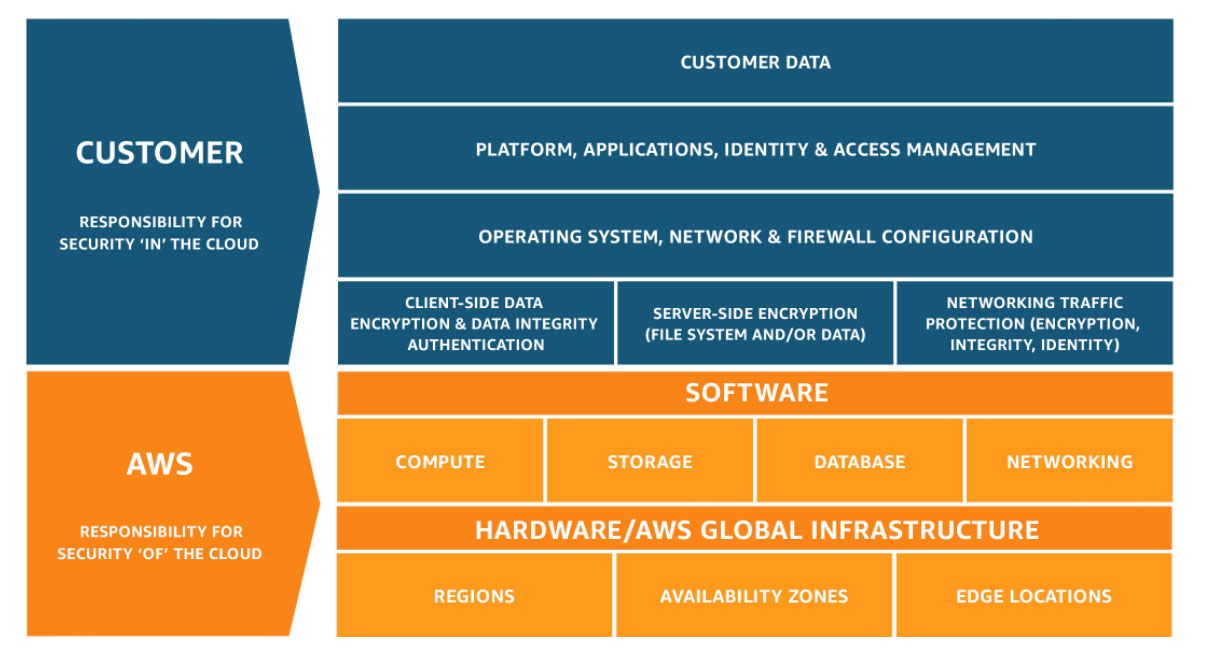


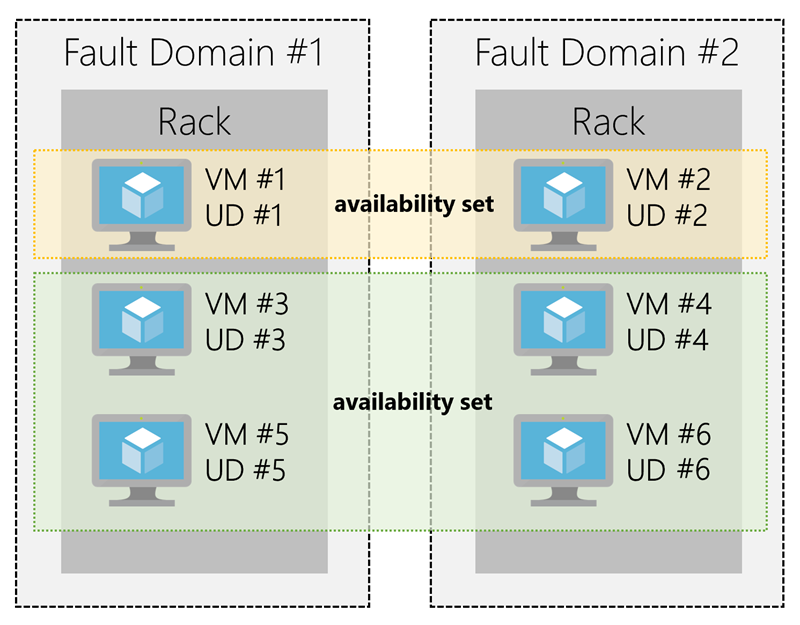


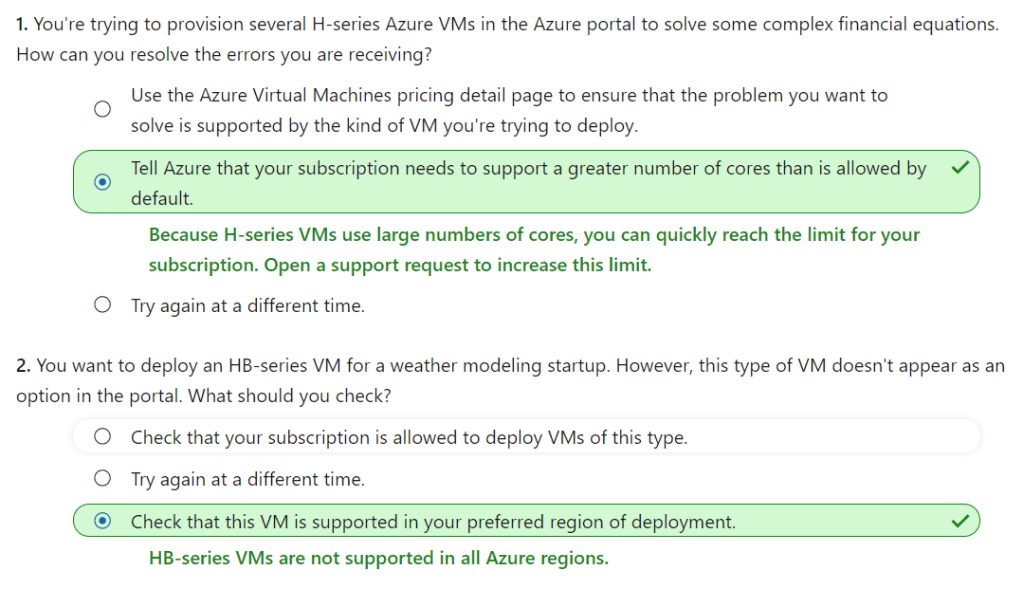
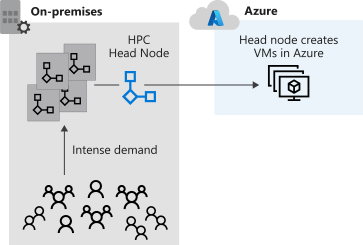

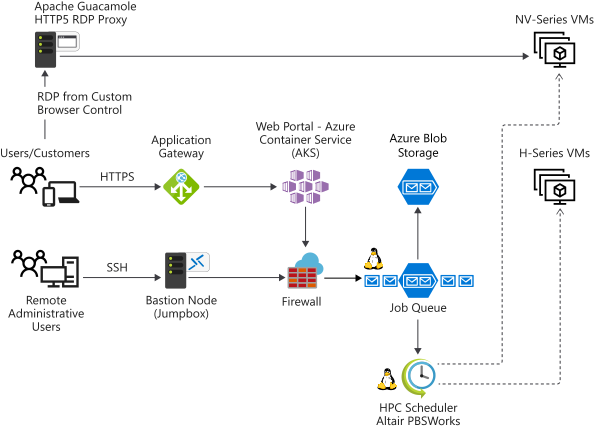

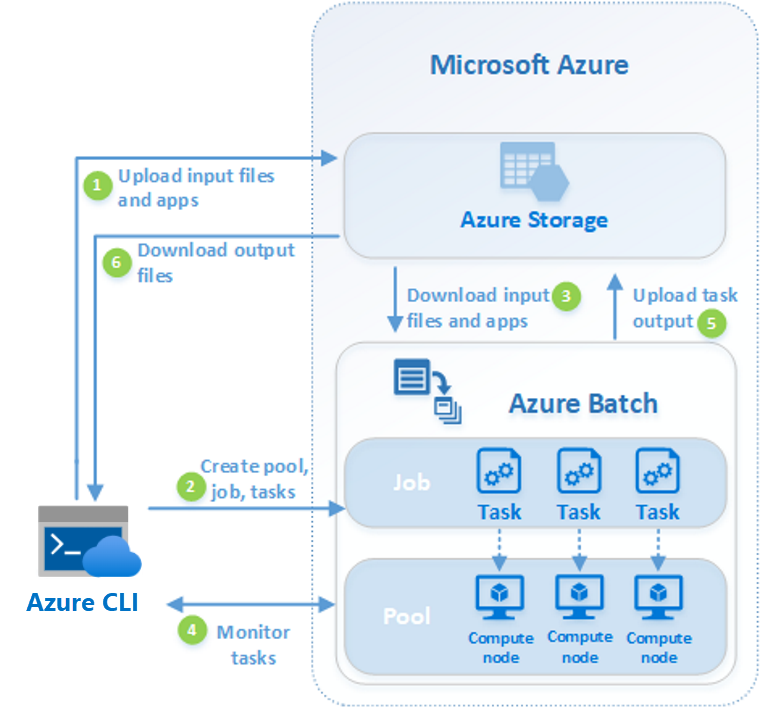




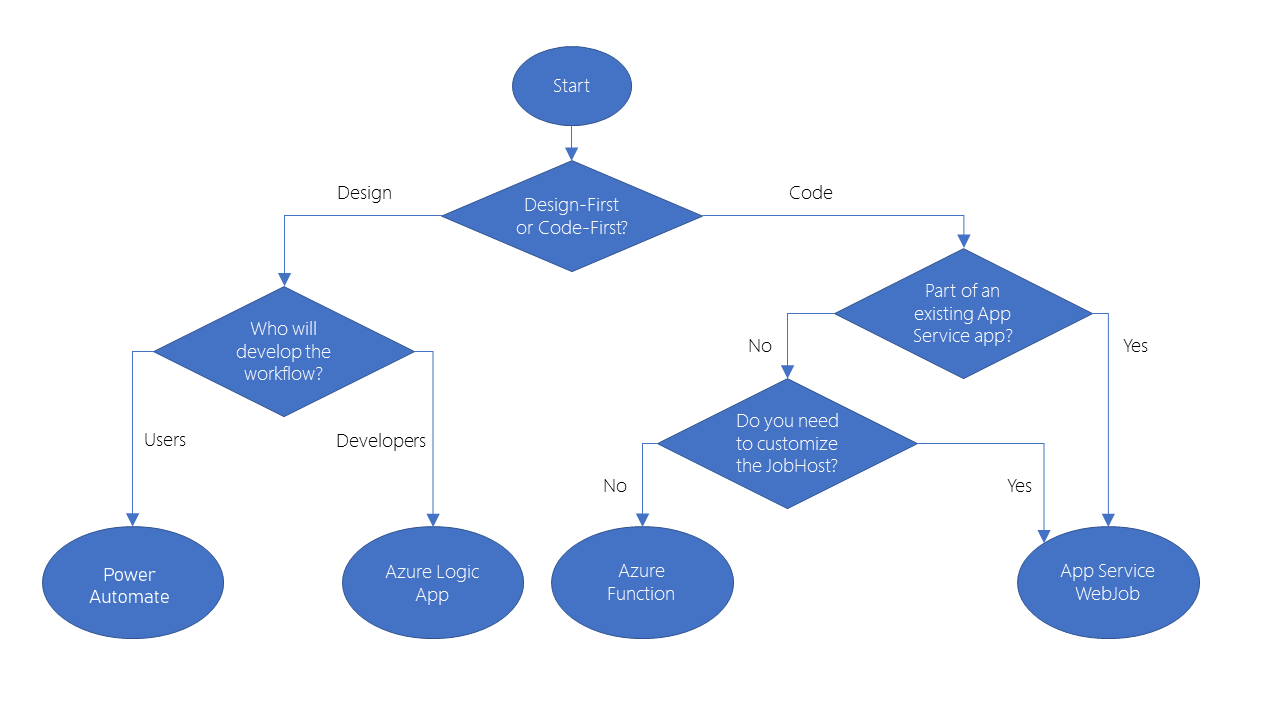








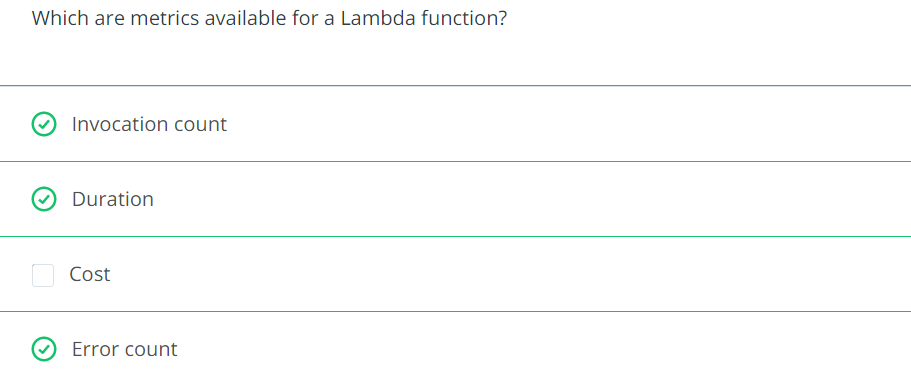
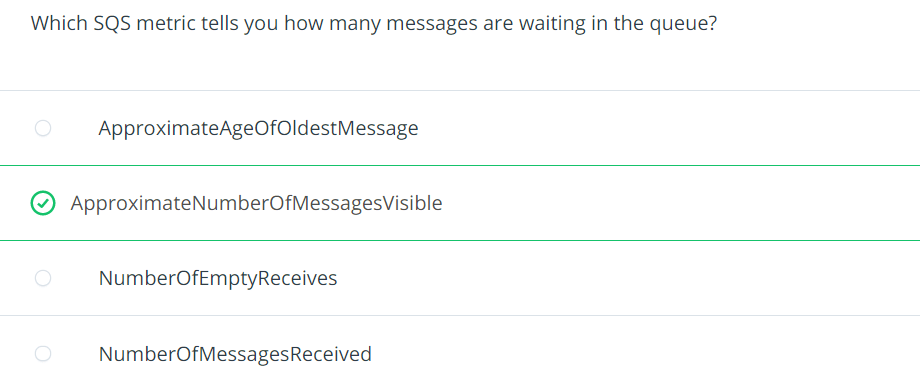

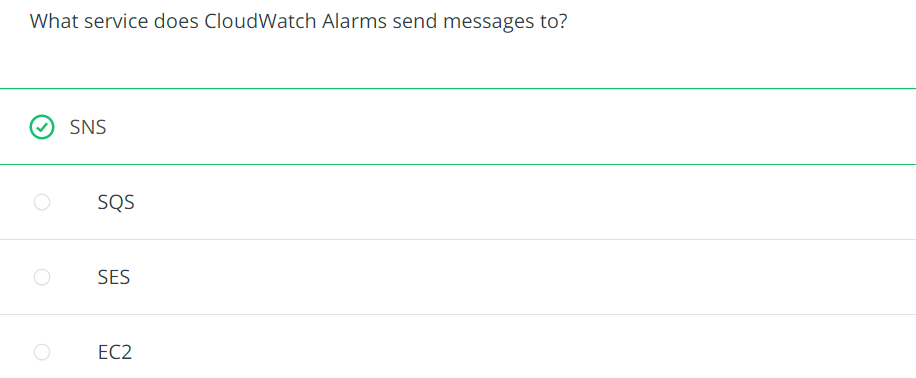






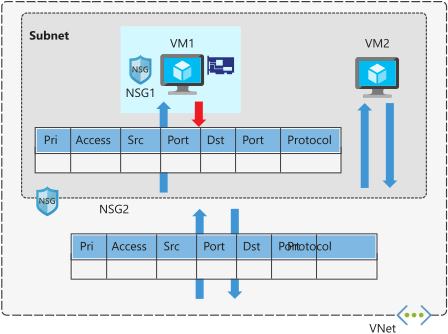



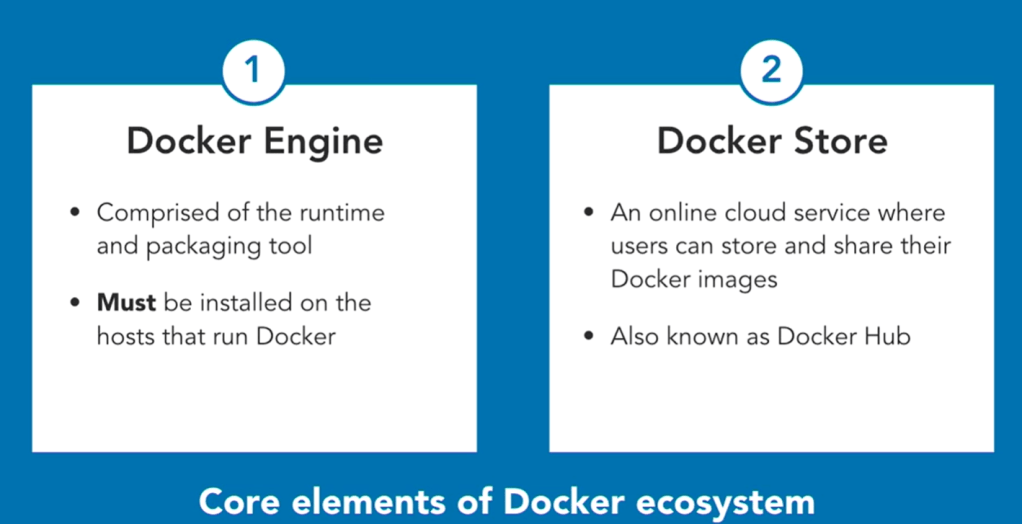


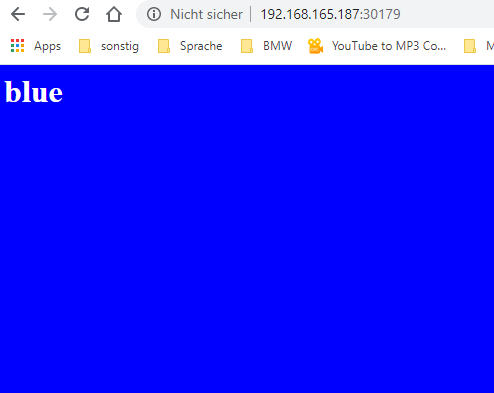
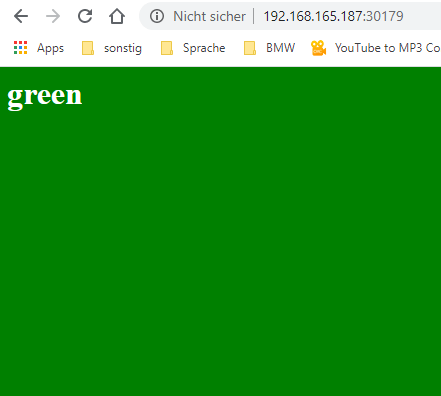
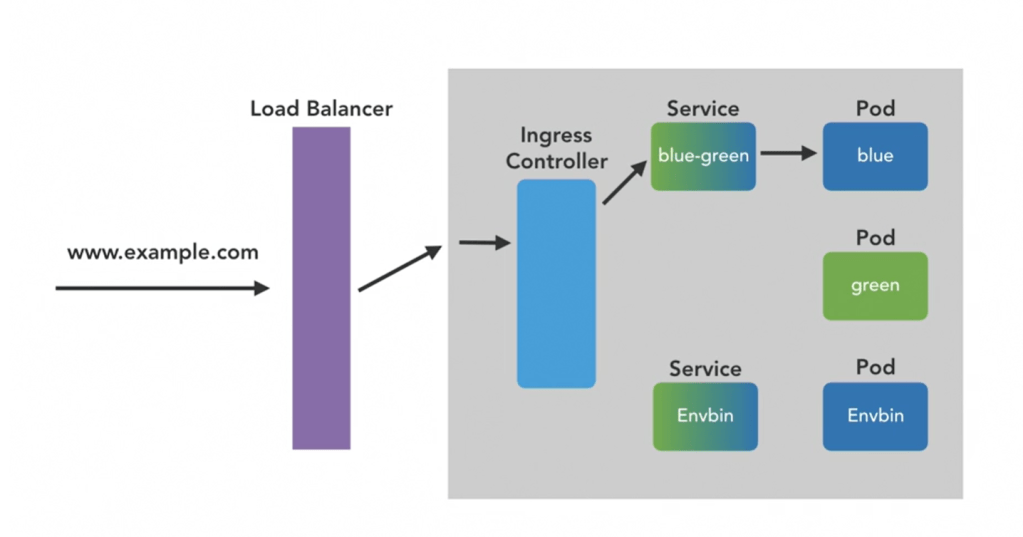
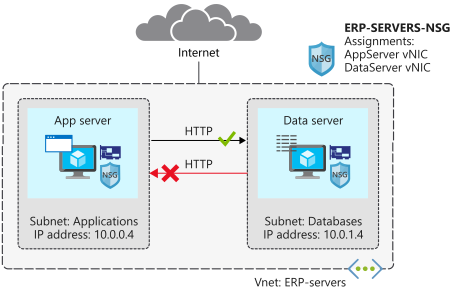
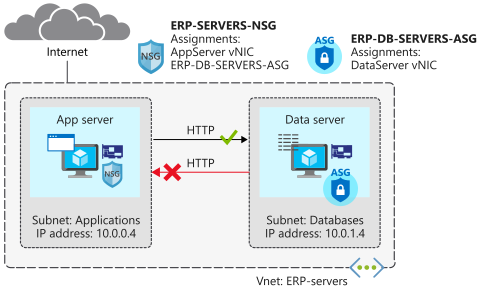
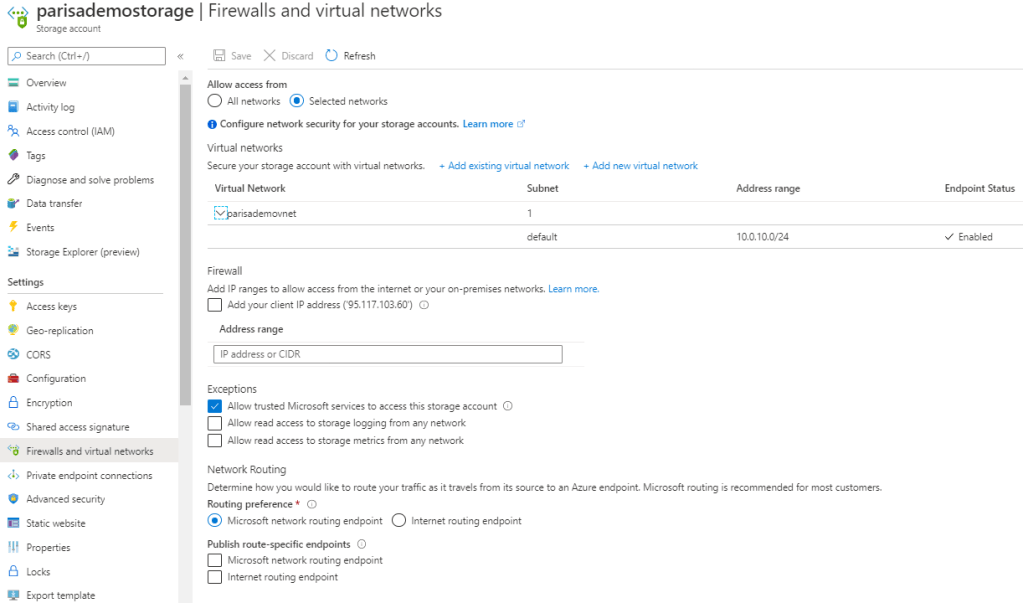


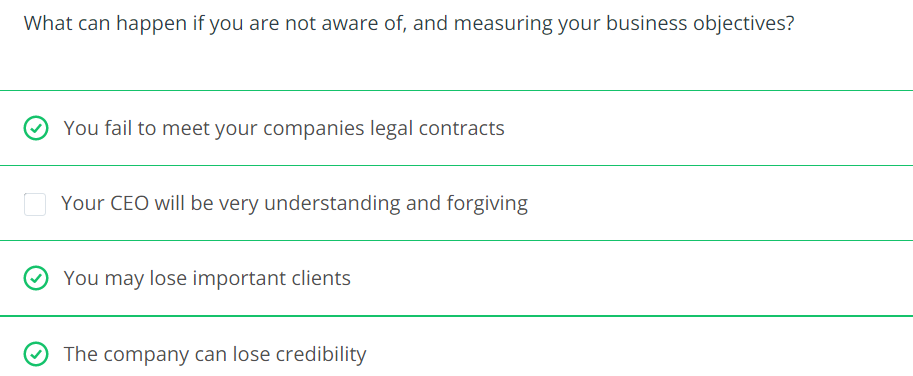
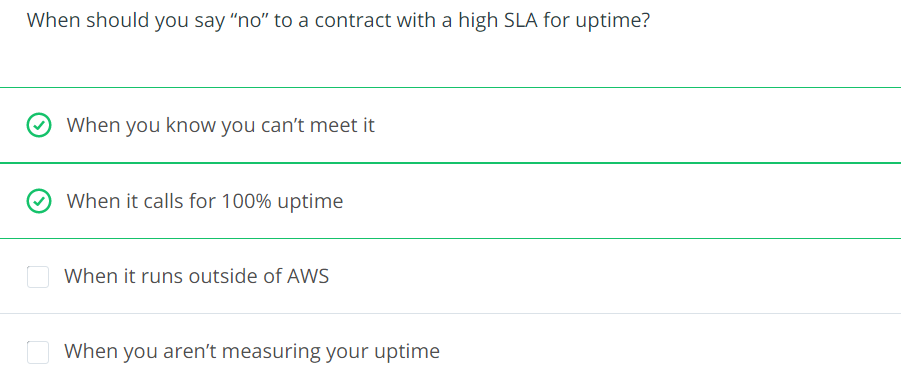
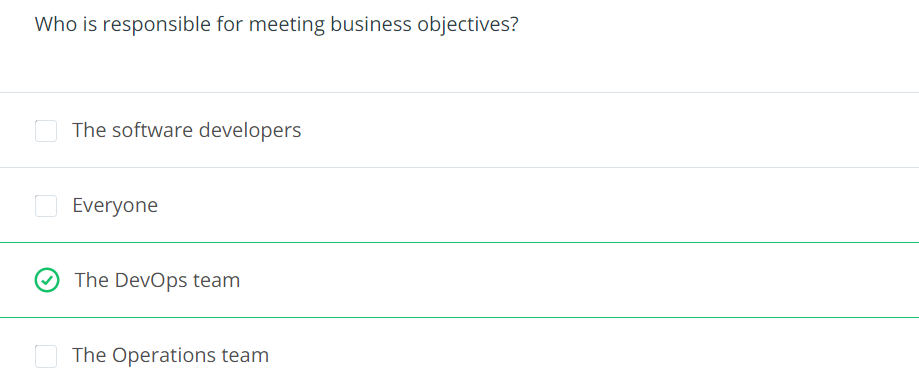


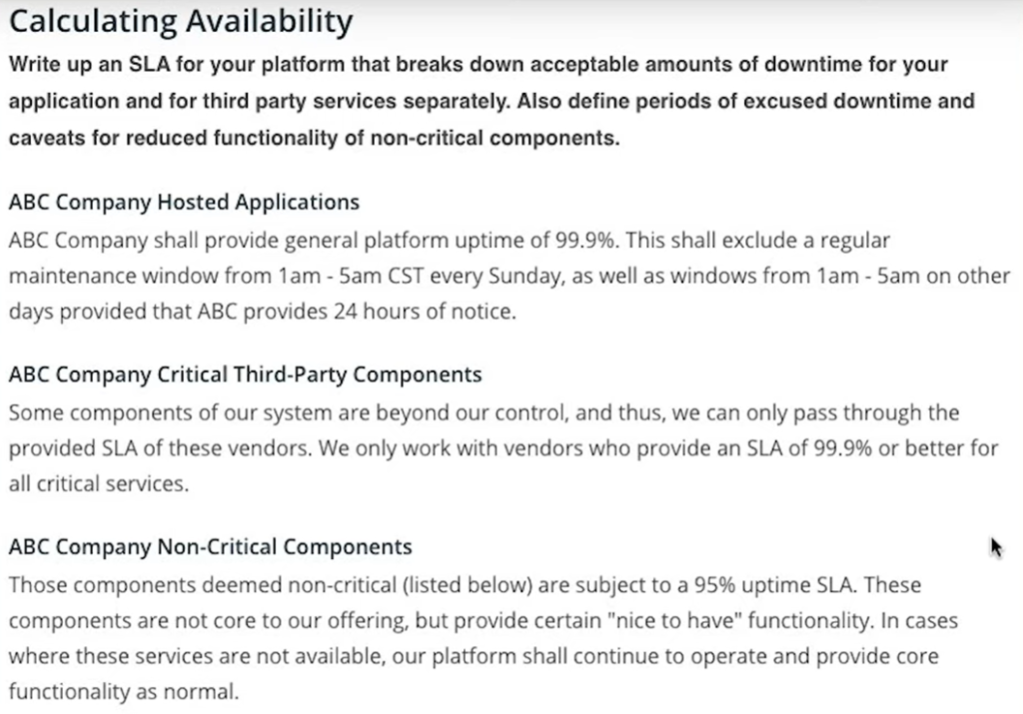


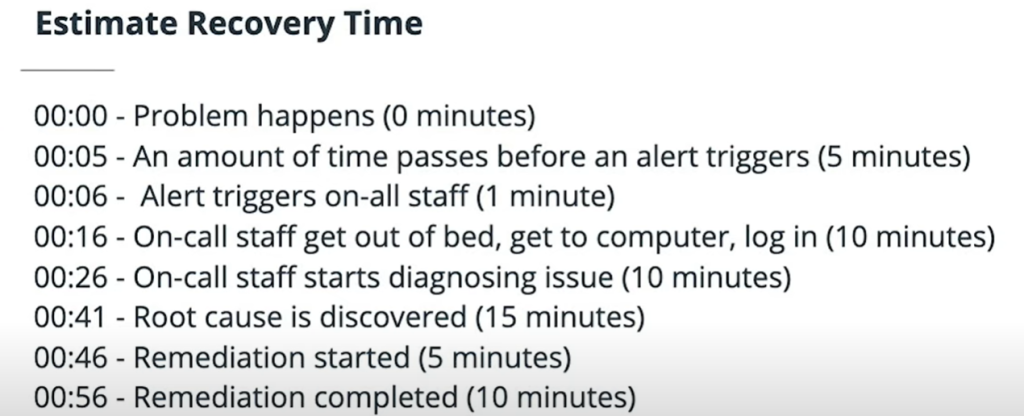


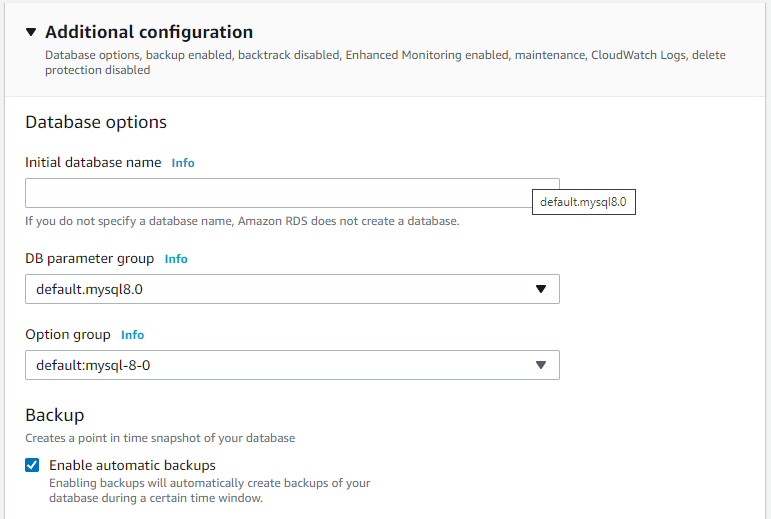




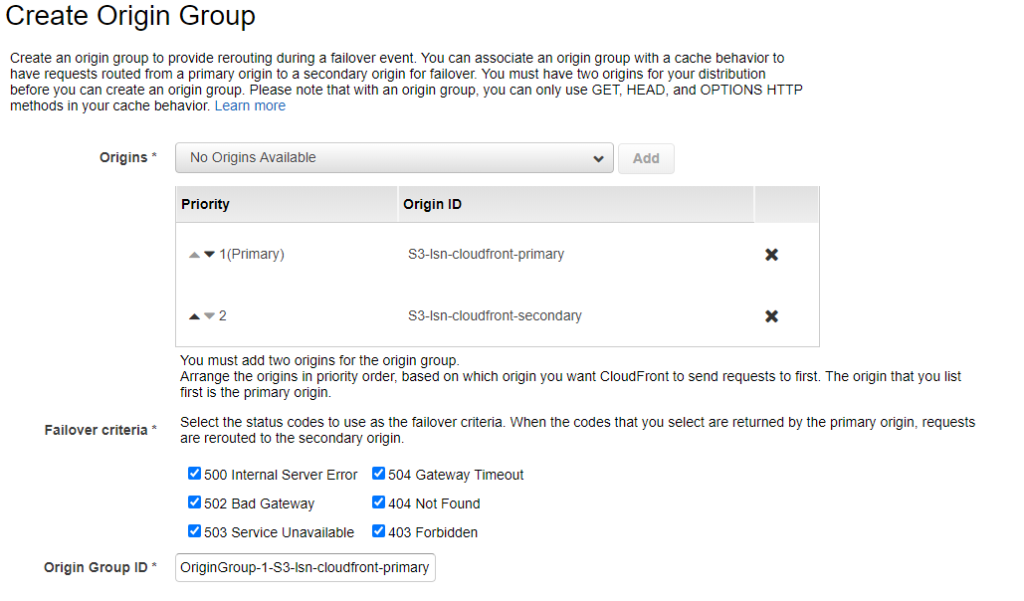
 Multi Cloud Solutions