We should ask this questions ourselves by architecting a solution by designing its monitoring solution
how would you diagnose issues with an application
how would you understand it’s health
what are it’s choke points
how would you identify them and what would you do when something breaks
Like the firefighting maneuver that must be executed half-yearly or yearly in each company, we have to use “chaos engineering” technique to intentionally cause breakage in the environments in a controlled manner to test monitoring, alerts, react of the architecture and resiliency of our solution.
Decide for the right resource and architecture for youe product
Choose the appropriate architecture based on your requirements
Know which compute options is right for your workload
Identify the right storage solution that meets your needs
Decide how you’re going to manage all your resources
Automation: The use of software to create repeatable instructions and processes to replace or reduce human interaction with IT systems
Cloud Governance: The people, process, and technology associated with your cloud infrastructure, security, and operations. It involves a framework with a set of policies and standard practices
Infrastructure as Code: The process of managing and provisioning computer resources through human and machine-readable definition files, rather than physical hardware configuration or interactive configuration tools like the AWS console
IT Audit: The examination and evaluation of an organization’s information technology infrastructure, policies and operations
CloudFormation
CloudFormation is a AWS service for create infrastructure as code.
it’s a yaml file
How to start with CloudFormation
Services -> CloudFormation
Create stack “With new resources (standard)”
Template is ready
Upload a template file
Click “Choose file” button
Select provided YAML file
Next
CloudFormation Template sections
Format version
Decsription
Parameters
Resources
Outputs
Each AWS Account has its own AWS Identity & Access Management (IAM) Service.
If you know Azure On Microsoft Azure, we have a Subscription. The AWS Account can be equivalent to the Azure Subscription. With a difference. Each AWS Account can have its own IAM Users but in Azure, we have a central IAM Service, called Azure Active Directory (AAD). Each above-called service is a huge topic but we don’t do a deep dive right now.
The AWS IAM User can be used
Only for CLI purposes. This user can’t log in to the AWS Portal.
Only for working with the AWS Portal. This user can’t be used for CLI.
Both purposes. This user can be used to log in to the AWS Portal and CLI.
Pipeline User
The first question is why do we need a Pipeline User?
Automated deployment (CI/CD) pipeline and prevent manual or per-click deployment.
We can only grant the pipeline user for some specific permissions and audit the logs of this user.
This user can work with AWS Services only via CLI. Therefore it has an Access Key ID and a Key Secret.
If you know Azure It’s used like a Service Principal, that you have a client-id and client-secret.
Expose the API/Service Products for external customers (exposes an OpenAPI endpoint)
Includes a secure API gateway
In case of Premium tier includes an Azure Traffic Manager
Throtteling the requests to prevent resource exhaustion
Set policies
Set Cache
Key concepts
Secure and isolate access to azure resources by using Network Security Group and Application Security Group
This section is only “what should we know about NSG and ASG”. To see the configuration refer to “Configure NSG and ASG“.
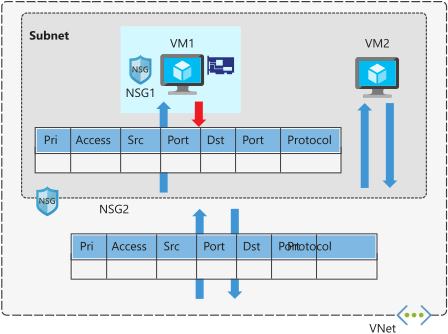
By using Network Security Group (NSG) can be specified which computer can be connected to application server [Source]. – Network Security Group: is to secure network traffic for virtual machines – Virtual Network Service Endpoint: is for controlling network traffic to and from azure services e.g. storage, database – Application Security Group:
Network security group
filter network traffic to or from azure resources
contains security rules that are configured to allow or deny inbound and outbound traffic.
can be used to filter traffic between virtual machines or subnets, both within a vnet and from the internet.
The allowed IP addresses can be configured in NSG as well.
NSG rules are applied to connection between on-prem to vnet or vnet to vnet.
NSG of a subnet is applied to all NIC in this subnet
NSG of subnet and NIC are evaluated separately
NSG on subnet instead of NIC reduces administration and management effort.
Each subnet and NIC can habe only one NSG
NSG supports TCP, UDP, ICMP, and operates at layer 4 of the OSI model.
Vnet and NSG must be in the same region
Network security group security rules
NSG contains one or more rules
Rules are allow or deny
Rule properites
Name
Priority 100..4096
Source [Any, IP Addresses|Service Tag|Application Security Group]
Source Port range
Protocol [Any|TCP|UDP|ICMP]
Destination [Any, IP Addresses|Service Tag|Application Security Group]
Destination Port range
Action [Allow|Deny]
Rules are evaluated by priority using 5-tuple information (Source, SourcePort, Destination, DestinationPort, Protocol)
The rule with lower priority will takeplace e.g. 200 (Allow 3389 RDP) and 150 (Deny 3389 RDP). 150 will takeplace.
With NSG, connections are stateful. It means, return traffic is automatically allowed for the same TCP/UDP session e.g. inbound rule allows traffic on port 80 also allows the vm to response the request. A corresponding outbound rule is not needed.
Add Inbound rule pane
Service tag can allow or deny traffic to a spesific azure service either globally or per region. Therefore you don’t need to know the IP address and port os the service because azure does it for you.
Microosft create the service tags (you cannot create your own)
Some examples of the tags are:
VirtualNetwork – This tag represents all virtual network addresses anywhere in Azure, and in your on-premises network if you’re using hybrid connectivity.
AzureLoadBalancer – This tag denotes Azure’s infrastructure load balancer. The tag translates to the virtual IP address of the host (168.63.129.16) where Azure health probes originate.
Internet – This tag represents anything outside the virtual network address that is publicly reachable, including resources that have public IP addresses. One such resource is the Web Apps feature of Azure App Service.
AzureTrafficManager – This tag represents the IP address for Azure Traffic Manager.
Storage – This tag represents the IP address space for Azure Storage. You can specify whether traffic is allowed or denied. You can also specify if access is allowed only to a specific region, but you can’t select individual storage accounts.
SQL – This tag represents the address for Azure SQL Database, Azure Database for MySQL, Azure Database for PostgreSQL, and Azure SQL Data Warehouse services. You can specify whether traffic is allowed or denied, and you can limit to a specific region.
AppService – This tag represents address prefixes for Azure App Service.
service Tag
Scenario: We have a WebServer in Subnet1 and SQL Server in Subnet2. NSG must only allow 1433 for SQL.
Scenario: Suppose your company wants to restrict access to resources in your datacenter, spread across several network address ranges. With augmented rules, you can add all these ranges into a single rule, reducing the administrative overhead and complexity in your network security groups.
Network security group default rules
default rules connot be deleted or changed but can be overriden
NSG Overview
Application Security Group (ASG)
Scenario: your company has a number of front-end servers in a virtual network. The web servers must be accessible over ports 80 and 8080. Database servers must be accessible over port 1433. You assign the network interfaces for the web servers to one application security group, and the network interfaces for the database servers to another application security group. You then create two inbound rules in your network security group. One rule allows HTTP traffic to all servers in the web server application security group. The other rule allows SQL traffic to all servers in the database server application security group.
Application security group let you configure network security for resources used by specific application.
It’s for grouping Vms logically, no matter what ip address is or in which subnet assigned
Using ASG within NSG to apply a security rule to a group of resources, after that should only the resources be added to ASG.
ASG let us to group network interfaces together and the ASG can be used as Source or Destination in NSG.
Secure and isolate access to azure resources by using Service Enpoints
Scenario: The agency has created an API to make recent and historical census data available. They want to prevent any unnecessary back-end information from being exposed that could be used in malicious attacks. They would also like to prevent abuse of the APIs in the form of a large volume of requests and need a mechanism to throttle requests if they exceed an allowed amount. They are serving their APIs on the Azure API Management service and would like to implement policies to address these concerns.
add a policy to remove the X-Powered-By header from responses via adding a policy to outbound
Converts a request or response body from JSON to XML.
Convert XML to JSON
Converts a request or response body from XML to JSON.
Find and replace string in body
Finds a request or response substring and replaces it with a different substring.
Mask URLs in content
Rewrites links in the response body so that they point to the equivalent link through the gateway. by adding <redirect-content-urls /> in outbount section, all backend urls are replaced with apim endpoint url.
Set backend service
Changes the backend service for an incoming request.
Set body
Sets the message body for incoming and outgoing requests.
Set HTTP header
Assigns a value to an existing response or request header, or adds a new response or request header.
Set query string parameter
Adds, replaces the value of, or deletes a request query string parameter.
Rewrite URL
Converts a request URL from its public form to the form expected by the web service.
Transform XML using an XSLT
Applies an XSL transformation to the XML in the request or response body.
Throttling policies
Throttling
Detail
Throttle API requests
a few users over-use an API to the extent that you incur extra costs or that responsiveness to other uses is reduced. You can use throttling to limit access to API endpoints by putting limits on the number of times an API can be called within a specified period of time <rate-limit calls=”3″ renewal-period=”15″ /> and user receives 429 error when that limit was reached
#  applies to all API operations
<rate-limit calls="3" renewal-period="15" />

# target a particular API operation
<rate-limit calls="number" renewal-period="seconds">
    <api name="API name" id="API id" calls="number" renewal-period="seconds" />
        <operation name="operation name" id="operation id" calls="number" renewal-period="seconds" />
    </api>
</rate-limit>

#it applies the limit to a specified request key, often the client IP address. It gives every client equal bandwidth for calling the API
<rate-limit-by-key calls="number"
                   renewal-period="seconds"
                   increment-condition="condition"
                   counter-key="key value" />

# limit rate limit by a requests IP Address
<rate-limit-by-key calls="10"
              renewal-period="60"
              increment-condition="@(context.Response.StatusCode == 200)"
              counter-key="@(context.Request.IpAddress)"/>
# When you choose to throttle by key, you will need to decide on specific requirements for rate limiting. For example, the table below lists three common ways of specifying the counter-key:
Value	                          Detail
context.Request.IpAddress	  Rates limited by client IP address
context.Subscription.Id	          Rates limited by subscription ID
context.Request.Headers.GetValue("My-Custom-Header-Value")	Rates limited by a specified client request header value
Note: The <rate-limit-by-key> policy is not available when your API Management gateway is in the Consumption tier. You can use <rate-limit>instead.
The list of necessary commands for working with docker, docker image and container.
# pull a docker image from docker hub
docker pull mcr.microsoft.com/dotnet/core/samples:aspnetapp

# list local docker images
docker image list

# Run a Docker container. if the docker image isn't available locally, docker downloads it first
docker run mcr.microsoft.com/dotnet/core/samples:aspnetapp
# output
info: Microsoft.Hosting.Lifetime[0]
      Now listening on: http://[::]:80 # the cintainer now listening for requests to arrive on HTTP port 80 (http://localhost:80)
info: Microsoft.Hosting.Lifetime[0]
      Application started. Press Ctrl+C to shut down.
info: Microsoft.Hosting.Lifetime[0]
      Hosting environment: Production
info: Microsoft.Hosting.Lifetime[0]
      Content root path: C:\app
# Info : if we use http://localhost:80 in browser we see nothing, read below.


# By default, Docker doesn't allow inbound network requests to reach your container.
# You need to tell Docker to assign a specific port number from your computer to a specific port number in the container
# by adding the -p option to docker run.
# This instruction enables network requests to the container on the specified port.
docker run -p 8080:80 -d mcr.microsoft.com/dotnet/core/samples:aspnetapp

# 8080 -> my computer port
# 80 -> my cotainer port

# Manage Docker containers
docker container ls [-a]
docker ps [-a] # this is the shortcut

#  stop an active container
docker stop elegant_ramanujan
docker container stop f9d0ce65d1f5

# restart a stopped container
docker start elegant_ramanujan

# once a container is stopped, it should also be removed
docker container rm f9d0ce65d1f5
docker container rm -f elegant_ramanujan # for force to stop and remove
docker rm elegant_ramanujan

# Remove Docker images
# Containers running the image must be terminated before the image can be removed
docker image rm mcr.microsoft.com/dotnet/core/samples:aspnetapp
Customize a docker image for your app
Docker Hub is an excellent source of images to get you started building your own containerized apps.
You can download an image that provides the basic functionality you require
and layer your own application on top of it to create a new custom image.
You can automate the steps for doing this process by writing a Dockerfile.
Dockerfile : is for automating docker image creation
the changes are
copying files into the container from the local filesystem,
and running various tools and utilities to compile code.
When finished, you would use the docker commit command to save the changes to a new image.
# sample dockerfile
#----------------------------------------

# FROM statement downloads the specified image and creates a new container based on this image.
FROM mcr.microsoft.com/dotnet/core/sdk:2.2

# The WORKDIR command sets the current working directory in the container,
# used by the following commands.
WORKDIR /app

# The COPY command copies files from the host computer to the container.
# The first argument (myapp_code) is a file or folder on the host computer.
# The second argument (.) specifies the name of the file or folder to act as
# the destination in the container.
# In this case, the destination is the current working directory (/app).
COPY myapp_code .

# The RUN command executes a command in the container.
# Arguments to the RUN command are command-line commands.
RUN dotnet build -c Release -o /rel

# The EXPOSE command creates configuration in the new image that specifies which ports are intended to be opened when the container is run.
# If the container is running a web app, it's common to EXPOSE port 80.
EXPOSE 80

WORKDIR /rel

# The ENTRYPOINT command specifies the operation the container should run when it starts.
# In this example, it runs the newly built app.
# You specify the command to be run and each of its arguments as a string array.
ENTRYPOINT ["dotnet", "myapp.dll"]
By convention, applications meant to be packaged as Docker images typically have a Dockerfile located in the root of their source code, and it’s almost always named Dockerfile.
docker build -t myapp:v1 .

# The docker build command creates a new image by running a Dockerfile.
# The -f flag indicates the name of the Dockerfile to use.
# The -t flag specifies the name of the image to be created, in this example, myapp:v1.
# The final parameter, ., provides the build context for the source files for the COPY command: the set of files on the host computer needed during the build process.
these commands help to create a customized doker image via command prompt
#------------------------------------------------------
# Customize a Docker image to run your own web app
#------------------------------------------------------

# clone source code
git clone https://github.com/MicrosoftDocs/mslearn-hotel-reservation-system.git

# change the directors
cd mslearn-hotel-reservation-system/src

# create a dockerfile
copy NUL Dockerfile
notepad Dockerfile


# Build and deploy the image using the Dockerfile
docker build -t reservationsystem .

# verify that the image has been created and stored in the local registry
docker image list

# Test the web app
docker run -p 8080:80 -d --name reservations reservationsystem
for running kubernetes cluster the minikube and kubectl must be installed
if you have already installed docker desktop, you don’t need to install the kubectl because docker desktop contains it. Only add the path of the kubectl.exe under your docker folder to the “Path” in your local variables e.g. in my case the path is “C:\Program Files\Docker\Docker\resources\bin”
for installing minikube use
choco install minikube
I do all these steps in Visual Studio Code but you can use any other command prompt environments.
It’s imporant to run the command prompt window as administrator (it’s necessary for running and stopping the cluster).
I installed and started the minikube in CMD Prompt run as admin.
If you have any problem with minikube use delete and start it again.
minikube delete
# Start a Minikube
minikube start   --kubernetes-version=v1.18.3 --addons="dashboard" --addons="metrics-server" --addons="ingress" --addons="ingress-dns" --feature-gates=EphemeralContainers=true

# Get version of the kubectl
Kubectl version

# Get the nodes
kubectl get nodes
# Output is as follows
# NAME       STATUS   ROLES    AGE   VERSION
# minikube   Ready    master   11h   v1.18.3
# Node with role(master) control the cluster.
# Worker nodes are our containers that we deploy.

# Stop Minikube cluster
Minikube stop

# Start the minikube again
Minikube Start
Running Pod/Container
# You have to start minikube before using kubectl

# Create a Pod
kubectl run web --image=nginx
# What we run is a wrapper called Pod

# Get Pods
kubectl get pods

# Get pod information
kubectl describe pod web

# Create Pod in the correct way
kubectl apply -f .\web-declarative.yaml
The web-declarative.yaml file is as follows
apiVersion: v1
kind: Pod
metadata:
  name: web-declarative
  labels:
    site: blog
spec:
  containers:
    - name: web
      image: nginx:1.18.0
Access Pods via Services inside the cluster (loose coupling)
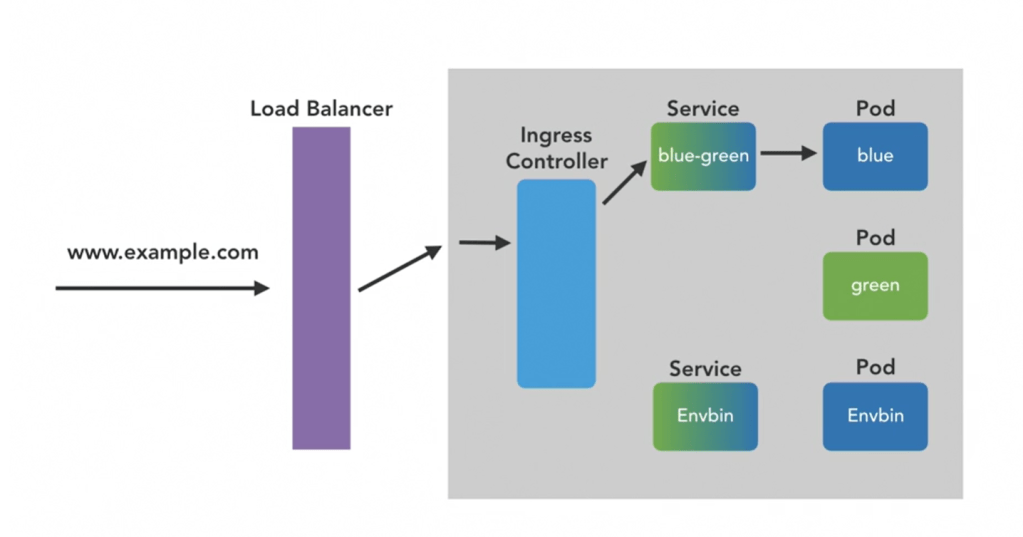
Services make the pod accessible inside the cluster
blue should only know the blue-green service (blue-green is like a DNS).
Service can be created in two ways
with exposing a port of the Pod (kubectl expose pod green –port 8080 .\blue-green.yaml)
wiht applying a service (kubectl apply -f .\blue-green.yaml)
for deploying a service we have to have a yaml file.
The following code to start the pod/green and then deploy service/blue-green
# Deploy a Pod
kubectl apply -f .\green.yaml

# A service is created to make the pod more accessible incide the cluster network
kubectl expose pod green --port 8080 blue-green

# If later want to remove service manually
kubectl delete service blue-green

# This command do the same like kubectl expose
kubectl apply -f .\blue-green.yaml
This is the configuration for service (blue-green.yaml)
Workflow: in service yaml file, we have configured the selector: (refer to a Pod with). It has been refered to a Pod with app: blue-greendsdsd, it means refer to a Pod, which has a app: blue-greendsdsd label.
The blue-green service can talk with all pods that have app: blue-greendsdsd label. This is called loose coupling.
Usually we cannot talk to the Pods (because they are in a cluster, which is a separate machine) and we have provide a way
To talk to a pod via browser we have to create a type of service
This service must open a port and listen to it.
Expose workers to other services within the culster
We create two Pods and one Service
# Deploy all yaml files in the current directory
kubectl apply -f .
# Output is as follows
# service/blue-green created
# pod/blue created
# pod/green unchanged
blue Pod
apiVersion: v1
kind: Pod
metadata:
name: blue
labels:
app: blue-green
spec:
containers:
- name: blue
image: docker.io/mtinside/blue-green:blue
green Pod
apiVersion: v1
kind: Pod
metadata:
  name: green
  labels:
    app: blue-green
spec:
  containers:
    - name: green
      image: docker.io/mtinside/blue-green:green
The default type of the service is ClusterIP (type: ClusterIP). To expose a port of service to be accessible from browser the type have to be changed to type: NodePort. The change have to be applied to service with following code.
# Apply changes to a running service
kubectl apply -f .\blue-green.yaml
# output is service/blue-green configured

# get IP of the Mnikube
Minikube ip # -> 192.168.165.187

# get the port number of the service
Kubectl get services
# NAME         TYPE        CLUSTER-IP     EXTERNAL-IP   PORT(S)        AGE
# blue-green   NodePort    10.105.57.15   <none>        80:30179/TCP   58m

# check this in your browser
http://192.168.165.187:30179
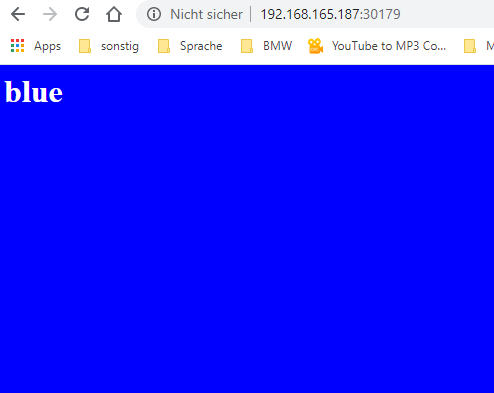
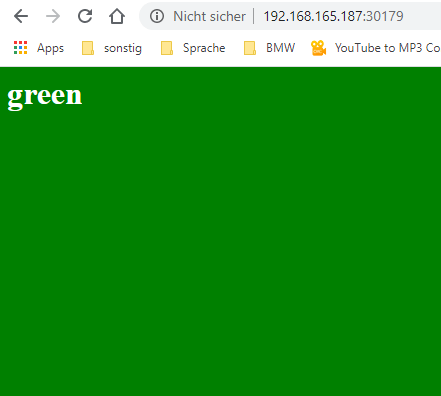
Sometimes the page is blue and sometimes is green.
Handling ingress to kubernetes
The workers can be exposed to services within the cluster and to the outside world
But exposing via service with type: NodePort isn’t a sophisticated (service of type load balancer).
In the modern architecture we don’t expose a service to outside.
The Ingress controller is exposed
Ingress controller is for Host- and path-based routing of HTTP traffic
Host- and path-based routing of HTTP traffic as it enters the cluster is handled by which component? Ingress Controller
Which of these is not needed to deploy a container to Kubernetes? an IP address but a name for the wrapper pod object, and a container image to run are necessary.
Where does minikube deploy a Kubernetes cluster? our laptop
Which of these types of service does not allow connections to Pods from outside the cluster? ClusterIP
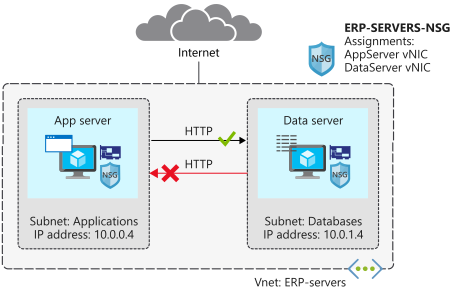
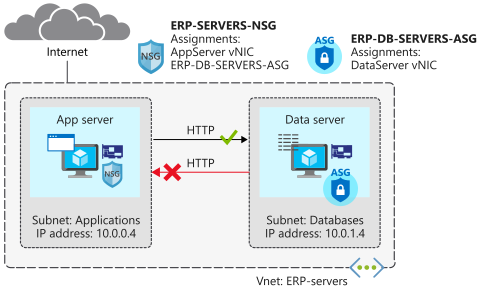
The following figure demonstrates, what we implement in the following code [Source].
# Define variable
rg=<resource group name>

# create a resource group
az group create --name $rg --location <location>

# Create a virtual network and subnet for application servers and database servers
az network vnet create \
    --resource-group $rg \
    --name ERP-servers \
    --address-prefix 10.0.0.0/16 \
    --subnet-name Applications \
    --subnet-prefix 10.0.0.0/24

az network vnet subnet create \
    --resource-group $rg \
    --vnet-name ERP-servers \
    --address-prefix 10.0.1.0/24 \
    --name Databases

# Create Network Security Group
az network nsg create \
    --resource-group $rg \
    --name ERP-SERVERS-NSG

# Create virtual machines running Ubuntu (build the AppServer virtual machine)
# NSG is assigned to NIC of the VM
wget -N https://raw.githubusercontent.com/MicrosoftDocs/mslearn-secure-and-isolate-with-nsg-and-service-endpoints/master/cloud-init.yml && \
az vm create \
    --resource-group $rg \
    --name AppServer \
    --vnet-name ERP-servers \
    --subnet Applications \
    --nsg ERP-SERVERS-NSG \
    --image UbuntuLTS \
    --size Standard_DS1_v2 \
    --admin-username azureuser \
    --custom-data cloud-init.yml \
    --no-wait \
    --admin-password <password>

# build the DataServer virtual machine
az vm create \
    --resource-group $rg \
    --name DataServer \
    --vnet-name ERP-servers \
    --subnet Databases \
    --nsg ERP-SERVERS-NSG \
    --size Standard_DS1_v2 \
    --image UbuntuLTS \
    --admin-username azureuser \
    --custom-data cloud-init.yml \
    --admin-password <password>

# To confirm that the virtual machines are running
az vm list \
    --resource-group $rg \
    --show-details \
    --query "[*].{Name:name, Provisioned:provisioningState, Power:powerState}" \
    --output table

# To connect to your virtual machines, use SSH directly from Cloud Shell. To do this, you need the public IP addresses that have been assigned to your virtual machines
az vm list \
    --resource-group $rg \
    --show-details \
    --query "[*].{Name:name, PrivateIP:privateIps, PublicIP:publicIps}" \
    --output table

# To make it easier to connect to your virtual machines during the rest of this exercise, assign the public IP addresses to variables
APPSERVERIP="$(az vm list-ip-addresses \
                 --resource-group $rg \
                 --name AppServer \
                 --query "[].virtualMachine.network.publicIpAddresses[*].ipAddress" \
                 --output tsv)"

DATASERVERIP="$(az vm list-ip-addresses \
                 --resource-group $rg \
                 --name DataServer \
                 --query "[].virtualMachine.network.publicIpAddresses[*].ipAddress" \
                 --output tsv)"

# to check whether you can connect to your AppServer virtual machine
ssh azureuser@$APPSERVERIP -o ConnectTimeout=5
# You'll get a Connection timed out message.

# to check whether you can connect to your DataServer virtual machine
ssh azureuser@$DATASERVERIP -o ConnectTimeout=5
# You'll get the same connection failure message.
Remember that the default rules deny all inbound traffic into a virtual network, unless this traffic is coming from another virtual network. The Deny All Inbound rule blocked the inbound SSH connections
Inbound
Name
Priority
Source IP
Destination IP
Access
Allow VNet Inbound
65000
VIRTUAL_NETWORK
VIRTUAL_NETWORK
Allow
Deny All Inbound
65500
*
*
Deny
Create a security rule for SSH
# Create a security rule for SSH
az network nsg rule create \
    --resource-group $rg \
    --nsg-name ERP-SERVERS-NSG \
    --name AllowSSHRule \
    --direction Inbound \
    --priority 100 \
    --source-address-prefixes '*' \
    --source-port-ranges '*' \
    --destination-address-prefixes '*' \
    --destination-port-ranges 22 \
    --access Allow \
    --protocol Tcp \
    --description "Allow inbound SSH"

# check whether you can now connect to your AppServer virtual machine
ssh azureuser@$APPSERVERIP -o ConnectTimeout=5

ssh azureuser@$DATASERVERIP -o ConnectTimeout=5

# You will be asked "are you sure to continue?", you answer with yes, and enter password
# for exit enter exit
Create a security rule to prevent web access
Server name
IP address
AppServer
10.0.0.4
DataServer
10.0.1.4
# Now add a rule so that AppServer can communicate with DataServer over HTTP, but DataServer can't communicate with AppServer over HTTP
az network nsg rule create \
    --resource-group $rg \
    --nsg-name ERP-SERVERS-NSG \
    --name httpRule \
    --direction Inbound \
    --priority 150 \
    --source-address-prefixes 10.0.1.4 \
    --source-port-ranges '*' \
    --destination-address-prefixes 10.0.0.4 \
    --destination-port-ranges 80 \
    --access Deny \
    --protocol Tcp \
    --description "Deny from DataServer to AppServer on port 80"

# to connect to your AppServer virtual machine, and check if AppServer can communicate with DataServer over HTTP.
ssh -t azureuser@$APPSERVERIP 'wget http://10.0.1.4; exit; bash'
# he response should include a 200 OK message.

# to connect to your DataServer virtual machine, and check if DataServer can communicate with AppServer over HTTP
ssh -t azureuser@$DATASERVERIP 'wget http://10.0.0.4; exit; bash'
# his shouldn't succeed, because you've blocked access over port 80. Press Ctrl+C to stop the command prior to the timeout.
Configure Application Security Group (ASG)
The following figure demonstrates, what we implement in this section.
Create an application security group for database servers, so that all servers in this group can be assigned the same settings. You’re planning to deploy more database servers, and want to prevent these servers from accessing application servers over HTTP. By assigning sources in the application security group, you don’t need to manually maintain a list of IP addresses in the network security group. Instead, you assign the network interfaces of the virtual machines you want to manage to the application security group.
# create a new application security group called ERP-DB-SERVERS-ASG
az network asg create \
    --resource-group $rg \
    --name ERP-DB-SERVERS-ASG

# to associate DataServer with the application security group
az network nic ip-config update \
    --resource-group $rg \
    --application-security-groups ERP-DB-SERVERS-ASG \
    --name ipconfigDataServer \
    --nic-name DataServerVMNic \
    --vnet-name ERP-servers \
    --subnet Databases

# to update the HTTP rule in the ERP-SERVERS-NSG network security group. It should reference the ERP-DB-Servers application security group
az network nsg rule update \
    --resource-group $rg \
    --nsg-name ERP-SERVERS-NSG \
    --name httpRule \
    --direction Inbound \
    --priority 150 \
    --source-address-prefixes "" \
    --source-port-ranges '*' \
    --source-asgs ERP-DB-SERVERS-ASG \
    --destination-address-prefixes 10.0.0.4 \
    --destination-port-ranges 80 \
    --access Deny \
    --protocol Tcp \
    --description "Deny from DataServer to AppServer on port 80 using application security group"

# to connect to your AppServer virtual machine, and check if AppServer can communicate with DataServer over HTTP.
ssh -t azureuser@$APPSERVERIP 'wget http://10.0.1.4; exit; bash'
# the response should include a 200 OK message.

# to connect to your DataServer virtual machine, and check if DataServer can communicate with AppServer over HTTP.
ssh -t azureuser@$DATASERVERIP 'wget http://10.0.0.4; exit; bash'
# you should get a Connection timed out message. Press Ctrl+C to stop the command prior to the timeout.
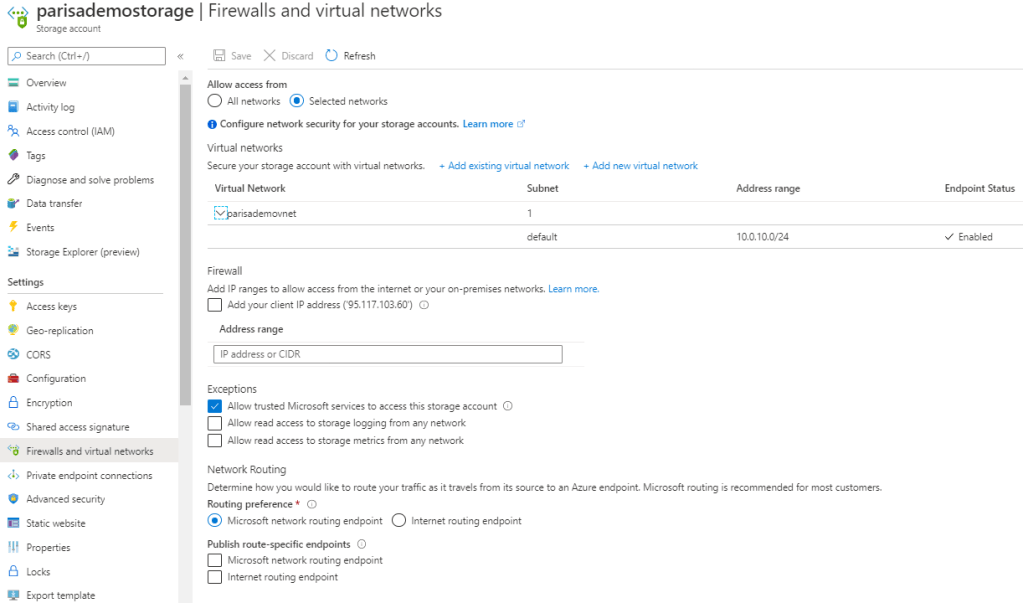
Configure Service Firewall
Storage
Storage has a layered security model
The layered model enables us to secure storage to a specific set of supported networks
To use network, the network rules must be configured.
Only applications requesting data from over specific networks can access storage.
The application request can go through the network rules, but this application must have an authorization on the storage as well
Authorization can be done via Storage Access Key (for blob & queue).
Or Authorization can be done via Share Access Signature (SAS) (for blob & queue).
In both case the authorization is done via Azure Active Directory.
Network rules are enforced are protocols e.g. REST and SMB
How network rules must be configured
Deny access to traffic from all networks (it will be done automatically after first config).
Grant access to the traffic of specific vnet (for secure application boundary).
Then if needed grant access to public internet IP/IP range or on-prem.
Configure network rules for Azure Portal, Storage Explorer, and AZCopy
VM disk traffic (mount, unmount, disk io) is not affected by network rules.
REST access is affected by network rules
Classic storage don’t support firewall and vnet.
Shared Access Signature (SAS)
This access token is not related to securing storage via vnet
The IP address that has some authorization on storage can work with storage again even after configuring network rules.
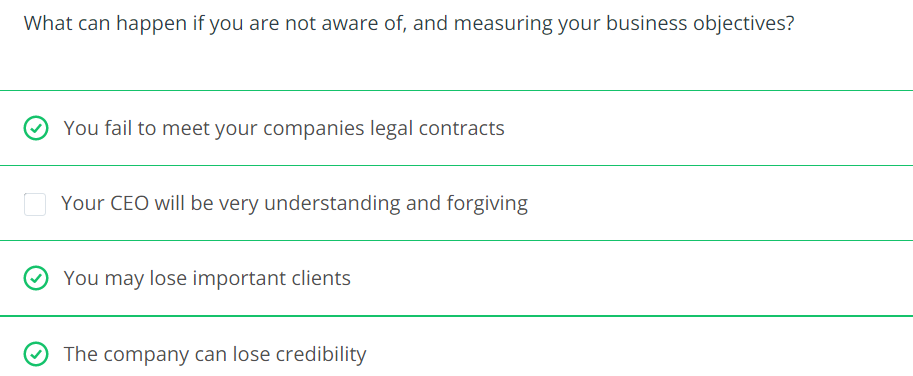
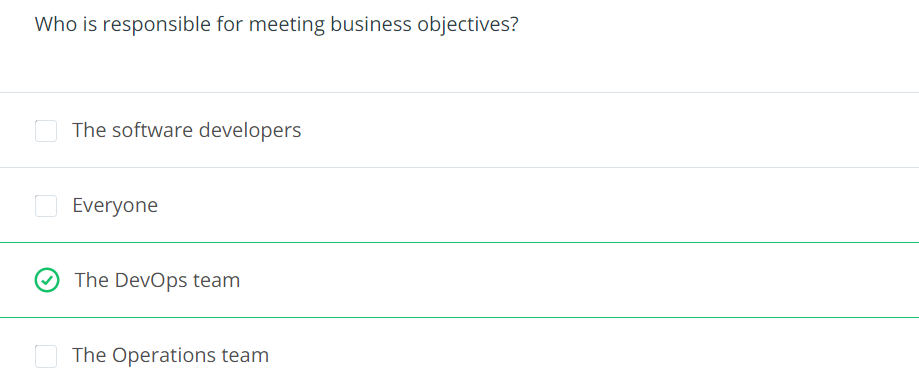
Business Objectives define how the business can market and sell its products and services. It is crucial for all parts of the business to agree and strive for the same business objectives in order to smoothly operate the business and work with customers.
Key concepts
Uptime:
Downtime
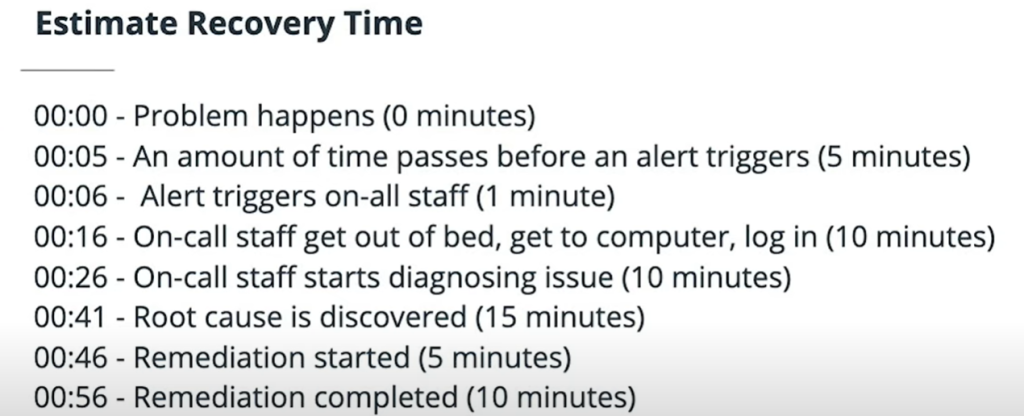
Recovery Time Objective (RTO): maximum amount of time that your service would be down.
Recovery Point Objective (RPO): maximum amount of time over which you would lose data.
Disaster Recovery: Bringing our system (major service) in another place in case of complete region outage.
They are the commitment that we do with customers
Big picture
Business objectives are where the other business functions of your company meet with the Engineering function. These other areas of the company focus on signing customers, managing finances, supporting customers, advertising your products, etc. Where all of these teams meet is in the realm of contracts, commitments and uptime. This is where other parts of a business have to collaborate with Engineering in order to come up with common goals and common language.
Developing your intuition
Develop regular communication: when working across departments within your business, it’s important to communicate regularly and clearly.
Be on the same page: using the same language is a good way to make sure that all teams are on the same page.
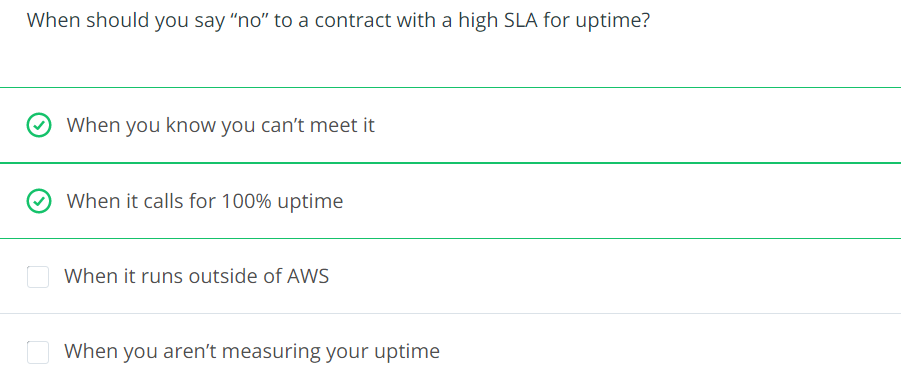
Push back where necessary: It’s imprerative to be well-prepared when dealing with business objectives. Other business units might wish to make more aggressive commitments to close more sales. Be cautious and transparent. Make sure that business understands what meeting higher commitments will cost in term of both time and dollers.
Be Prepared: Service disruptions can be rare enough that how to recover can be forgotten and can be tricky. Practicing recovery operations in key to doing them well. Which in turn is key to keep relationship and solid footing with your peers in other parts of the business.
It is important to gauge how much effort and cost will be involved in meeting different business objectives. Communicating these numbers will help keep the whole company centered around common and achievable goals. Setting unrealistic or unachievable goals can quickly lead to poor morale and missed deadlines. Before committing to a business objective, ensure that you have an idea of how to build, run, monitor and maintain a system that can achieve the desired metrics, and make sure that the rest of the business understands the resource that will be required to do so. In this fashion, it is key to get all parts of the company to work together to set these goals. These goals are so critical to success and potentially costly to achieve that they often must be set at the highest levels of the company.
Uptime
Percentage of time: the percentage of time that a service is available. 99,9% is a standard uptime by many service level agreements. This percentage is measured over the course of a month.
Part of every Service Level Agreement: if you likely face penalties for the SLA, it comes usually in the form of monetary or service credit that you would owe your customers.
Requires diligence: you need to tack your platform uptimes to demonstrate to your customers that you are measuring it and meeting commitments.
In order to maintain a high level of uptime, we must have redundancy throughout the services. Everything must be redundant: – Databases – Networking – Servers – Staff
Uptime is a measure of how much time an application or service is available and running normally. Uptime is often measured as a percentage, usually in the “number of 9s” vernacular. For example, “4 9s” refers to a service being available for 99.99% of a time period.
Services that offer Service Level Agreements (SLAs) typically start at 99% and get more stringent from there. 99.9% is a common SLA. The more “9s” an SLA offers, the more difficult and costly it is to achieve. You must ask yourself how much effort you are willing to put in and how much your company is willing to pay before proceeding into the territory of 4 9s or beyond.
Allowed downtime is calculated on monthly bases because some months have different length.
Allowed downtime = (30 days 24 hours 60 minutes) – (30 days 24 hours 60 minutes * SLA percentage)
For example a 99% = 7.3 hours of allowed downrime per month
Drafting a Service Level Agreement (SLA)
When drafting a Service Level Agreement (SLA) for your platform, there are many things to consider. You will need to ponder what you will need to implement in order to meet the SLA, and also understand what types of guarantees that you are providing to your customers that you will meet the SLA. Monetary compensation is common for SLA violations either in the form of service credits or outright refunds.
Often when considering what type of SLA a platform can provide, there is a tendency to forget to consider some of the components of the system. If the SLA isn’t carefully considered, it can quickly become very difficult and expensive to meet [Source].
Example: Your company would like to offer a 99.9% SLA on your entire platform. Consider the following services that are required for your service to operate normally:
Email service provider: 99.9%
DNS provider: 99.99%
Authentication service provider: 99.9%
AWS services: 99.9%
Twitter feed: 99%
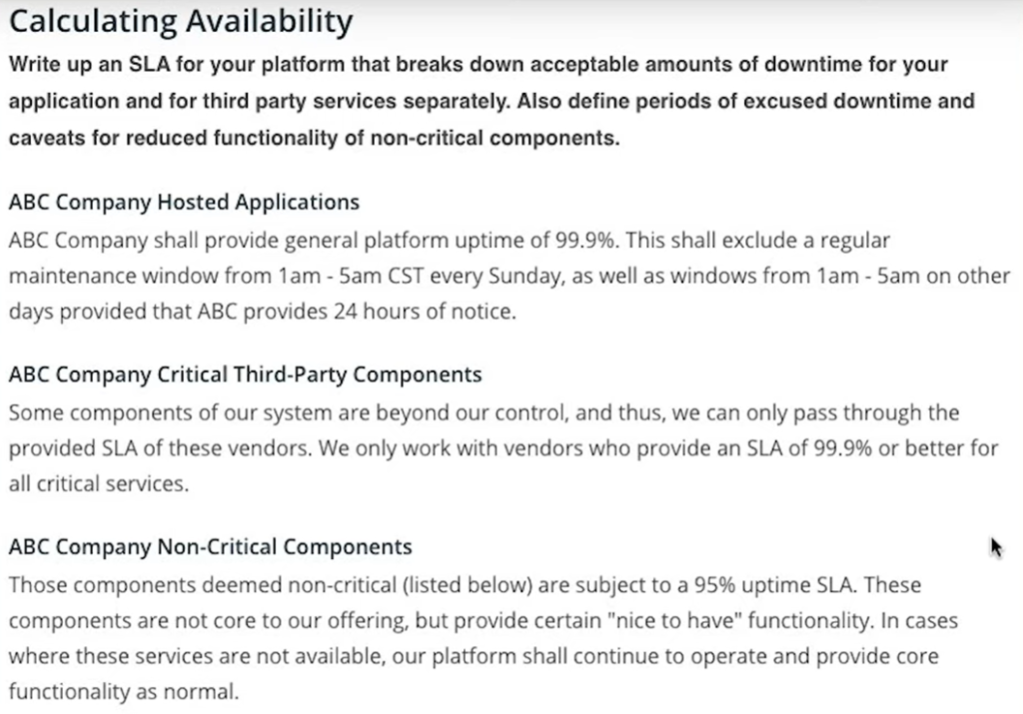
Write an SLA for your platform that breaks down acceptable amounts of downtime for your application and for third-party services separately. Also, define periods of excused downtime and caveats for reduced functionality of non-critical components.
In time of happening an incident, if the whole system is getting down together, the RPO is zero. Because we lost no data.
RDS database
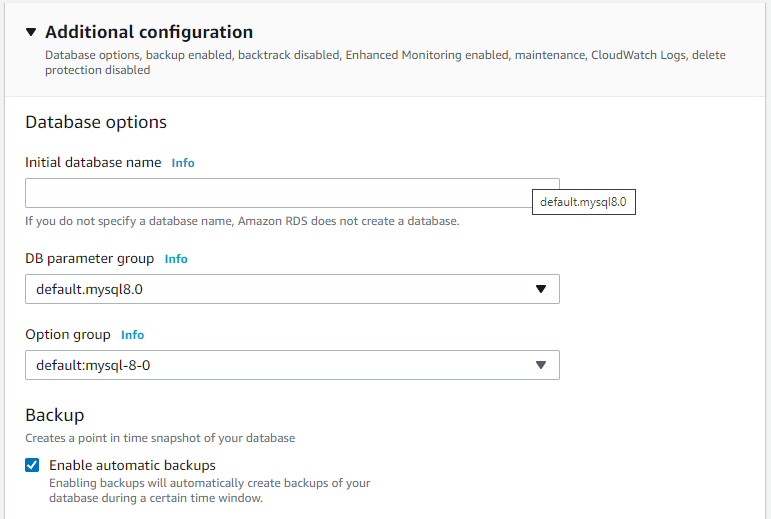
Creating a RDS database with backup enabled to prevent high RPO.
In creating steps this checkbox is important to point-in-time recovery.
After creating the RDS database, then we can execute a point in time recovery.
Restore point can be latest or custom
The the name of restored instance must be specified
Then we will have the original and the restored instance
Disaster Recovery
is about how fast we can restore services after major failure
RPO and RTO is applyed to any incident (consider the worst-case scenario)
RTO and RPO numbers apply to localized outages, but when setting your RTO and RPO, you must take into account worst case scenarios. The term Disaster Recover is used to describe a more widespread failure. In AWS, if you normally run your services in one region, a large enough failure to make you move your system to another region would be a Disaster Recovery (DR) event [Source].
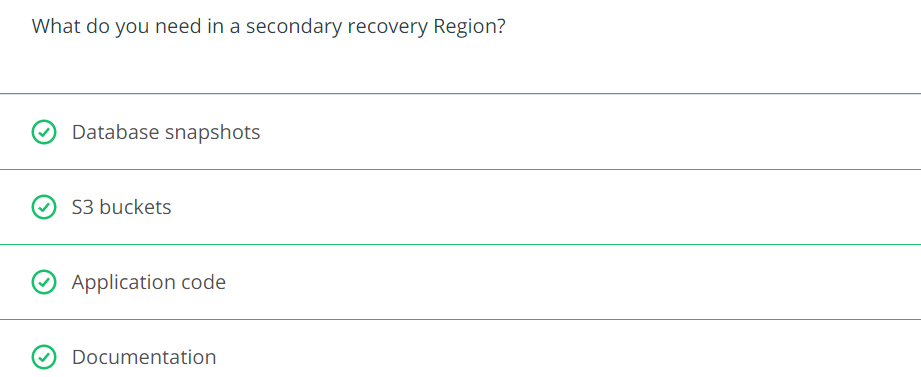
Disaster Recovery usually involves the wholesale moving of your platform from one place to another. Outside of AWS, you might have to move to a backup data center. Inside AWS, you can move to a different region. Disaster recovery is not something you can do after an incident occurs to take down your primary region. If you have not prepared in advance, you will have no choice but to wait for that region to recover. To be prepared ahead of time, consider all of the things you will need to restart your platform in a new home. What saved state do you need, what application software, what configuration information. Even your documentation cannot live solely in your primary region. All of these things must be considered ahead of time and replicated to your DR region [Source].
Which tools have help us in DR on AWS
Geographic Recovery / Multi-region Services (typical DR plan calls for re-establishing your platform)
AWS Service
Multi Region capability
DynamoDB
– Active/Active replica via Global Table
S3
– Active/Passive replica + Double costs for replica
IAM
– By default Global
CloudFront
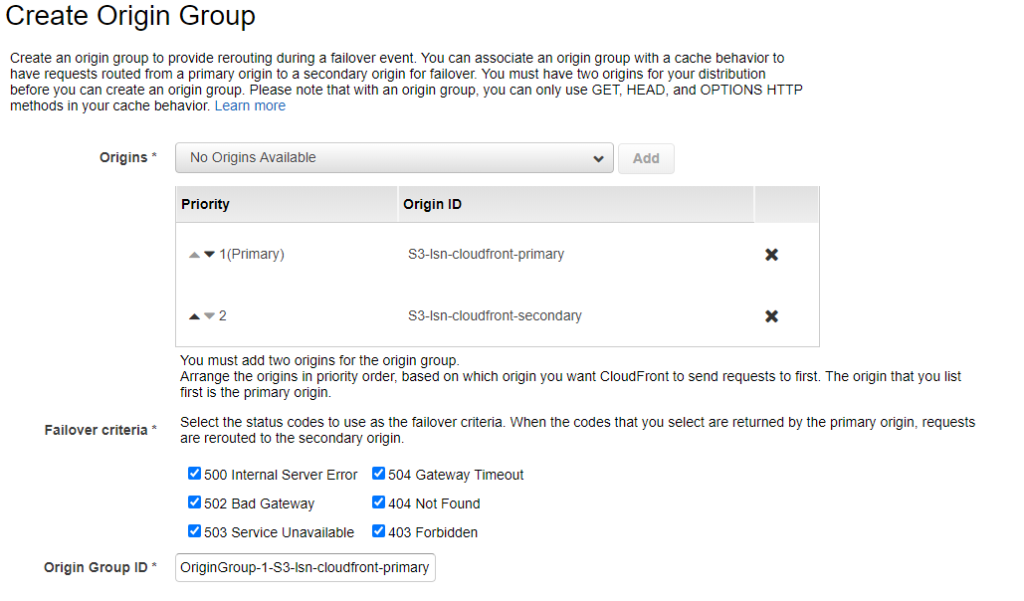
– Active/Passive replica via Origin Group, failover/failback automatically
AWS CloudFront is a content distribution network. It allows for edge location spread around the world to cache content so that the original source only needs to be consulted after a certain amount of time has expired. CloudFront is a global AWS service and has the ability to serve files from an S3 bucket. It also can be configured to have a primary bucket and a backup bucket in case the primary is not available.
Discover the services and tools available to automate the deployment and configuration of your Azure infrastructure
Scenario: A clothing manufacturer that’s moving several product design applications to Azure virtual machines. The company needs to scale out to many virtual machines now and in the future. Their current manual process is time consuming and error prone. They want to automate the scale-out process to improve operational abilities. They’re unsure about the tools that are available on Azure to provision compute resources, and where each fits into the overall provisioning process.
Available provisioing solutions are:
Custom scripts (VMs)
Desired State Configuration Extensions (VMs)
Chef Server
Terraform (all resources)
Azure Automation State Configuration
Azure Resource Manager templates (all resources)
Custom Script Extension (VMs)
custom script extension downloads and runs scripts on vms
useful for post deployment configuration, software installation
Note: Take care if your configuration or management task requires a restart. A custom script extension won’t continue after a restart.
How to extend a Resource Manager template
There are several ways
create multiple templates, each defining one piece of the system (then link or nest them together to build a more complete system)
modify an existing template ( that’s often the fastest way to get started writing your own templates)
Example
Create a VM.
Open port 80 through the network firewall.
Install and configure web server software on your VM.
# Requirements:
# Create a VM.
# Open port 80 through the network firewall.
# Install and configure web server software on your VM.

az vm extension set \
  --resource-group $RESOURCEGROUP \
  --vm-name SimpleWinVM \
  --name CustomScriptExtension \
  --publisher Microsoft.Compute \
  --version 1.9 \
  --settings '{"fileUris":["https://raw.githubusercontent.com/MicrosoftDocs/mslearn-welcome-to-azure/master/configure-iis.ps1"]}' \
  --protected-settings '{"commandToExecute": "powershell -ExecutionPolicy Unrestricted -File configure-iis.ps1"}' # the script to enable IIS


# This is the content of the configure-iis.ps1 file
#--------------------------------------------------------------
# Install IIS.
dism /online /enable-feature /featurename:IIS-WebServerRole

# Set the home page.
Set-Content `
  -Path "C:\\inetpub\\wwwroot\\Default.htm" `
  -Value "<html><body><h2>Welcome to Azure! My name is $($env:computername).</h2></body></html>"
#--------------------------------------------------------------
Use Chef’s knife tool to deploy virtual machines and simultaneously apply recipes to them. You install the knife tool on your admin workstation, which is the machine where you create policies and execute commands. Then run your knife commands from your admin workstation.
# The following example shows how a knife command can be used to create a virtual machine on Azure. The command
# simultaneously applies a recipe that installs a web server on the machine.

knife azurerm server create `
    --azure-resource-group-name rg-chefdeployment `
    --azure-storage-account store `
    --azure-vm-name chefvm `
    --azure-vm-size 'Standard_DS2_v2' `
    --azure-service-location 'eastus' `
    --azure-image-reference-offer 'WindowsServer' `
    --azure-image-reference-publisher 'MicrosoftWindowsServer' `
    --azure-image-reference-sku '2016-Datacenter' `
    --azure-image-reference-version 'latest' `
    -x myuser `
    -P yourPassword `
    --tcp-endpoints '80,3389' `
    --chef-daemon-interval 1 `
    -r "recipe[webserver]"
You can also use the Chef extension to apply recipes to the target machines. The following example defines a Chef extension for a virtual machine in an Azure Resource Manager template. It points to a Chef server by using the chef_server_url property. It points to a recipe to run on the virtual machine to put it in the desired state.
A recipe might look like the one that follows. The recipe installs an IIS web server.
#install IIS on the node.
powershell_script 'Install IIS' do
     action :run
     code 'add-windowsfeature Web-Server'
end

service 'w3svc' do
     action [ :enable, :start ]
end
Azure Desired State Configuration (DSC) extensions
Automation State Configuration
Resource Manager templates
Ease of setup
is built into the Azure portal, so setup is eas
are easy to read, update, and store. Configurations define what state you want to achieve. The author doesn’t need to know how that state is reached.
isn’t difficult to set up, but it requires the user to be familiar with the Azure portal.
create Resource Manager templates easily. You have many templates available from the GitHub community, which you can use or build upon. Alternatively, you can create your own templates from the Azure portal.
Management
can get tricky as your infrastructure grows and you accumulate different custom scripts for different resources
democratizes configuration management across servers.
The service manages all of the virtual machines for you automatically. Each virtual machine can send you detailed reports about its state, which you can use to draw insights from this data. Automation State Configuration also helps you to manage your DSC configurations more easily.
is straightforward because you manage JavaScript Object Notation (JSON) files.
Interoperability
can be added into an Azure Resource Manager template. can also deploy it through Azure PowerShell or the Azure CLI.
are used with Azure Automation State Configuration. They can be configured through the Azure portal, Azure PowerShell, or Azure Resource Manager templates.
requires DSC configurations. It works with your Azure virtual machines automatically, and any virtual machines that you have on-premises or on another cloud provider.
You can use other tools to provision Resource Manager templates, such as the Azure CLI, the Azure portal, PowerShell, and Terraform.
Configuration language
write scripts by using many types of commands. e.g. powershell, bash
Use PowerShell
powershell
JSON
Limitations and drawbacks
aren’t suitable for long run scripts or reboots needed scripts
only use PowerShell to define configurations. If you use DSC without Azure Automation State Configuration, you have to take care of your own orchestration and management.
use powershell
JSON has a strict syntax and grammar, and mistakes can easily render a template invalid. The requirement to know all of the resource providers in Azure and their options can be onerous.
Scenario for custom script: The organization you work for has been given a new contract to work for a new client. They have a handful of virtual machines that run on Azure. The development team decides they need to install a small application they’ve written to help increase their team’s productivity and make sure they can meet new deadlines. This application doesn’t require a restart.
Custom script advantages: The custom script extension is good for small configurations after provisioning. It’s also good if you need to add or update some applications on a target machine quickly. It’s imperative for ad-hoc cross-platform scripting.
Scenario for Azure Desired State Configuration State: The organization you work for is testing a new application, which requires new virtual machines to be identical so that the application can be accurately tested. The company wants to ensure that the virtual machines have the exact same configuration settings. You notice that some of these settings require multiple restarts of each virtual machine. Your company wants a singular state configuration for all machines at the point of provisioning. Any error handling to achieve the state should be abstracted as much as possible from the state configuration. Configurations should be easy to read.
Azure Desired State Configuration advantages: DSC is easy to read, update, and store. DSC configurations help you declare the state your machines should be in at the point they are provisioned, rather than having instructions that detail how to put the machines in a certain state. Without Azure Automation State Configuration, you have to manage your own DSC configurations and orchestration. DSC can achieve more when it’s coupled with Azure Automation State Configuration.
Scenario for Azure State Configuration: You learn that the company you work for wants to be able to create hundreds of virtual machines, with identical configurations. They want to report back on these configurations. They want to be able to see which machines accept which configurations without problems. They also want to see those problems when a machine doesn’t achieve a desired state. In addition, they want to be able to feed all of this data into a monitoring tool so they can analyze all of the data and learn from it.
Azure State Configuration advantages: The Azure Automation State Configuration service is good for automating your DSC configurations, along with the management of machines that need those configurations, and getting centralized reporting back from each machine. You can use DSC without Azure Automation State Configuration, particularly if you want to administer a smaller number of machines. For larger and more complicated scenarios that need orchestration, Azure Automation State Configuration is the solution you need. All of the configurations and features that you need can be pushed to all of the machines, and applied equally, with minimal effort.
Scenario for ARM Templates: Each developer should be able to automatically provision an entire group of virtual machines that are identical to what everyone else on the team creates. The developers want to be sure they’re all working in the same environment. The developers are familiar with JSON, but they don’t necessarily know how to administer infrastructure. They need to be able to provision all of the resources they need to run these virtual machines in an easy and rapid manner.
ARM Template advantages: Resource Manager templates can be used for small ad-hoc infrastructures. They’re also ideal for deploying larger infrastructures with multiple services along with their dependencies. Resource templates can fit well into developers’ workflows. You use the same template to deploy your application repeatedly during every stage of the application lifecycle.
third-party solution comparison
Chef
Terraform
Ease of setup
runs on the master machine, and Chef clients run as agents on each of your client machines. You can also use hosted Chef and get started much faster, instead of running your own server.
To get started with Terraform, download the version that corresponds with your operating system and install it.
Management
can be difficult because it uses a Ruby-based domain-specific language. You might need a Ruby developer to manage the configuration.
files are designed to be easy to manage.
Interoperability
only works under Linux and Unix, but the Chef client can run on Windows.
supports Azure, Amazon Web Services, and Google Cloud Platform.
Configuration language
uses a Ruby-based domain-specific language.
uses Hashicorp Configuration Language (HCL). You can also use JSON.
Limitations and drawbacks
The language can take time to learn, especially for developers who aren’t familiar with Ruby.
Because Terraform is managed separately from Azure, you might find that you can’t provision some types of services or resources.
Scenario for Chef Server: Your organization has decided to let the developers create some virtual machines for their own testing purposes. The development team knows various programming languages and recently started writing Ruby applications. They’d like to scale these applications and run them on test environments. They’re familiar with Linux. The developers run only Linux-based machines and destroy them after testing is finished.
Chef Server advantages: Chef is suitable for large-scale infrastructure deployment and configuration. Chef makes it easy for you to automate the deployment of an entire infrastructure, such as in the workflow of a development team.
Scenario for Terraform: Your organization has gained a new client who wants to create multiple virtual machines across several cloud providers. The client has asked you to create three new virtual machines in Azure and one other in the public cloud. The client wants the virtual machines to be similar. They should be created by using a script that works with both providers. This approach will help the client have a better idea of what they’ve provisioned across providers.
Terraform advantages: With Terraform, you can plan the infrastructure as code and see a preview of what the code will create. You can have that code peer reviewed to minimize errors in configuration. Terraform supports infrastructure configurations across different cloud service providers.
Example
# Source : https://docs.microsoft.com/en-us/learn/modules/choose-compute-provisioning/5-exercise-deploy-template
# Clone the configuration and template
git clone https://github.com/MicrosoftDocs/mslearn-choose-compute-provisioning.git

cd mslearn-choose-compute-provisioning
code Webserver.ps1

# file content
Configuration Webserver
{
    param ($MachineName)

    Node $MachineName
    {
        #Install the IIS Role
        WindowsFeature IIS
        {
            Ensure = "Present"
            Name = "Web-Server"
        }

        #Install ASP.NET 4.5
        WindowsFeature ASP
        {
            Ensure = "Present"
            Name = "Web-Asp-Net45"
        }

        WindowsFeature WebServerManagementConsole
        {
            Name = "Web-Mgmt-Console"
            Ensure = "Present"
        }
    }
}

# configure template
code template.json

# replace modulesUrl parameter in template
"modulesUrl": {
    "type": "string",
    "metadata": {
        "description": "URL for the DSC configuration module."
    }
},

# Validate your template
az deployment group validate \
    --resource-group learn-46d7acf0-e3c7-48c8-9416-bf9f3875659c \
    --template-file template.json \
    --parameters vmName=hostVM1 adminUsername=serveradmin

# Deploy your template
az deployment group create \
    --resource-group learn-46d7acf0-e3c7-48c8-9416-bf9f3875659c \
    --template-file template.json \
    --parameters vmName=hostVM1 adminUsername=serveradmin

az resource list \
    --resource-group learn-46d7acf0-e3c7-48c8-9416-bf9f3875659c \
    --output table \
    --query "[*].{Name:name, Type:type}"

echo http://$(az vm show \
    --show-details \
    --resource-group learn-46d7acf0-e3c7-48c8-9416-bf9f3875659c \
    --name hostVM1 \
    --query publicIps \
    --output tsv)
New-AzResourceGroup -Name <resource-group-name> -Location <resource-group-location> #use this command when you need to create a new resource group for your deployment
New-AzResourceGroupDeployment -ResourceGroupName <resource-group-name> -TemplateUri https://raw.githubusercontent.com/Azure/azure-quickstart-templates/master/101-vm-simple-windows/azuredeploy.json
CLI
az group create --name <resource-group-name> --location <resource-group-location> #use this command when you need to create a new resource group for your deployment
az group deployment create --resource-group <my-resource-group> --template-uri https://raw.githubusercontent.com/Azure/azure-quickstart-templates/master/101-vm-simple-windows/azuredeploy.json
Example
# define parameters for ARM template
RESOURCEGROUP=learn-quickstart-vm-rg
LOCATION=eastus
USERNAME=azureuser
PASSWORD=$(openssl rand -base64 32)

# create resource group
az group create --name $RESOURCEGROUP --location $LOCATION

# validate the template
az deployment group validate \
  --resource-group $RESOURCEGROUP \
  --template-uri "https://raw.githubusercontent.com/Azure/azure-quickstart-templates/master/101-vm-simple-windows/azuredeploy.json" \
  --parameters adminUsername=$USERNAME \
  --parameters adminPassword=$PASSWORD \
  --parameters dnsLabelPrefix=$DNS_LABEL_PREFIX

# deploy the template
az deployment group create \
  --name MyDeployment \
  --resource-group $RESOURCEGROUP \
  --template-uri "https://raw.githubusercontent.com/Azure/azure-quickstart-templates/master/101-vm-simple-windows/azuredeploy.json" \
  --parameters adminUsername=$USERNAME \
  --parameters adminPassword=$PASSWORD \
  --parameters dnsLabelPrefix=$DNS_LABEL_PREFIX

  # verify the deployment
  az deployment group show \
  --name MyDeployment \
  --resource-group $RESOURCEGROUP


  # list the vms
  az vm list \
  --resource-group $RESOURCEGROUP \
  --output table
This document presents the Azure Storage’s Best Practices.
Call Storage Rest API
The Storage’s REST API can be called as follows over HTTP/HTTPS. The output of this call is XML therefore the pre-built client libraries can help to work with XML output.
GET https://[url-for-service-account]/?comp=list&include=metadata

# Custom Domain can be used as well
# Https://[StorageName].blob.core.windows.net/
# Https://[StorageName].queue.core.windows.net/
# Https://[StorageName].table.core.windows.net/
# Https://[StorageName].file.core.windows.net/
Access Key & API Endpoint: Each storage has a unique access key.
Shared Access Signature (SAS): It can have grained permission
How to secure the authentication values
Using Key/value
Best Practice 1
Scenario
You’re building a photo-sharing application. Every day, thousands of users take pictures and rely on your application to keep them safe and make them accessible across all their devices. Storing these photos is critical to your business, and you would like to ensure that the system used in your application is fast, reliable, and secure. Ideally, this would be done without you having to build all these aspects into the app. [Source]
# Create an Azure Storage
az storage account create \
        --resource-group learn-242f907f-37b3-454d-a023-dae97958e5d9 \
        --kind StorageV2 \
        --sku Standard_LRS \
        --access-tier Cool \
        --name parisalsnstorage

# Get the ConnectionString of the Storage
az storage account show-connection-string \
    --resource-group learn-242f907f-37b3-454d-a023-dae97958e5d9 \
    --name parisalsnstorage \
    --query parisalsnstorage
2. Create an Application
# Create a DotNet Core Application
# Create the project in spesific folder with -o / --output <folder-name>
dotnet new console --name PhotoSharingApp

# Change to project folder
cd PhotoSharingApp

# Run the project
dotnet run

# Create a appsettings.json file. The Storage connection string is kept here.
# This is the simple version
touch appsettings.json
3. Configure Application
# Add Azure Storage NuGet Package
dotnet add package WindowsAzure.Storage

# Run to test the project
dotnet run

# Edit the appsettings.json
code .
After the appsettings.json file is opned in Editor change the content as follows
{
  "StorageAccountConnectionString": "The Storage Connection String must be placed here"
}
The next file is PhotoSharingApp.csproj. It have to be changed as follows
using System;
using Microsoft.Extensions.Configuration;
using System.IO;
using Microsoft.WindowsAzure.Storage;
using System.Threading.Tasks;

namespace PhotoSharingApp
{
    class Program
    {
        static async Task Main(string[] args)
        {
            var builder = new ConfigurationBuilder()
                .SetBasePath(Directory.GetCurrentDirectory())
                .AddJsonFile("appsettings.json");

            var configuration = builder.Build();
            var connectionString = configuration["StorageAccountConnectionString"];

            # Simplest way to initialize the object model via either .TryParse or .Parse
            if (!CloudStorageAccount.TryParse(connectionString, out CloudStorageAccount storageAccount))
            {
                Console.WriteLine("Unable to parse connection string");
                return;
            }

            var blobClient = storageAccount.CreateCloudBlobClient();
            var blobContainer = blobClient.GetContainerReference("photoblobs");
            bool created = await blobContainer.CreateIfNotExistsAsync();

            Console.WriteLine(created ? "Created the Blob container" : "Blob container already exists.");
        }
    }
}
Best Practice 2
Best Practice n
I’m working on the content..it will be published soon 🙂
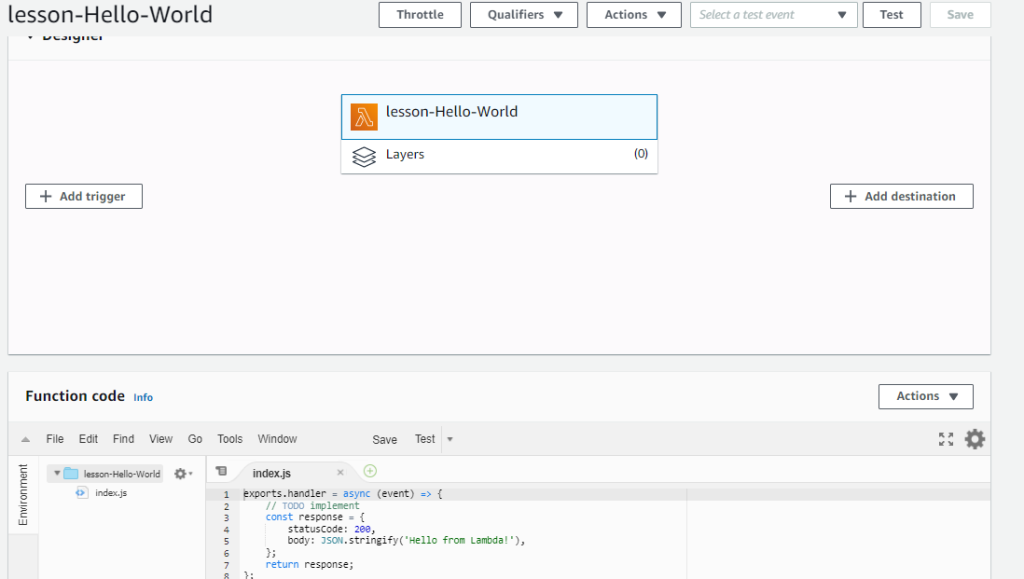
AWS Lambda is one of the Serverless possibilites, We can bring our code and have it run in response to an event.
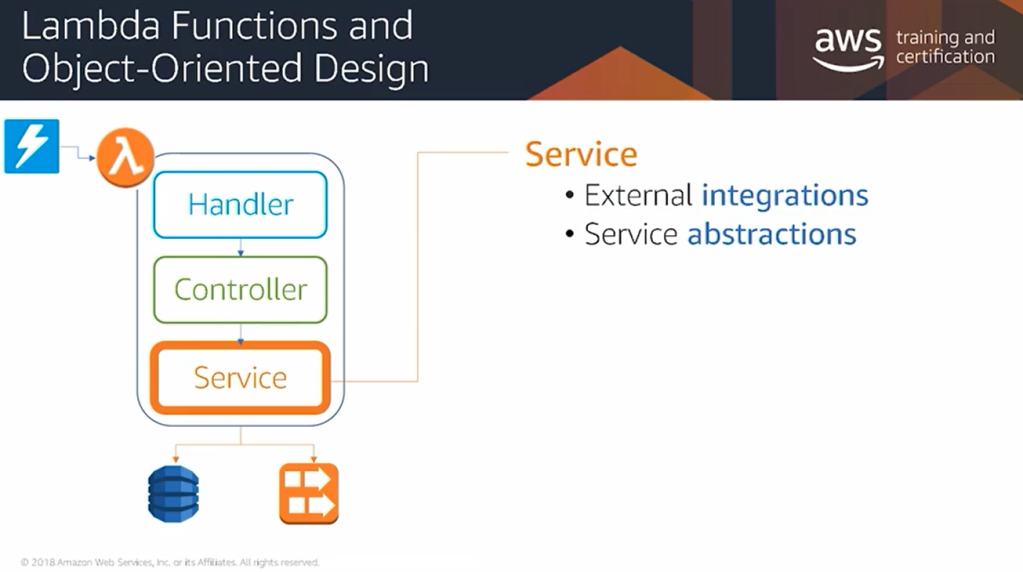
Handler is the primary entry point and the whole code can follow the OOP standards.
Lambda function and object oriented design
This is the usual layer of the lambda function. The business logic must not be developed in handler.
The business logic must be developed in controller class.
Services is for interfaces with external services.
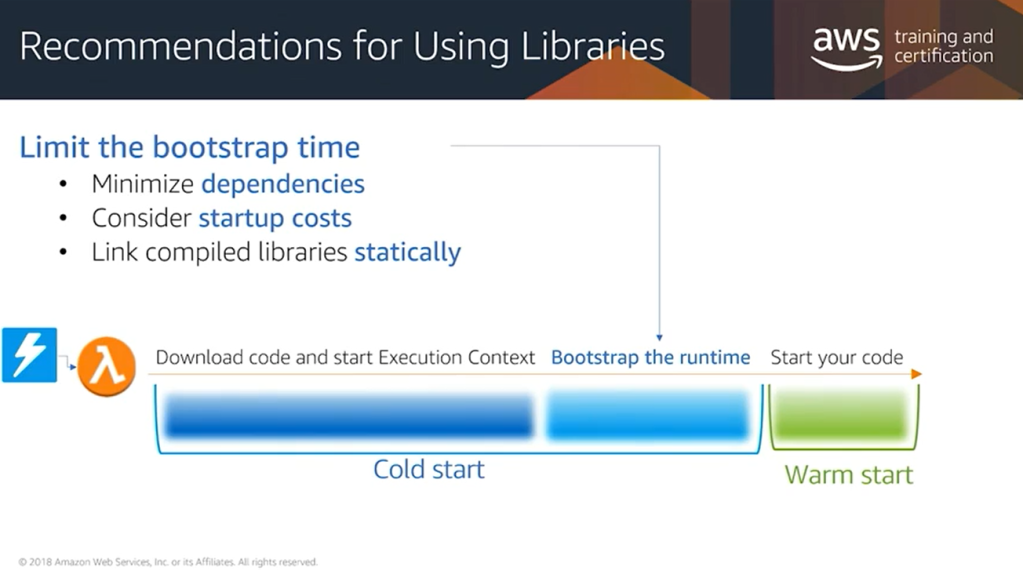
when a Lambda function runs, each time a new execution context is created, there’s a bootstrap component to that start up time for that function where the runtime itself needs to be bootstrapped, and all of the dependencies for that function have to be loaded from S3 and initialized. In order to optimize the cold starts for your function, you should consider reducing the overall size of your libraries.
So that means removing any unnecessary dependencies in your dependency graph, as well as being conscious of the overall start up time for the libraries you’re using. Certain libraries like Spring within the Java context take a long time to initialize, and that time is going to impact the cold start times for your function. Also, if you’re using any compiled libraries within your function, consider statically linking them instead of using dynamic link libraries.
Amazon DynamoDB is a fast NoSQL database service for all applications that need consistent, single-millisecond latency at any scale. It is a fully managed database and supports both document and key-value data models. Its flexible data model and reliable performance make it a great fit for mobile, web, gaming, ad-tech, IoT, and many other applications. [Source]
Create DynamoDB
Create Global table
For creating Global table, the DynamoDb Stream must be enabled. The following figure demonstrates how to enable it.
Then we use the Global Tables tab and Add region.
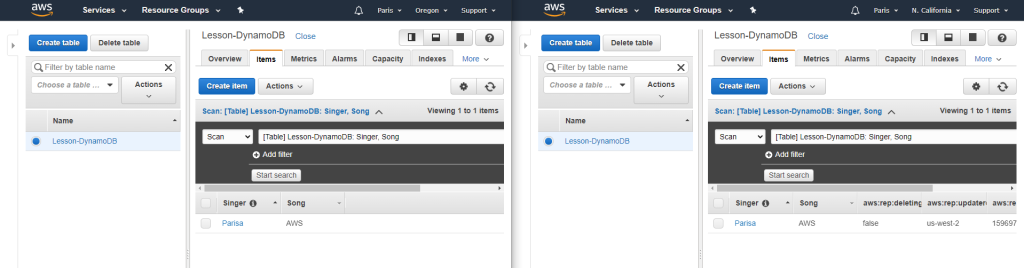
After I added a new item to “Oregon” table, the values would be added to the “California” as well.































 Multi Cloud Solutions