Multi-cloud

Most organizations choose to work with multiple cloud providers, because it’s a struggle for an enterprise to find only one public cloud infrustructure provider, which meet all their requirements. [refrence]

The following figure demonstrates that the multi-cloud solution is a sub concept for hybrid-cloud computing.

Multi-cloud solutions are sub topic of the hybrid-cloud computing.

Multi-cloud scenarios

1-Strategic advantages of partitioned complexity

To avoid committing to a single vendor, you spread applications across multiple cloud providers. Best Practice: weight the strategic advantages of a partitioned complexity this setup brings. Achieving workload portability and consistent tooling across multiple cloud environments increases development, testing, and operations work. [1]

2-For regulatory reasons

For regulatory reasons, you serve a certain segment of your user base and data from a country where a vendor does not yet have any presence. Best Practice: Use a multi-cloud environment only for mission-critical workloads or if, for legal or regulatory reasons, a single public cloud environment cannot accommodate the workloads. [1]

3-Choose the best services that the providers offer

For deploying application across multiple cloud providers in a way that allows you to choose among the best services that the providers offer. Best practice: Minimize dependencies between systems are running in different public cloud environments, particularly when communication is handled synchronously. These dependencies can slow performance and decrease overall availability. [1]

4-To have data autonomy

To have data autonomy in the future, therefore companies can take their data with them wherever they end up going.

Advantage of multi-cloud scenarios

  1. To avoid vendor lock-in. The multi-cloud helps lower strategic risk and provides you with the flexibility to change plans or partnerships later. [1]
  2. If the workload has been kept portable, you can optimize your operations by shifting workloads between computing environments. [1]

Hybrid-cloud scenarios

Hybrid-cloud description by National Institute of Standards

Hybrid cloud is a composition of two or more distinct cloud infrastructures (private, community, or public) that remain unique entities, but are bound together by standardized or proprietary technology that enables data and application portability. [2]

Cloud and on-premises, which were previously distinct entities and had cumbersome interaction configuration, are now converging to provide more efficient, less costly, and more flexible operation model for workflows.

1-Backup & Archive [2]
hybrid cloud diagram
2-Data Protection [2]
hybrid cloud for data protection
3-Lifecycle Partitioning [4]

Lifecycle partitioning is the process of moving parts of the application development lifecycle to the cloud while the rest remains on premises. The most popular is the cloud deployment and testing but move to on-premises for the production deployment.

4-Application Partitioning [4]

A part of an application is running in the could and the other part runs on premises. For example, Sony PlayStation runs databases for individual games in the cloud but takes care of user authentication on-premises.

5-Application spanning [3]

Application spanning happens when the same application runs on-premises and in the cloud. “Best Buy” is an example of the application spanning. The entire online store application is running across multiple cloud regions and multiple on-premises data center to allow it to quickly adjust to demand.



References

API Management in Azre, Aws and GCP

Application Programming Interface Management (API Management), consists of a set of tools and services that enable developers and companies to build, analyse, operate, and scale APIs in secure environment.

AzureAWSGCP
ServiceAPI Management ServiceAmazon API Gateway
– API Gateway
– Developer Portal
– API Access Control
– API Protection
– API Creation and design
– Support for hybrid models
– High performance
– Customizable developer portal
???
API Management tools overview

API Management can be delivered on-premises, through the could, or using a hybrid on-premises – SaaS (Software as a Service) approach.

Resouces

Compare Migration

For migration from On-Prem to Cloud we have the following possibilities on different platforms.

AzureAWSGCP
Lift and shiftYesYes

Lift and shift
It means a virtual machine is taken from a hyper-visor and migrated to cloud with the same configuration as it had on-prem. An app will be migrated to the cloud without refactoring or changing architecture.

Customers realize cost savings

Azure Migration Service: Assess Hyper-V Environments

The Azure Migration Service can be used for assessment. This document explains how to use Azure Migration to assess an on-premises Hyper-v-based environment.

I had only non-domain Windows Servers on Hyper-v. For the credentials I added the credentials for Windows Servers and Hyper-v Host. I used the Username and Password of the servers. For the Hyper-v Host I used a local admin user.

Username: hyper-v-host-machine-name\local-admin-username
(ex. del0074\parisaadmin)
Password: The password

To discovery source the following values are required.

IP Address/FQDN: hyper-v-host-machine-name(ex. del0074)
Map credentials: host

Azure Virtual Network (VNet)

The Azure Virtual Network (VNet) is like a container that provide traffic isolation and segmentation.

An Azure virtual network (VNet) is a representation of your own network in the cloud. You can control your Azure network settings and define DHCP address blocks, DNS settings, security policies, and routing. You can also further segment your VNet into subnets and deploy Azure IaaS virtual machines (VMs) and PaaS role instances, in the same way you can deploy physical and virtual machines to your on-premises datacenter. In essence, you can expand your network to Azure, bringing your own IP address blocks.

The termes which are used in VNet are as follows:

  • Virtual Network
    • Virtual Network Subnet
    • Gateway Subnet
  • Virtual Network Gateway
    • Viurtual VPN Gateway
  • Network Security Group (NSG) -> Can be assigned to
    • Virtual Network
    • Virtual Machine
    • Sunbet -> at subnet level would be prefered.
  • User Defined Routing (UDR) -> for customizing traffic.

We can have one to many VNets but of course there’s subscription limitation. All VNets are isolated boundries. But there’s different types of connectivity available between VNets according to the scenario.

Connectivity types

VNets PeeringThere’s two different VNets peering:
– Global Peering
– VNets Peering -> the VNets must be in the same region.
VPN Gateway/ TunnelThe VPN Gateway is used for different types of connectivity:
– VNet-to-VNet (Microsoft Doc)
– Site-to-site -> On-premises env to Azure VNet (Microsoft Doc)
– Point-to-site -> Laptop to Azure VNet
Express Route

Virtual Network Security

Provide network security with using

  • Network security group
  • Using attack simulation to access protection and detection capabilities of azure web application firewall (WAF)

Network Security Group (NSG)

The Network Security is applied to the network via Network Security Groups (NSGs) and it has the following features:

  • It has a stateful firewalll for inbount and outbound traffic.

Clouds: Virtual Network and Subnet

Web Application Firewall (WAF)

Common vulnerabilities [more]

  • Injection
  • Broker authentication
  • Cross-site scription (xss)
  • Sensitive Data Exposure
  • Insecure Deserlialization
  • Broker Access Control
  • Insufficient logging and monitoring
  • Server-side Request Forgery (SSAF)
  • Known Vulnerabilities
  • Security Misconfiguration

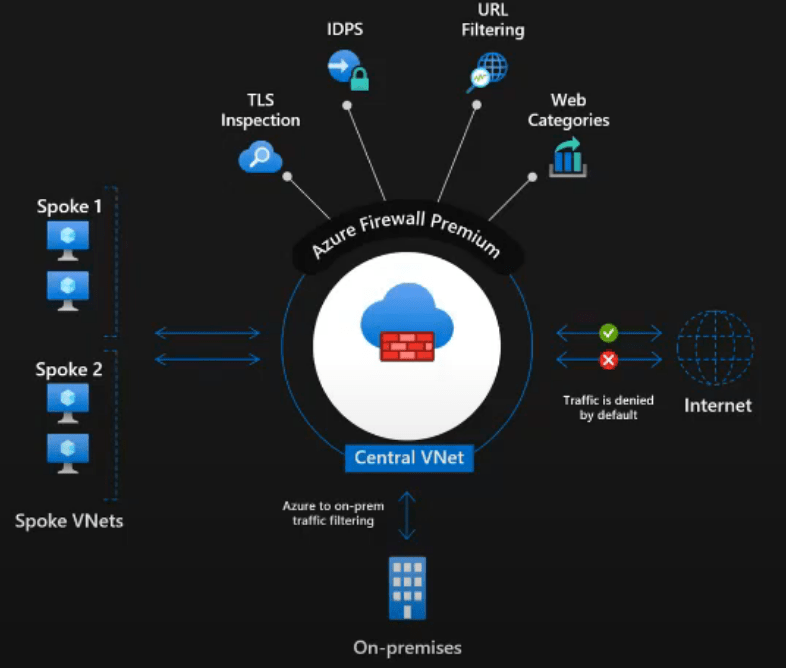
Central DNS Management and Logging with Azure Firewall

Azure Firewall overview [Source]

Firewall as a Service is a PaaS.

Azure Firewall
Central governance of all traffic flows– Built-in high availability and auto scale
– Network and application traffic filtering
– Centralized policy across VNets and subscriptions
Complete VNET protectionFilter Outbound, Inbound, Spoke-Spoke and Hybrid Connections traffic (VPN and ExpressRoute)
Centralized loggingArchive logs to a storage account, stream events to your Event Hub, or send them to Log Analytics or Security Integration and Event Management (SIEM) system of choice.
Best for AzureDevOps integration, FQDN tags, Service Tags, Integration with ASE, Backup and other Azure Services.
Azure Firewall PremiumNext-Gen Firewall features, including TLS inspection, IDPS, and URL Categories.

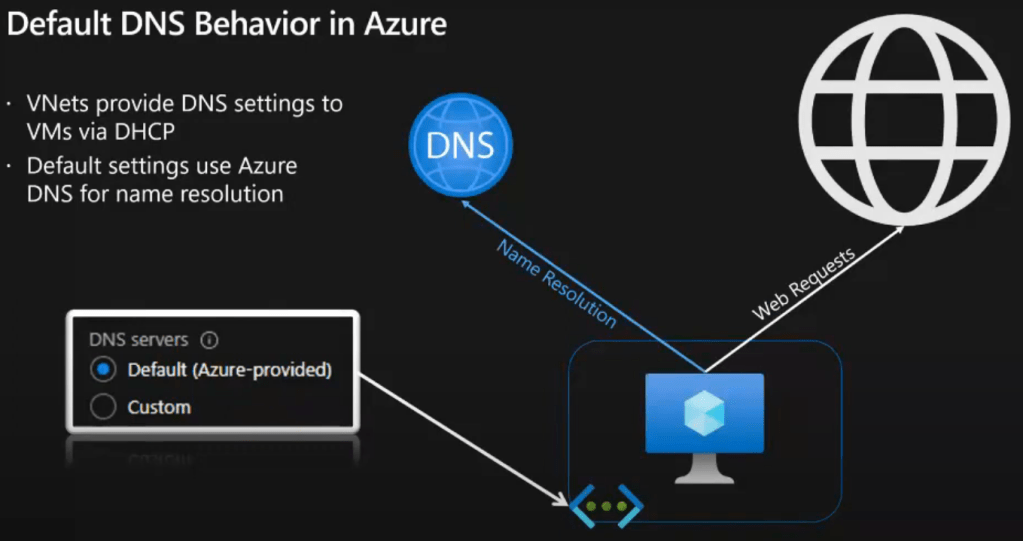
Default DNS behavior in Azure [Source]

  • VNets provide DNS settings to VMs via DHCP
  • Default settings use Azure DNS for name resolution

Azure Firewall DNS Proxy and custom DNS

References

Azure Service Bus

Service bus is available on azure platform with three different messaging possibilities:

  • Service Bus Queue
  • Service Bus Topic
  • Service Bus Relay
Service Bus QueueIt’s available for Basic Price Tier.
Service Bus TopicIt’s available for Standard / Premium Price Tier.
Service Bus Relay

Service Bus is usually for the enterprise level solutions, where the following items must be considered in the solution:

  • Multi components communicate with each other via brokered messaging
  • Communication is discrete.
  • A broker is needed to distribute the messages between components.
  • The message order is important (FIFO).
  • The application can have multi-tier architecture.
  • The application is hybrid (partially on-prem and partially cloud-based).
  • The applicaions of different departments must communicate with each other.

Service bus is created as a namespace and the message streamings are defined in the namespace and the price tier is defined at namespace level.

With Premium price tier is possible to define the Message Units. The message unit, isolate the workload processing in CPU and Memory. therefore, the partitioning option is removed from Create Queue and Topic blade. Two are features for premium are:

  • Event -> for automation
  • Firewall and virtual networks

Bus Service Overview

It’s available in Premium Price Tier

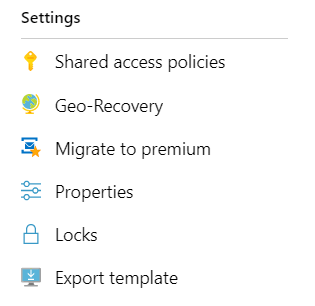
Shared Access Policies: in this blade we access the primary & secondary key & connection.

This is available in premium price tier

Queues: Add serveral queues.

Topics: Add several topics.

Secure Acceess

Uses the Shared Access Signature (SAS) with full access. This is generated by creating the service bus namesapace.

For Developers

The development has two parts

  • Sending message to the service bus queue
  • Handling/ process the messages in the service bus queue

Resources

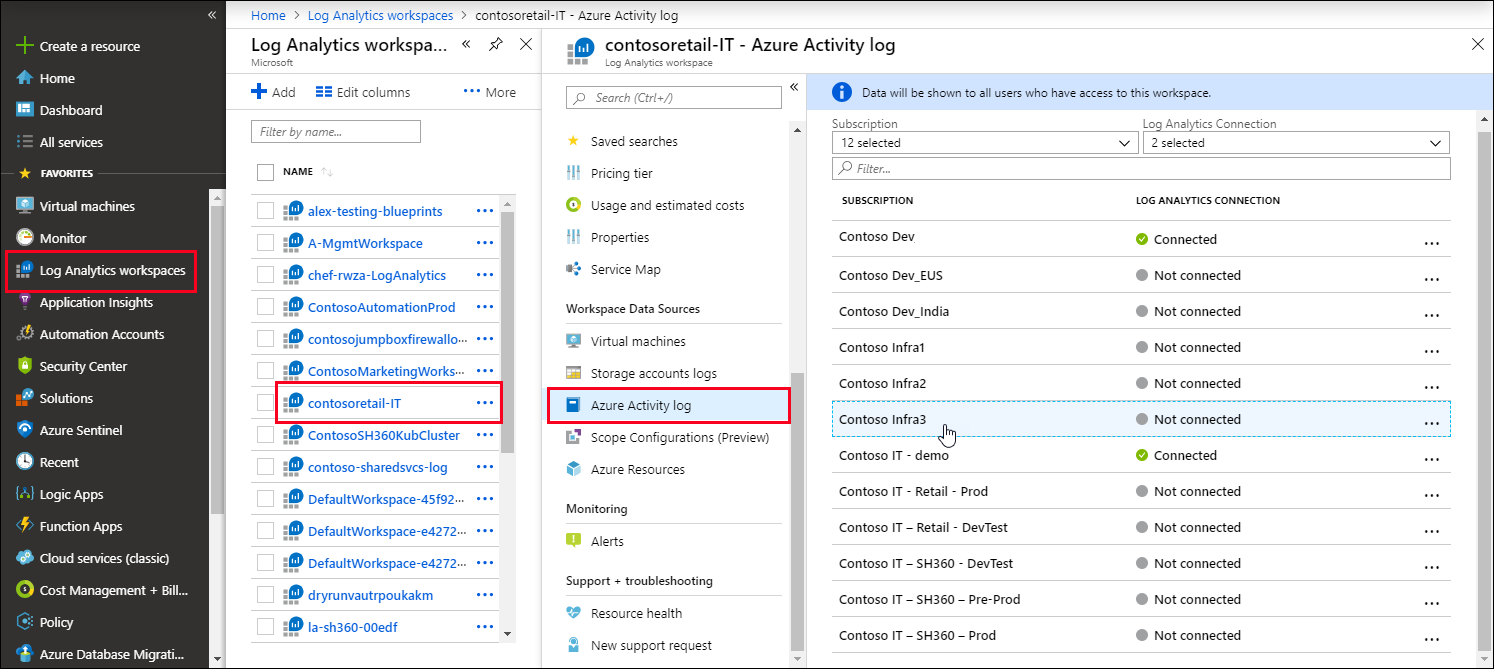
Azure Activity Log

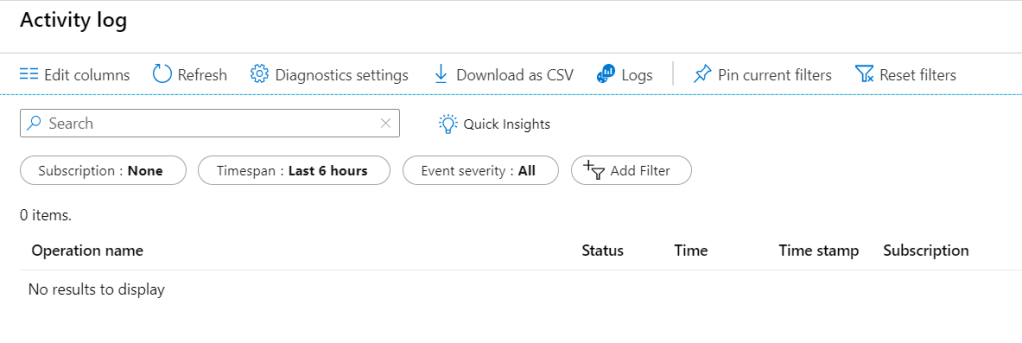
Azure Activity Log -> provides insights into subscription-level events.
Retention period of 90 days

Benefit of connecting Activity Log to Log Analytics

  • consolidate the activity logs of multi subscriptions in one place for analysis.
  • Store Activity Log enteries for more than 90 days.
  • Correlate Activity Log data with Azure Monitor data.
  • Use Log queries for complex analysis and get deep insight on Activity log.

Note
Each subscription has only one Activity Log.
Each Activity Log can be connected to only one Log Analytics Workspace.
One Log Analytics Workspace can be connected to the Activity Log of multiple subscription in a same tenant.

Connect an Activity Log to a Log Analytics workspace

Variante 1 (form log analytics blade)
Go to the Log Analytics Workspace > Select one of the created workspaces > From the blade > Azure Activity Log > Select one Subscription > Connect | Disconnect

Workspaces
Connect Workspaces

Variante 2 (from activity log blade)
Select a resource > Select Logs / Diagnostic settings menu > Select a Log Analytics Workspace.

Resources