Onboarding : Azure Compute

Topics

  • Keywords
  • Manage VM
  • Availability Set
  • Scale Set
  • Snapshot
  • Image
  • Deploy VM from VHD
    • Generalize a server
  • Azure Batch
  • Automate business processes

Related topics

Keywords

  • Virtual Machine (VM)
  • CLI
  • VM
  • Availability Set
  • Scale Set
  • Snapshot (from disk)
  • Image (from vm)
  • Azure Batch: Azure Batch is an Azure service that enables you to run large-scale parallel and high-performance computing (HPC) applications efficiently in the cloud.
  • High-performance computing (HPC)
  • MPI: Message Passing Interface
  • Workflow: Business processes modeled in software are often called workflows.
  • Design-first approach: include user interfaces in which you can draw out the workflow
  • Azure compute: is an on-demand computing service for running cloud-based applications
    • Virtual machines
    • Containers
    • Azure App Service
    • Serverless computing

Source

Manage VM

VM management roles (RBAC)
  • Virtual Machine Contributor
  • Network Contributor
  • Storage Account Contributor

Note: The roles have to be assigned to an Azure AD Group instead of a user

To have a proper management on VMs, different management opptions have to be used

Available VM commands
az vm [subcommands]
Sub-commandDescription
createCreate a new virtual machine
deallocateDeallocate a virtual machine
deleteDelete a virtual machine
listList the created virtual machines in your subscription
open-portOpen a specific network port for inbound traffic
restartRestart a virtual machine
showGet the details for a virtual machine
startStart a stopped virtual machine
stopStop a running virtual machine
updateUpdate a property of a virtual machine
# Create a Linux virtual machine
az vm create \
  --resource-group [sandbox resource group name] \
  --location westus \
  --name SampleVM \
  --image UbuntuLTS \
  --admin-username azureuser \
  --generate-ssh-keys \
  --verbose # Azure CLI tool waits while the VM is being created.
    # Or
  --no-wait # option to tell the Azure CLI tool to return immediately and have Azure continue creating the VM in the background.
  
# output
{
  "fqdns": "",
  "id": "/subscriptions/<subscription-id>/resourceGroups/Learn-2568d0d0-efe3-4d04-a08f-df7f009f822a/providers/Microsoft.Compute/virtualMachines/SampleVM",
  "location": "westus",
  "macAddress": "00-0D-3A-58-F8-45",
  "powerState": "VM running",
  "privateIpAddress": "10.0.0.4",
  "publicIpAddress": "40.83.165.85",
  "resourceGroup": "2568d0d0-efe3-4d04-a08f-df7f009f822a",
  "zones": ""
}

  # generate-ssh-keys flag: This parameter is used for Linux distributions and creates 
  # a pair of security keys so we can use the ssh tool to access the virtual machine remotely. 
  # The two files are placed into the .ssh folder on your machine and in the VM. If you already 
  # have an SSH key named id_rsa in the target folder, then it will be used rather than having a new key generated.

# Connecting to the VM with SSH
ssh azureuser@<public-ip-address>

# for exit
logout

# Listing images
az vm image list --output table

# Getting all images
az vm image list --sku WordPress --output table --all # t is helpful to filter the list with the --publisher, --sku or –-offer options.

# Location-specific images
az vm image list --location eastus --output table


Pre-defined VM sizes

Azure defines a set of pre-defined VM sizes for Linux and Windows to choose from based on the expected usage.

TypeSizesDescription
General purposeDsv3, Dv3, DSv2, Dv2, DS, D, Av2, A0-7Balanced CPU-to-memory. Ideal for dev/test and small to medium applications and data solutions.
Compute optimizedFs, FHigh CPU-to-memory. Good for medium-traffic applications, network appliances, and batch processes.
Memory optimizedEsv3, Ev3, M, GS, G, DSv2, DS, Dv2, DHigh memory-to-core. Great for relational databases, medium to large caches, and in-memory analytics.
Storage optimizedLsHigh disk throughput and IO. Ideal for big data, SQL, and NoSQL databases.
GPU optimizedNV, NCSpecialized VMs targeted for heavy graphic rendering and video editing.
High performanceH, A8-11Our most powerful CPU VMs with optional high-throughput network interfaces (RDMA).
# get a list of the available sizes
az vm list-sizes --location eastus --output table

# output
MaxDataDiskCount    MemoryInMb  Name                      NumberOfCores    OsDiskSizeInMb    ResourceDiskSizeInMb
------------------  ------------  ----------------------  ---------------  ----------------  ----------------------
                 2          2048  Standard_B1ms                         1           1047552                    4096
                 2          1024  Standard_B1s                          1           1047552                    2048
                 4          8192  Standard_B2ms                         2           1047552                   16384
                 4          4096  Standard_B2s                          2           1047552                    8192
                 8         16384  Standard_B4ms                         4           1047552                   32768
                16         32768  Standard_B8ms                         8           1047552                   65536
                 4          3584  Standard_DS1_v2 (default)             1           1047552                    7168
                 8          7168  Standard_DS2_v2                       2           1047552                   14336
                16         14336  Standard_DS3_v2                       4           1047552                   28672
                32         28672  Standard_DS4_v2                       8           1047552                   57344
                64         57344  Standard_DS5_v2                      16           1047552                  114688
        ....
                64       3891200  Standard_M128-32ms                  128           1047552                 4096000
                64       3891200  Standard_M128-64ms                  128           1047552                 4096000
                64       3891200  Standard_M128ms                     128           1047552                 4096000
                64       2048000  Standard_M128s                      128           1047552                 4096000
                64       1024000  Standard_M64                         64           1047552                 8192000
                64       1792000  Standard_M64m                        64           1047552                 8192000
                64       2048000  Standard_M128                       128           1047552                16384000
                64       3891200  Standard_M128m                      128           1047552                16384000

# Specify a size during VM creation
az vm create \
    --resource-group learn-5d4bcefe-17c2-4db6-aba8-3f25d2c54844 \
    --name SampleVM2 \
    --image UbuntuLTS \
    --admin-username azureuser \
    --generate-ssh-keys \
    --verbose \
    --size "Standard_DS5_v2"

# Get available VM Size
# Before a resize is requested, we must check to see if the desired size is available in the cluster our VM is part of.
az vm list-vm-resize-options \
    --resource-group learn-5d4bcefe-17c2-4db6-aba8-3f25d2c54844 \
    --name SampleVM \
    --output table

# Resize an existing VM 
az vm resize \
    --resource-group learn-5d4bcefe-17c2-4db6-aba8-3f25d2c54844 \
    --name SampleVM \
    --size Standard_D2s_v3

This will return a list of all the possible size configurations available in the resource group. If the size we want isn’t available in our cluster, but is available in the region, we can deallocate the VM. This command will stop the running VM and remove it from the current cluster without losing any resources. Then we can resize it, which will re-create the VM in a new cluster where the size configuration is available.

# List VMs
az vm list

# Output types
az vm list --output table|json|jsonc|tsv

# Getting the IP address
az vm list-ip-addresses -n SampleVM -o table
# output
VirtualMachine    PublicIPAddresses    PrivateIPAddresses
----------------  -------------------  --------------------
SampleVM          168.61.54.62         10.0.0.4

# Getting VM details
az vm show --resource-group learn-5d4bcefe-17c2-4db6-aba8-3f25d2c54844 --name SampleVM
# we could change to a table format, but that omits almost all of the interesting data. Instead, we can turn to a built-in query language for JSON called JMESPath.
# https://jmespath.org/


# Adding filters to queries with JMESPath
{
  "people": [
    {
      "name": "Fred",
      "age": 28
    },
    {
      "name": "Barney",
      "age": 25
    },
    {
      "name": "Wilma",
      "age": 27
    }
  ]
}

# poeple is an array
people[1]
# output
{
    "name": "Barney",
    "age": 25
}


people[?age > '25'] 
# output
[
  {
    "name": "Fred",
    "age": 28
  },
  {
    "name": "Wilma",
    "age": 27
  }
]

people[?age > '25'].[name]
# output
[
  [
    "Fred"
  ],
  [
    "Wilma"
  ]
]

# Filtering our Azure CLI queries
az vm show \
    --resource-group learn-5d4bcefe-17c2-4db6-aba8-3f25d2c54844 \
    --name SampleVM \
    --query "osProfile.adminUsername"

az vm show \
    --resource-group learn-5d4bcefe-17c2-4db6-aba8-3f25d2c54844 \
    --name SampleVM \
    --query hardwareProfile.vmSize

az vm show \
    --resource-group learn-5d4bcefe-17c2-4db6-aba8-3f25d2c54844 \
    --name SampleVM \
    --query "networkProfile.networkInterfaces[].id"

az vm show \
    --resource-group learn-5d4bcefe-17c2-4db6-aba8-3f25d2c54844 \
    --name SampleVM \
    --query "networkProfile.networkInterfaces[].id" -o tsv

# Stopping a VM
az vm stop \
    --name SampleVM \
    --resource-group learn-5d4bcefe-17c2-4db6-aba8-3f25d2c54844

# We can verify it has stopped by attempting to ping the public IP address, using ssh, or through the vm get-instance-view command.
az vm get-instance-view \
    --name SampleVM \
    --resource-group learn-5d4bcefe-17c2-4db6-aba8-3f25d2c54844 \
    --query "instanceView.statuses[?starts_with(code, 'PowerState/')].displayStatus" -o tsv

# Starting a VM    
az vm start \
    --name SampleVM \
    --resource-group learn-5d4bcefe-17c2-4db6-aba8-3f25d2c54844

# Restarting a VM
az vm start \
    --name SampleVM \
    --resource-group learn-5d4bcefe-17c2-4db6-aba8-3f25d2c54844
    --no-wait 

# Install NGINX web server
# 1.
z vm list-ip-addresses --name SampleVM --output table

# 2.
ssh azureuser@<PublicIPAddress>

# 3.
sudo apt-get -y update && sudo apt-get -y install nginx

# 4.
exit

# Retrieve our default page
# Either
curl -m 10 <PublicIPAddress>
# Or
# in browser try the public ip address

# This command will fail because the Linux virtual machine doesn't expose
# port 80 (http) through the network security group that secures the network 
# connectivity to the virtual machine. We can change this with the Azure CLI command vm open-port.

# open oprt
az vm open-port \
    --port 80 \
    --resource-group learn-5d4bcefe-17c2-4db6-aba8-3f25d2c54844 \
    --name SampleVM

# output of curl command
<!DOCTYPE html>
<html>
<head>
<title>Welcome to nginx!</title>
<style>
body {
    width: 35em;
    margin: 0 auto;
    font-family: Tahoma, Verdana, Arial, sans-serif;
}
</style>
</head>
<body>
<h1>Welcome to nginx!</h1>
<p>If you see this page, the nginx web server is successfully installed and
working. Further configuration is required.</p>

<p>For online documentation and support please refer to
<a href="http://nginx.org/">nginx.org</a>.<br/>
Commercial support is available at
<a href="http://nginx.com/">nginx.com</a>.</p>

<p><em>Thank you for using nginx.</em></p>
</body>
</html>

Source: https://docs.microsoft.com/en-us/learn/modules/manage-virtual-machines-with-azure-cli/

Availability Set

  • An availability set is a logical grouping of two or more VMs
  • keep your application available during planned or unplanned maintenance.
  • planned maintenance event is when the underlying Azure fabric that hosts VMs is updated by Microsoft.
    • to patch security vulnerabilities,
    • improve performance,
    • and add or update features
  • When the VM is part of an availability set, the Azure fabric updates are sequenced so not all of the associated VMs are rebooted at the same time.
  • VMs are put into different update domains.
  • Update domains indicate groups of VMs and underlying physical hardware that can be rebooted at the same time.
  • Update domains are a logical part of each data center and are implemented with software and logic.
  • Unplanned maintenance events involve a hardware failure in the data center,
    • such as a server power outage
    • or disk failure
  • VMs that are part of an availability set automatically switch to a working physical server so the VM continues to run.
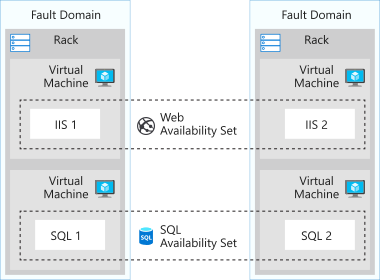
  • The group of virtual machines that share common hardware are in the same fault domain.
  • A fault domain is essentially a rack of servers.
  • It provides the physical separation of your workload across different power, cooling, and network hardware that support the physical servers in the data center server racks. 
  • With an availability set, you get:
    • Up to three fault domains that each have a server rack with dedicated power and network resources
    • Five logical update domains which then can be increased to a maximum of 20
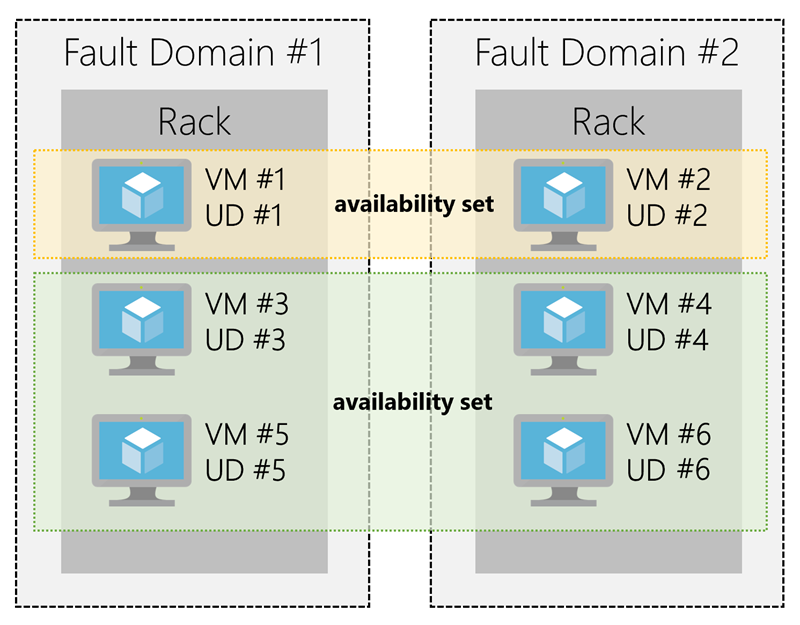
Diagram showing availability sets update and fault domains that are duplicated across servers.
Your VMs are then sequentially placed across the fault and update domains. The following diagram shows an example where you have six VMs in two availability sets distributed across the two fault domains and five update domains.

Source

Scale Set

Scenario: Imagine that you work for a domestic shipping company. Your customers use one of the company’s websites to manage and check the status of their shipments. This website is deployed to virtual machines and hosted on-premises. You’ve noticed that increased usage on the site is straining the virtual machines’ resources. However, you can’t adjust to load fluctuations without manually intervening and creating or deallocating virtual machines.

  • Scale set is for scalable applications ( automatically adjust to changes in load while minimizing costs with virtual machine scale sets)
  • adjust your virtual machine resources to match demands
  • keep the virtual machine configuration consistent to ensure application stabilit
  • VMs in this type of scale set all have the same configuration and run the same applications
  • for scenarios that include compute workloads, big-data workloads, and container workloads
  • to deploy and manage many load-balanced, identical VMs
  • it scales up and down automatically
  • it can even resize the vm
  • A scale set uses a load balancer to distribute requests across the VM instances
  • It uses a health probe to determine the availability of each instance (The health probe pings the instance)
  • keep in mind that you’re limited to running 1,000 VMs on a single scale set
  • support both Linux and Windows VMs
  • are designed for cost-effectiveness
  • scaling options
    • horizontal: adding or removing several VMs, by using rules, The rules are based on metrics.
    • vertical: adding resources such as memory, CPU power, or disk space to VMs,  increasing the size of the VMs in the scale set, by using rules.
  • How to scale
    • Scheduled scaling: You can proactively schedule the scale set to deploy one or N number of additional instances to accommodate a spike in traffic and then scale back down when the spike ends.
    • Autoscaling: If the workload is variable and can’t always be scheduled, you can use metric-based threshold scaling. Autoscaling horizontally scales out based on node usage. It then scales back in when the resources return to a baseline.
  • Reducing costs by using low-priority
    • allows you to use Azure compute resources at cost savings of up to 80 percent.
    • A low-priority scale set provisions VMs through this underused compute capability.
    • these VMs, keep in mind that they’re temporary. Availability depends on size, region, time of day, and so on. These VMs have no SLA.
    • When Azure needs the computing power again, you’ll receive a notification about the VM that will be removed from your scale set
    • you can use Azure Scheduled Events to react to the notification within the VM. 
  • low-priority scale set, you specify two kinds of removal
    • Delete: The entire VM is removed, including all of the underlying disks.
    • Deallocate: The VM is stopped. The processing and memory resources are deallocated. Disks are left intact and data is kept. You’re charged for the disk space while the VM isn’t running.
  • if the workload increases in complexity rather than in volume, and this complexity demands more of your resources, you might prefer to scale vertically.
# create custom data to config scale set
code cloud-init.yaml

# custom data 
#cloud-config
package_upgrade: true
packages:
  - nginx
write_files:
  - owner: www-data:www-data
  - path: /var/www/html/index.html
    content: |
        Hello world from Virtual Machine Scale Set !
runcmd:
  - service nginx restart

# create resource group
az group create \
  --location westus \
  --name scalesetrg

# create scale set
az vmss create \
  --resource-group scalesetrg \
  --name webServerScaleSet \
  --image UbuntuLTS \
  --upgrade-policy-mode automatic \
  --custom-data cloud-init.yaml \
  --admin-username azureuser \
  --generate-ssh-keys

# More about scaling : https://docs.microsoft.com/en-us/learn/modules/build-app-with-scale-sets/4-configure-virtual-machine-scale-set

By default, the new virtual machine scale set has two instances and a load balancer.

The custom-data flag specifies that the VM configuration should use the settings in the cloud-init.yaml file after the VM has been created. You can use a cloud-init file to install additional packages, configure security, and write to files when the machine is first installed.

Configure vm scale set

# add a health probe to the load balancer
az network lb probe create \
  --lb-name webServerScaleSetLB \
  --resource-group scalesetrg \
  --name webServerHealth \
  --port 80 \
  --protocol Http \
  --path /

The health probe pings the root of the website through port 80. If the website doesn't respond, the server is considered unavailable. The load balancer won't route traffic to the server.

# configure the load balancer to route HTTP traffic to the instances in the scale set
az network lb rule create \
  --resource-group scalesetrg \
  --name webServerLoadBalancerRuleWeb \
  --lb-name webServerScaleSetLB \
  --probe-name webServerHealth \
  --backend-pool-name webServerScaleSetLBBEPool \
  --backend-port 80 \
  --frontend-ip-name loadBalancerFrontEnd \
  --frontend-port 80 \
  --protocol tcp

# change the number of instances in a virtual machine scale set
az vmss scale \
    --name MyVMScaleSet \
    --resource-group MyResourceGroup \
    --new-capacity 6


  • a mechanism that updates your application consistently, across all instances in the scale set
    • Azure custom script extension downloads and runs a script on an Azure VM. It can automate the same tasks on all the VMs in a scale set.
    • create a configuration file that defines the files to get and the commands to run. This file is in JSON format.
    • to know more about custom script refer to Onboarding : Azure Infrastructure deployment.
# custom script configuration that downloads an application from a repository in GitHub and installs it on a host instance by running a script named custom_application_v1.sh
# yourConfigV1.json 
{
  "fileUris": ["https://raw.githubusercontent.com/yourrepo/master/custom_application_v1.sh"],
  "commandToExecute": "./custom_application_v1.sh"
}


# To deploy this configuration on the scale set, you use a custom script extension
az vmss extension set \
  --publisher Microsoft.Azure.Extensions \
  --version 2.0 \
  --name CustomScript \
  --resource-group myResourceGroup \
  --vmss-name yourScaleSet \
  --settings @yourConfigV1.json

# view the current upgrade policy for the scale set
az vmss show \
    --name webServerScaleSet \
    --resource-group scalesetrg \
    --query upgradePolicy.mode

# apply the update script
az vmss extension set \
    --publisher Microsoft.Azure.Extensions \
    --version 2.0 \
    --name CustomScript \
    --vmss-name webServerScaleSet \
    --resource-group scalesetrg \
    --settings "{\"commandToExecute\": \"echo This is the updated app installed on the Virtual Machine Scale Set ! > /var/www/html/index.html\"}"

# retrieve the IP address
az network public-ip show \
    --name webServerScaleSetLBPublicIP \
    --resource-group scalesetrg \
    --output tsv \
    --query ipAddress

Source

Snapshot

Image

  • Managed disk supports creating a managed Custome image
  • We can create image from custom VHD in a storage account or directly from generalized VM (via sysprepped VM command)
    • This process capture a single image
    • this image contains all managed disks associated with a VM, including both OS, and Data.

Image vs. Snapshot

ImageSnapshot
With managed disks, you can take an image of a generalized VM that has been deallocated.It’s copy of disk in a specific point of time.
This image includes all managed disks attached to this VM. it applies only to one disk.
This image can be used to create a Vm.Sanpshot doesn’t have awareness of any disk except the one it contains.

If a VM has only one OS disk, we can take a snapshot of the disk or take image of VM and create a VM from either snapshot or the image.

Deploy VM from VHD

  • a vm can have some configurations like installed software -> we can create a new Virtual Hard Disk (VHD) from this vm.
  • VHD
    • is like physical hard disk
    • A VHD can also hold databases and other user-defined folders, files, and data
    • A virtual machine can contain multiple VHDs
    • Typically, a virtual machine has an operating system VHD on which the operating system is installed. 
    • It also has one or more data VHDs that contain the applications and other user-specific data used by the virtual machine.
  • VHD advantages
    • high availability
    • physical security
    • Durability
    • scalability
    • cost and performance
  • VM image
    • vm image is an original image without preconfigured items
    • VHD contains configurations
    • vm image and vhds can be created via Microsoft Hyper-V -> then upload to cloud
  • Generalized image
    • it’s customized vm image
    • and then some server-specific information must be remove and create a general image
      • The host name of your virtual machine.
      • The username and credentials that you provided when you installed the operating system on the virtual machine.
      • Log files.
      • Security identifiers for various operating system services.
    • The process of resetting this data is called generalization, and the result is a generalized image.
    •  For Windows, use the Microsoft System Preparation (Sysprep) tool. For Linux, use the Windows Azure Linux Agent (waagent) tool.
  • specialized virtual image
    • use a specialized virtual image as a backup of your system at a particular point in time. If you need to recover after a catastrophic failure, or you need to roll back the virtual machine, you can restore your virtual machine from this image.
    • is snapshot of vm at a point in time
Generalize a server
  1. use a generalized image to build pre-configured virtual machines (VMs)
  2. To generalize a Windows VM, follow these steps:
    • Sign in to the Windows virtual machine.
    • Open a command prompt as an administrator.
    • Browse to the directory \windows\system32\sysprep.
    • Run sysprep.exe.
    • In the System Preparation Tool dialog box, select the following settings, and then select OK.TABLE 1PropertyValueSystem Cleanup ActionEnter System Out-of-Box Experience (OOBE)GeneralizeSelectShutdown OptionsShutdown

Running Sysprep is a destructive process, and you can’t easily reverse its effects. Back up your virtual machine first.

When you create a virtual machine image in this way, the original virtual machine becomes unusable. You can’t restart it. Instead, you must create a new virtual machine from the image, as described later in this unit.

Source

High-performance computing

Scenario: Suppose you work for an engineering organization that has an application that creates 3D models of the facilities they design. Your organization also has another system that stores a large amount of project-related statistical data. They want to use Azure to modernize the aging high-performance compute platforms that support these applications. Your organization needs to understand the solutions available on Azure, and how they fit into their plans.

  • Azure HPC choices
    • Azure batch
    • Azure VM HPC Instances
    • Microsoft HPC Pack
  • they are for specialized tasks
    • In genetic sciences, gene sequencing.
    • In oil and gas exploration, reservoir simulations.
    • In finance, market modeling.
    • In engineering, physical system modeling.
    • In meteorology, weather modeling.
  • Azure batch
    • for working with large-scale parallel and computationally intensive tasks 
    • batch is managed service
    • The Batch scheduling and management service is free
    • batch components
      • batch account
        • pools pf vms / notes
        • batch job
          • tasks / units of work
    • batch can associate with storage for input/ourput
    • the scheduling and management engine determines the optimal plan for allocating and scheduling tasks across the specified compute capacity
    • suggested for embarrassingly parallel tasks (https://www.youtube.com/watch?v=cadoD0aSQoM)
  • Azure VM HPC
    • H-series
    • HB-Series
    • HC-series
    • N -> NVIDIA GPUs
    • NC -> NVIDIA GPUs + CUDA
    • ND -> optimized for AI and deep learning workloads for are fast at running single-precision floating point operations, which are used by AI frameworks including Microsoft Cognitive Toolkit, TensorFlow, and Caffe.
  • Microsoft HPC Pack
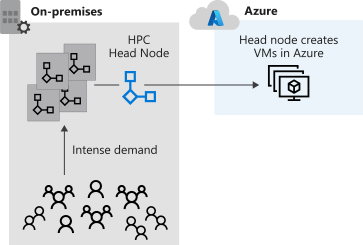
    • for migrate from on-prem to azure
    • have full control of the management and scheduling of your clusters of VMs
    • HPC Pack has the flexibility to deploy to on-premises and the cloud.
    • HPC Pack offers a series of installers for Windows that allows you to configure your own control and management plane, and highly flexible deployments of on-premises and cloud nodes.
    •  Deployment of HPC Pack requires Windows Server 2012 or later, and takes careful consideration to implement.
    • Prerequisites:
      • You need SQL Server and an Active Directory controlle, and a topology
      • specify the count of heads/controller nodes and workers
      • pre-provision Azure nodes as part of the cluster
      • The size of the main machines that make up the control plane (head and control nodes, SQL Server, and Active Directory domain controller) will depend on the projected cluster size
      • install HPC PAck -> the you have job scheduler  for both HPC and parallel jobs
      • scheduler appears in the Microsoft Message Passing Interface
      • HPC Pack is highly integrated with Windows
      • can see all the application, networking, and operating system events from the compute nodes in the cluster in a single, debugger view.
Source

Azure Batch

Scenario: Imagine you’re a software developer at a non-profit organization whose mission is to give every human on the planet access to clean water. To reach this goal, every citizen is asked to take a picture of their water purification meter and text it to you. Each day, you have to scan pictures from over 500,000 households, and record each reading against the sender phone number. The data is used to detect water quality trends and to dispatch the mobile water quality team to investigate the worst cases across each region. Time is of the essence, but processing each image with Optical Character Recognition (OCR) is time-intensive. With Azure Batch, you can scale out the amount of compute needed to handle this task on a daily basis, saving your non-profit the expense of fixed resources.

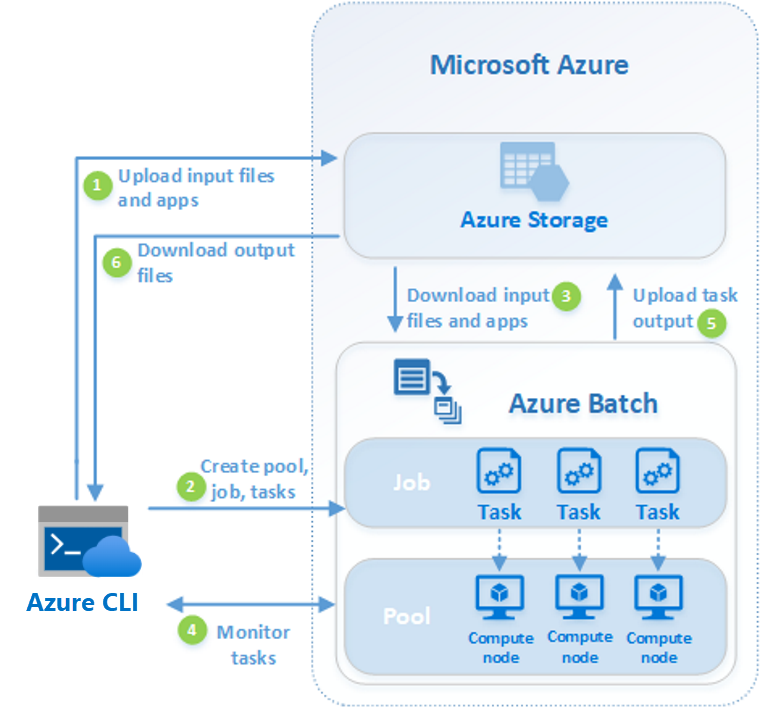
  • Azure Batch is an Azure service that enables you to run large-scale parallel and high-performance computing (HPC) applications efficiently in the cloud.
  • no need to manage infrastructure
  • Azure Batch to execute large-scale, high-intensity computation jobs
  • for running parallel tasks
  • flexible and scalable compute solution, such as Azure Batch, to provide the computational power
  • for compute-intensive tasks
    • heavy workloads can be broken down into separate subtasks and run in parallel
  • components
    • azure batch account
    • batch account is container for all batch resources
    • batch account contains many batch pools
    • azure batch workflow
# define variables
RESOURCE_GROUP=<your resource group>
BATCH_ACCOUNT=batchaccount$RANDOM
LOCATION=westeurope

# create azure batch account
az batch account create \
 --name $BATCH_ACCOUNT \
 --resource-group $RESOURCE_GROUP \
 --location <choose a location from the list above>

# login to azure batch account
az batch account login \
 --name $BATCH_ACCOUNT \
 --resource-group $RESOURCE_GROUP \
 --shared-key-auth

# create azure batch bool
az batch pool create \
 --id mypool --vm-size Standard_A1_v2 \
 --target-dedicated-nodes 3 \
 --image canonical:ubuntuserver:16.04-LTS \
 --node-agent-sku-id "batch.node.ubuntu 16.04"

# verify the nodes
az batch pool show --pool-id mypool \
 --query "allocationState"

# create a job
az batch job create \
 --id myjob \
 --pool-id mypool

# create tasks
for i in {1..10}
do
   az batch task create \
    --task-id mytask$i \
    --job-id myjob \
    --command-line "/bin/bash -c 'echo \$(printenv | grep \AZ_BATCH_TASK_ID) processed by; echo \$(printenv | grep \AZ_BATCH_NODE_ID)'"
done


# delete batch job
az batch job delete --job-id myjob -y

Source

Monitor Azure Batch job
  • to monitor the progress ob the tasks
# create a job for monitoring
az batch job create \
 --id myjob2 \
 --pool-id mypool

# create tasks of the job
for i in {1..10}
do
   az batch task create \
    --task-id mytask$i \
    --job-id myjob2 \
    --command-line "/bin/bash -c 'echo \$(printenv | grep \AZ_BATCH_TASK_ID) processed by; echo \$(printenv | grep \AZ_BATCH_NODE_ID)'"
done

# check status
az batch task show \
 --job-id myjob2 \
 --task-id mytask1

# list tasks output
az batch task file list \
 --job-id myjob2 \
 --task-id mytask5 \
 --output table

# create a folder for output and change to this folder
mkdir taskoutputs && cd taskoutputs

# download tasks output
for i in {1..10}
do
az batch task file download \
    --job-id myjob2 \
    --task-id mytask$i \
    --file-path stdout.txt \
    --destination ./stdout$i.txt
done

# show content
cat stdout1.txt && cat stdout2.txt

# delte job
az batch job delete --job-id myjob2 -y

Automate business processes

  • Modern businesses run on multiple applications and services
  • send the right data to the rigth task impact the efficiency
  • azure features to build and implement workflows that integrate multiple systems
    • Logic Apps
    • Microsoft Power Automate
    • WebJobs
    • Azure Functions
  • similarities of them
    • They can all accept inputs. An input is a piece of data or a file that is supplied to the workflow.
    • They can all run actions. An action is a simple operation that the workflow executes and may often modify data or cause another action to be performed.
    • They can all include conditions. A condition is a test, often run against an input, that may decide which action to execute next.
    • They can all produce outputs. An output is a piece of data or a file that is created by the workflow.
    • In addition, workflows created with these technologies can either start based on a schedule or they can be triggered by some external event.
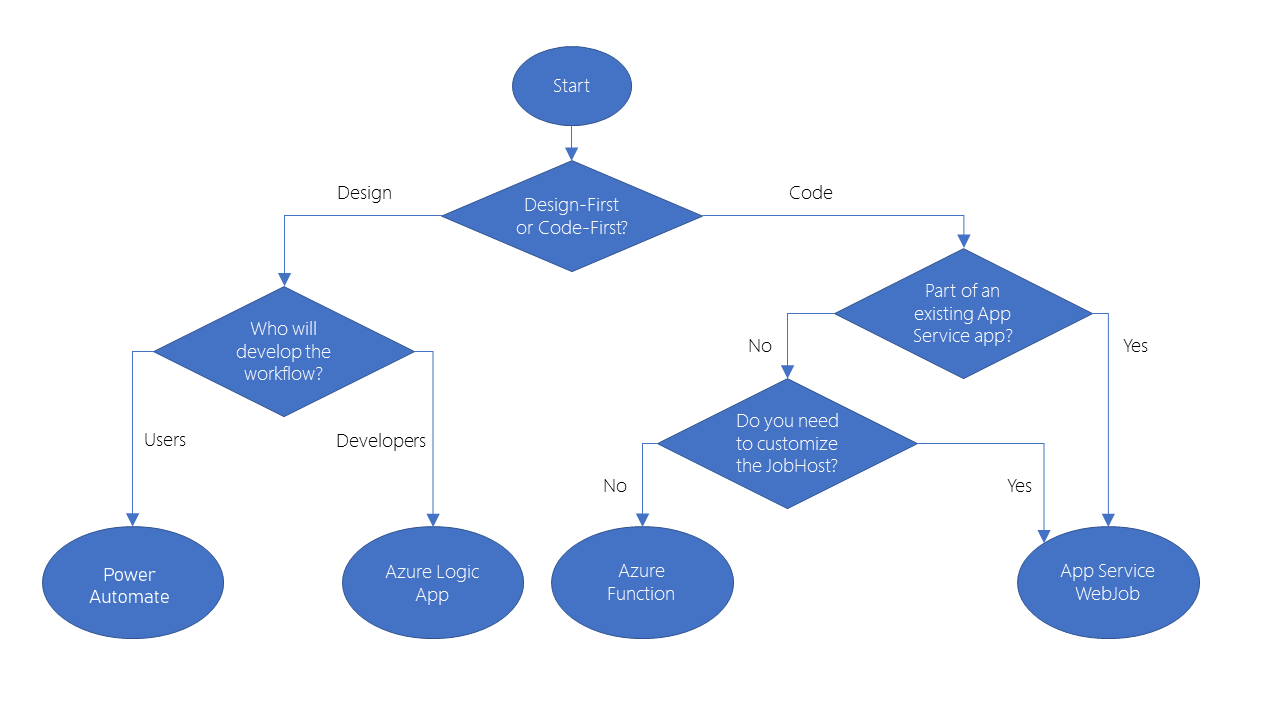
    • They have design-first approach
      • Logic app
      • Power automate
    • They have code-first technology
      • webjob
      • Azure functions

Logic Apps

  • to automate, orchestrate, and integrate disparate components of a distributed application.
  • Visual designer / Json Code Editor
  • over 200 connectors to external services
  • If you have an unusual or unique system that you want to call from a Logic Apps, you can create your own connector if your system exposes a REST API.

Microsoft Power Automate

  • create workflows even when you have no development or IT Pro experience
  • support four different types of flow
  • is built on Logic Apps
  • support same connectors and custom connectors

Webjobs

  • is a background tasks for app service
  • Onboarding : Modern Applications
  • kinds
    • continous
    • triggered
  • webjob can be written in several languages.
  • The WebJobs SDK only supports C# and the NuGet package manager.

Azure Functions

  • small pieces of code
  • pay for the time when the code runs
  • Azure automatically scales the function 
  • has available template
  • Microsoft Power Automate supported flows
    • Automated: A flow that is started by a trigger from some event. For example, the event could be the arrival of a new tweet or a new file being uploaded.
    • Button: Use a button flow to run a repetitive task with a single click from your mobile device.
    • Scheduled: A flow that executes on a regular basis such as once a week, on a specific date, or after 10 hours.
    • Business process: A flow that models a business process such as the stock ordering process or the complaints procedure.
  • Azure function available templates
    • HTTPTrigger. Use this template when you want the code to execute in response to a request sent through the HTTP protocol.
    • TimerTrigger. Use this template when you want the code to execute according to a schedule.
    • BlobTrigger. Use this template when you want the code to execute when a new blob is added to an Azure Storage account.
    • CosmosDBTrigger. Use this template when you want the code to execute in response to new or updated documents in a NoSQL database.
  • WebJobs for these reasons
    • You want the code to be a part of an existing App Service application and to be managed as part of that application, for example in the same Azure DevOps environment.
    • You need close control over the object that listens for events that trigger the code. This object in question is the JobHost class, and you have more flexibility to modify its behavior in WebJobs

design-first comparison

Microsoft Power AutomateLogic Apps
Intended usersOffice workers and business analystsDevelopers and IT pros
Intended scenariosSelf-service workflow creationAdvanced integration projects
Design toolsGUI only. Browser and mobile appBrowser and Visual Studio designer. Code editing is possible
Application Lifecycle ManagementPower Automate includes testing and production environmentsLogic Apps source code can be included in Azure DevOps and source code management systems

code-first comparison

Azure WebJobsAzure Functions
Supported languagesC# if you are using the WebJobs SDKC#, Java, JavaScript, PowerShell, etc.
Automatic scalingNoYes
Development and testing in a browserNoYes
Pay-per-use pricingNoYes
Integration with Logic AppsNoYes
Package managersNuGet if you are using the WebJobs SDKNuget and NPM
Can be part of an App Service applicationYesNo
Provides close control of JobHostYesNo
Diagram of decision flow chart that will be described in depth in the text that follows.
[Source]

Source


You owe your dreams your courage.

Koleka Putuma


Clouds : Solution Architecting

Consideration by architecting

We should ask this questions ourselves by architecting a solution by designing its monitoring solution

  • how would you diagnose issues with an application
  • how would you understand it’s health
  • what are it’s choke points
  • how would you identify them and what would you do when something breaks

Like the firefighting maneuver that must be executed half-yearly or yearly in each company, we have to use “chaos engineering” technique to intentionally cause breakage in the environments in a controlled manner to test monitoring, alerts, react of the architecture and resiliency of our solution.

Decide for the right resource and architecture for youe product

  • Choose the appropriate architecture based on your requirements
  • Know which compute options is right for your workload
  • Identify the right storage solution that meets your needs
  • Decide how you’re going to manage all your resources
  • Optimize your application for the cloud
  • Secure your Infrastructure

Documents

  • Security document
  • Holistic Monitor Strategy for application & infrustructure
    • explains about the alerts: for which failures an alert is necessary
    • explain about the dashboard: which values can be monitored only via dashboard
    • explain how to meet SLA and how to mange with alert
  • Busines Continuity and Disaster Recovery document
  • The cloud solution architect must consider the framework and provide a buisiness plan for migration.

You owe your dreams your courage.

Koleka Putuma

Onboarding : Azure Configure NSG, ASG, Firewall, and Service Endpoints

Configure Network Security Group (NSG)

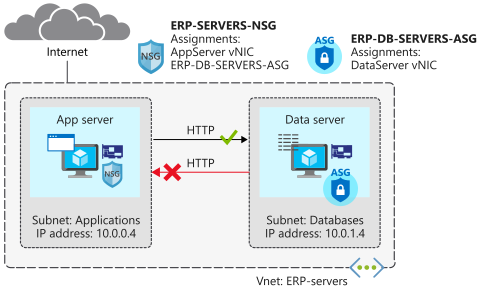
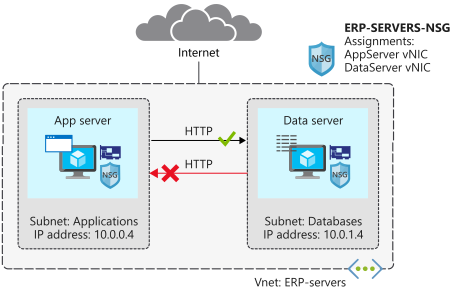
The following figure demonstrates, what we implement in the following code [Source].

Diagram of exercise scenario network security groups
# Define variable
rg=<resource group name>

# create a resource group
az group create --name $rg --location <location>

# Create a virtual network and subnet for application servers and database servers
az network vnet create \
    --resource-group $rg \
    --name ERP-servers \
    --address-prefix 10.0.0.0/16 \
    --subnet-name Applications \
    --subnet-prefix 10.0.0.0/24

az network vnet subnet create \
    --resource-group $rg \
    --vnet-name ERP-servers \
    --address-prefix 10.0.1.0/24 \
    --name Databases

# Create Network Security Group
az network nsg create \
    --resource-group $rg \
    --name ERP-SERVERS-NSG

# Create virtual machines running Ubuntu (build the AppServer virtual machine)
# NSG is assigned to NIC of the VM
wget -N https://raw.githubusercontent.com/MicrosoftDocs/mslearn-secure-and-isolate-with-nsg-and-service-endpoints/master/cloud-init.yml && \
az vm create \
    --resource-group $rg \
    --name AppServer \
    --vnet-name ERP-servers \
    --subnet Applications \
    --nsg ERP-SERVERS-NSG \
    --image UbuntuLTS \
    --size Standard_DS1_v2 \
    --admin-username azureuser \
    --custom-data cloud-init.yml \
    --no-wait \
    --admin-password <password>

# build the DataServer virtual machine
az vm create \
    --resource-group $rg \
    --name DataServer \
    --vnet-name ERP-servers \
    --subnet Databases \
    --nsg ERP-SERVERS-NSG \
    --size Standard_DS1_v2 \
    --image UbuntuLTS \
    --admin-username azureuser \
    --custom-data cloud-init.yml \
    --admin-password <password>

# To confirm that the virtual machines are running
az vm list \
    --resource-group $rg \
    --show-details \
    --query "[*].{Name:name, Provisioned:provisioningState, Power:powerState}" \
    --output table

# To connect to your virtual machines, use SSH directly from Cloud Shell. To do this, you need the public IP addresses that have been assigned to your virtual machines
az vm list \
    --resource-group $rg \
    --show-details \
    --query "[*].{Name:name, PrivateIP:privateIps, PublicIP:publicIps}" \
    --output table

# To make it easier to connect to your virtual machines during the rest of this exercise, assign the public IP addresses to variables
APPSERVERIP="$(az vm list-ip-addresses \
                 --resource-group $rg \
                 --name AppServer \
                 --query "[].virtualMachine.network.publicIpAddresses[*].ipAddress" \
                 --output tsv)"

DATASERVERIP="$(az vm list-ip-addresses \
                 --resource-group $rg \
                 --name DataServer \
                 --query "[].virtualMachine.network.publicIpAddresses[*].ipAddress" \
                 --output tsv)"

# to check whether you can connect to your AppServer virtual machine
ssh azureuser@$APPSERVERIP -o ConnectTimeout=5
# You'll get a Connection timed out message.

# to check whether you can connect to your DataServer virtual machine
ssh azureuser@$DATASERVERIP -o ConnectTimeout=5
# You'll get the same connection failure message.

Remember that the default rules deny all inbound traffic into a virtual network, unless this traffic is coming from another virtual network. The Deny All Inbound rule blocked the inbound SSH connections

Inbound

NamePrioritySource IPDestination IPAccess
Allow VNet Inbound65000VIRTUAL_NETWORKVIRTUAL_NETWORKAllow
Deny All Inbound65500**Deny
Create a security rule for SSH
# Create a security rule for SSH
az network nsg rule create \
    --resource-group $rg \
    --nsg-name ERP-SERVERS-NSG \
    --name AllowSSHRule \
    --direction Inbound \
    --priority 100 \
    --source-address-prefixes '*' \
    --source-port-ranges '*' \
    --destination-address-prefixes '*' \
    --destination-port-ranges 22 \
    --access Allow \
    --protocol Tcp \
    --description "Allow inbound SSH"

# check whether you can now connect to your AppServer virtual machine
ssh azureuser@$APPSERVERIP -o ConnectTimeout=5

ssh azureuser@$DATASERVERIP -o ConnectTimeout=5

# You will be asked "are you sure to continue?", you answer with yes, and enter password
# for exit enter exit
Create a security rule to prevent web access
Server nameIP address
AppServer10.0.0.4
DataServer10.0.1.4
# Now add a rule so that AppServer can communicate with DataServer over HTTP, but DataServer can't communicate with AppServer over HTTP
az network nsg rule create \
    --resource-group $rg \
    --nsg-name ERP-SERVERS-NSG \
    --name httpRule \
    --direction Inbound \
    --priority 150 \
    --source-address-prefixes 10.0.1.4 \
    --source-port-ranges '*' \
    --destination-address-prefixes 10.0.0.4 \
    --destination-port-ranges 80 \
    --access Deny \
    --protocol Tcp \
    --description "Deny from DataServer to AppServer on port 80"

# to connect to your AppServer virtual machine, and check if AppServer can communicate with DataServer over HTTP.
ssh -t azureuser@$APPSERVERIP 'wget http://10.0.1.4; exit; bash'
# he response should include a 200 OK message.

# to connect to your DataServer virtual machine, and check if DataServer can communicate with AppServer over HTTP
ssh -t azureuser@$DATASERVERIP 'wget http://10.0.0.4; exit; bash'
# his shouldn't succeed, because you've blocked access over port 80. Press Ctrl+C to stop the command prior to the timeout.

Configure Application Security Group (ASG)

The following figure demonstrates, what we implement in this section.

Create an application security group for database servers, so that all servers in this group can be assigned the same settings. You’re planning to deploy more database servers, and want to prevent these servers from accessing application servers over HTTP. By assigning sources in the application security group, you don’t need to manually maintain a list of IP addresses in the network security group. Instead, you assign the network interfaces of the virtual machines you want to manage to the application security group.

Diagram of exercise scenario application security groups
# create a new application security group called ERP-DB-SERVERS-ASG
az network asg create \
    --resource-group $rg \
    --name ERP-DB-SERVERS-ASG

# to associate DataServer with the application security group
az network nic ip-config update \
    --resource-group $rg \
    --application-security-groups ERP-DB-SERVERS-ASG \
    --name ipconfigDataServer \
    --nic-name DataServerVMNic \
    --vnet-name ERP-servers \
    --subnet Databases

# to update the HTTP rule in the ERP-SERVERS-NSG network security group. It should reference the ERP-DB-Servers application security group
az network nsg rule update \
    --resource-group $rg \
    --nsg-name ERP-SERVERS-NSG \
    --name httpRule \
    --direction Inbound \
    --priority 150 \
    --source-address-prefixes "" \
    --source-port-ranges '*' \
    --source-asgs ERP-DB-SERVERS-ASG \
    --destination-address-prefixes 10.0.0.4 \
    --destination-port-ranges 80 \
    --access Deny \
    --protocol Tcp \
    --description "Deny from DataServer to AppServer on port 80 using application security group"

# to connect to your AppServer virtual machine, and check if AppServer can communicate with DataServer over HTTP.
ssh -t azureuser@$APPSERVERIP 'wget http://10.0.1.4; exit; bash'
# the response should include a 200 OK message.

# to connect to your DataServer virtual machine, and check if DataServer can communicate with AppServer over HTTP.
ssh -t azureuser@$DATASERVERIP 'wget http://10.0.0.4; exit; bash'
# you should get a Connection timed out message. Press Ctrl+C to stop the command prior to the timeout.

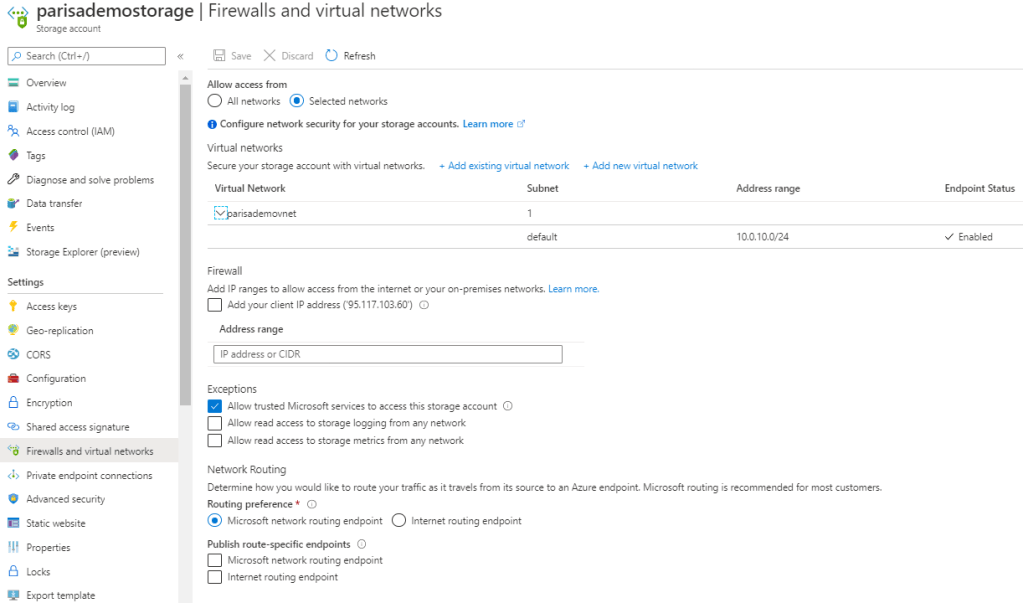
Configure Service Firewall

Storage
  • Storage has a layered security model
  • The layered model enables us to secure storage to a specific set of supported networks
  • To use network, the network rules must be configured.
  • Only applications requesting data from over specific networks can access storage.
  • The application request can go through the network rules, but this application must have an authorization on the storage as well
    • Authorization can be done via Storage Access Key (for blob & queue).
    • Or Authorization can be done via Share Access Signature (SAS) (for blob & queue).
  • In both case the authorization is done via Azure Active Directory.
  • Network rules are enforced are protocols e.g. REST and SMB
How network rules must be configured
  1. Deny access to traffic from all networks (it will be done automatically after first config).
  2. Grant access to the traffic of specific vnet (for secure application boundary).
  3. Then if needed grant access to public internet IP/IP range or on-prem.
  4. Configure network rules for Azure Portal, Storage Explorer, and AZCopy
  5. VM disk traffic (mount, unmount, disk io) is not affected by network rules.
  6. REST access is affected by network rules
  7. Classic storage don’t support firewall and vnet.
Shared Access Signature (SAS)
  • This access token is not related to securing storage via vnet
  • The IP address that has some authorization on storage can work with storage again even after configuring network rules.

Configure Service Endpoints

Storage

Resources

Onboarding : Azure Infrastructure deployment

Scenarios

Keywords

  • Azure Resource Manager (ARM)

Available provisioning solutions

Discover the services and tools available to automate the deployment and configuration of your Azure infrastructure

Scenario: A clothing manufacturer that’s moving several product design applications to Azure virtual machines. The company needs to scale out to many virtual machines now and in the future. Their current manual process is time consuming and error prone. They want to automate the scale-out process to improve operational abilities. They’re unsure about the tools that are available on Azure to provision compute resources, and where each fits into the overall provisioning process.

Available provisioing solutions are:

  • Custom scripts (VMs)
  • Desired State Configuration Extensions (VMs)
  • Chef Server
  • Terraform (all resources)
  • Azure Automation State Configuration
  • Azure Resource Manager templates (all resources)
Custom Script Extension (VMs)
  • custom script extension downloads and runs scripts on vms
  • useful for post deployment configuration, software installation
  • this script can be powershell script on
    • local file server,
    • Github,
    • azure storage,
    • other locations that are accessible to vm
  • available via powershell, cli, ARM template
{
    "apiVersion": "2019-06-01",
    "type": "Microsoft.Compute/virtualMachines/extensions",
    "name": "[concat(variables('virtual machineName'),'/', 'InstallWebServer')]",
    "location": "[parameters('location')]",
    "dependsOn": [
        "[concat('Microsoft.Compute/virtualMachines/',variables('virtual machineName'))]"
    ],
    "properties": {
        "publisher": "Microsoft.Compute",
        "type": "CustomScriptExtension",
        "typeHandlerVersion": "1.7",
        "autoUpgradeMinorVersion":true,
        "settings": {
            "fileUris": [
                "https://your-potential-file-location.com/your-script-file.ps1"
            ],
            "commandToExecute": "powershell.exe -ExecutionPolicy Unrestricted -File your-script-file.ps1"
       		 }
    	}
    }
}

Note: Take care if your configuration or management task requires a restart. A custom script extension won’t continue after a restart.

How to extend a Resource Manager template

There are several ways

  • create multiple templates, each defining one piece of the system (then link or nest them together to build a more complete system)
  • modify an existing template ( that’s often the fastest way to get started writing your own templates)

Example

  1. Create a VM.
  2. Open port 80 through the network firewall.
  3. Install and configure web server software on your VM.
# Requirements:
# Create a VM.
# Open port 80 through the network firewall.
# Install and configure web server software on your VM.

az vm extension set \
  --resource-group $RESOURCEGROUP \
  --vm-name SimpleWinVM \
  --name CustomScriptExtension \
  --publisher Microsoft.Compute \
  --version 1.9 \
  --settings '{"fileUris":["https://raw.githubusercontent.com/MicrosoftDocs/mslearn-welcome-to-azure/master/configure-iis.ps1"]}' \
  --protected-settings '{"commandToExecute": "powershell -ExecutionPolicy Unrestricted -File configure-iis.ps1"}' # the script to enable IIS


# This is the content of the configure-iis.ps1 file
#--------------------------------------------------------------
# Install IIS.
dism /online /enable-feature /featurename:IIS-WebServerRole

# Set the home page.
Set-Content `
  -Path "C:\\inetpub\\wwwroot\\Default.htm" `
  -Value "<html><body><h2>Welcome to Azure! My name is $($env:computername).</h2></body></html>"
#--------------------------------------------------------------

Source

Desired State Configuration Extensions (VMs)
  • DSC extensions are for more complex configuration, installation
  • configuration for state can be located in blob storage, internal file storage
  • DSC can reboot, and continue the execution after reboots are completed
{
	"type": "Microsoft.Compute/virtualMachines/extensions",
	"name": "Microsoft.Powershell.DSC",
	"apiVersion": "2018-06-30",
	"location": "your-region",
	"dependsOn": [
		"[concat('Microsoft.Compute/virtualMachines/', parameters('virtual machineName'))]"
	],
	"properties": {
		"publisher": "Microsoft.Powershell",
		"type": "DSC",
		"typeHandlerVersion": "2.77",
		"autoUpgradeMinorVersion": true,
		"settings": {
			"configuration": {
				"url": "https://demo.blob.core.windows.net/iisinstall.zip",
				"script": "IisInstall.ps1",
				"function": "IISInstall"
			}
		},
		"protectedSettings": {
			"configurationUrlSasToken": "odLPL/U1p9lvcnp..."
		}
	}
}
Chef Automate Server
  • chef server handels 10,000 node/machine at a time
  • works on-prem and cloud
  • it can be hosted for you and works as a service
  • Use Chef’s knife tool to deploy virtual machines and simultaneously apply recipes to them. You install the knife tool on your admin workstation, which is the machine where you create policies and execute commands. Then run your knife commands from your admin workstation.
# The following example shows how a knife command can be used to create a virtual machine on Azure. The command
# simultaneously applies a recipe that installs a web server on the machine.

knife azurerm server create `
    --azure-resource-group-name rg-chefdeployment `
    --azure-storage-account store `
    --azure-vm-name chefvm `
    --azure-vm-size 'Standard_DS2_v2' `
    --azure-service-location 'eastus' `
    --azure-image-reference-offer 'WindowsServer' `
    --azure-image-reference-publisher 'MicrosoftWindowsServer' `
    --azure-image-reference-sku '2016-Datacenter' `
    --azure-image-reference-version 'latest' `
    -x myuser `
    -P yourPassword `
    --tcp-endpoints '80,3389' `
    --chef-daemon-interval 1 `
    -r "recipe[webserver]"

You can also use the Chef extension to apply recipes to the target machines. The following example defines a Chef extension for a virtual machine in an Azure Resource Manager template. It points to a Chef server by using the chef_server_url property. It points to a recipe to run on the virtual machine to put it in the desired state.

{
  "type": "Microsoft.Compute/virtualMachines/extensions",
  "name": "[concat(variables('virtual machineName'),'/', variables('virtual machineExtensionName'))]",
  "apiVersion": "2015-05-01-preview",
  "location": "[parameters('location')]",
  "dependsOn": [
    "[concat('Microsoft.Compute/virtualMachines/', variables('virtual machineName'))]"
  ],
  "properties": {
    "publisher": "Chef.Bootstrap.WindowsAzure",
    "type": "LinuxChefClient",
    "typeHandlerVersion": "1210.12",
    "settings": {
      "bootstrap_options": {
        "chef_node_name": "chef_node_name",
        "chef_server_url": "chef_server_url",
        "validation_client_name": "validation_client_name"
      },
      "runlist": "recipe[your-recipe]",
      "validation_key_format": "validation_key_format",
      "chef_service_interval": "chef_service_interval",
      "bootstrap_version": "bootstrap_version",
      "bootstrap_channel": "bootstrap_channel",
      "daemon": "service"
    },
    "protectedSettings": {
      "validation_key": "validation_key",
      "secret": "secret"
    }
  }
}

A recipe might look like the one that follows. The recipe installs an IIS web server.

#install IIS on the node.
powershell_script 'Install IIS' do
     action :run
     code 'add-windowsfeature Web-Server'
end

service 'w3svc' do
     action [ :enable, :start ]
end

Terraform
  • Hashicorp Configuration Language (HCL)
# Configure the Microsoft Azure as a provider
provider "azurerm" {
    subscription_id = "xxxxxxx-xxxx-xxxx-xxxx-xxxxxxxxxxxx"
    client_id       = "xxxxxxx-xxxx-xxxx-xxxx-xxxxxxxxxxxx"
    client_secret   = "xxxxxxx-xxxx-xxxx-xxxx-xxxxxxxxxxxx"
    tenant_id       = "xxxxxxx-xxxx-xxxx-xxxx-xxxxxxxxxxxx"
}

# Create a resource group
resource "azurerm_resource_group" "myterraformgroup" {
    name     = "myResourceGroup"
    location = "eastus"

    tags = {
        environment = "Terraform Demo"
    }
}
# Create the virtual machine
resource "azurerm_virtual_machine" "myterraformvirtual machine" {
    name                  = "myvirtual machine"
    location              = "eastus"
    resource_group_name   = "${azurerm_resource_group.myterraformgroup.name}"
    network_interface_ids = ["${azurerm_network_interface.myterraformnic.id}"]
    virtual machine_size               = "Standard_DS1_v2"

    storage_os_disk {
        name              = "myOsDisk"
        caching           = "ReadWrite"
        create_option     = "FromImage"
        managed_disk_type = "Premium_LRS"
    }

    storage_image_reference {
        publisher = "Canonical"
        offer     = "UbuntuServer"
        sku       = "16.04.0-LTS"
        version   = "latest"
    }

    os_profile {
        computer_name  = "myvirtual machine"
        admin_username = "azureuser"
    }

    os_profile_linux_config {
        disable_password_authentication = true
        ssh_keys {
            path     = "/home/azureuser/.ssh/authorized_keys"
            key_data = "ssh-rsa AAAAB3Nz{snip}hwhaa6h"
        }
    }

    boot_diagnostics {
        enabled     = "true"
        storage_uri = "${azurerm_storage_account.mystorageaccount.primary_blob_endpoint}"
    }

    tags = {
        environment = "Terraform Demo"
    }
}

To use terraform file the following commands have to be used

  • terraform init
  • terraform plan
  • terraform apply

Source

Azure Automation State Configuration (DSC)
Azure Resource Manager templates (all resources)
  • Azure Resource Manager (ARM) template
    • Structure of sections and spesific properties of each sections
    • Version of the template language is important e.g. “2019-04-01”
    • Resource Manager templates express your deployments as code
    • Azure Resource Manager is the interface for managing and organizing cloud resources
    • Resource Manager is what organizes the resource groups that let you deploy, manage, and delete all of the resources together in a single action.
    • Resource Manager template is a JSON
    • a form of declarative automation (means that you define what resources you need but not how to create them)
    • make your deployments faster and more repeatable
    • Templates improve consistency
    • Templates help express complex deployments
    • Templates reduce manual, error-prone tasks
    • Templates are code
    • Templates promote reuse
    • Templates are linkable

Sections of the ARM template

{
  "$schema": "https://schema.management.azure.com/schemas/2019-04-01/deploymentTemplate.json#", # required
  "contentVersion": "", # required : any value is acceptable
  "apiProfile": "",
  "parameters": {  },
  "variables": {  },
  "functions": [  ],
  "resources": [  ], # required
  "outputs": {  }
}

Parameters

Parameter section for input value in deployment time

limited to 256 parameters

We can used objects that contains multiple properties instead of using input parameters.

"parameters": {
  "<parameter-name>" : { # required
    "type" : "<type-of-parameter-value>", # required : [string|securestring|int|bool|object|secureObject|array]
    "defaultValue": "<default-value-of-parameter>",
    "allowedValues": [ "<array-of-allowed-values>" ],
    "minValue": <minimum-value-for-int>,
    "maxValue": <maximum-value-for-int>,
    "minLength": <minimum-length-for-string-or-array>,
    "maxLength": <maximum-length-for-string-or-array-parameters>,
    "metadata": {
      "description": "<description-of-the parameter>"
    }
  }
}

Variables

  • Variables to reduce the complexity
"variables": {
  "<variable-name>": "<variable-value>",
  "<variable-name>": {
    <variable-complex-type-value>
  },
  "<variable-object-name>": {
    "copy": [
      {
        "name": "<name-of-array-property>",
        "count": <number-of-iterations>,
        "input": <object-or-value-to-repeat>
      }
    ]
  },
  "copy": [
    {
      "name": "<variable-array-name>",
      "count": <number-of-iterations>,
      "input": <object-or-value-to-repeat>
    }
  ]
}

Functions

  • procedures that you don’t want to repeat throughout the template
  • This example creates a unique name for resources
"functions": [
  {
    "namespace": "contoso",
    "members": {
      "uniqueName": {
        "parameters": [
          {
            "name": "namePrefix",
            "type": "string"
          }
        ],
        "output": {
          "type": "string",
          "value": "[concat(toLower(parameters('namePrefix')), uniqueString(resourceGroup().id))]"
        }
      }
    }
  }
],

Output

  • any information you’d like to receive when the template runs
  • information you do not know until the deployment runs (VM’s IP address or FQDN)
"outputs": {
  "hostname": {
    "type": "string",
    "value": "[reference(variables('publicIPAddressName')).dnsSettings.fqdn]"
  }
}

How to write a ARM template

Example

{
  "type": "Microsoft.Compute/virtualMachines",
  "apiVersion": "2018-10-01",
  "name": "[variables('virtual machineName')]",
  "location": "[parameters('location')]",
  "dependsOn": [
    "[resourceId('Microsoft.Storage/storageAccounts/', variables('storageAccountName'))]",
    "[resourceId('Microsoft.Network/networkInterfaces/', variables('nicName'))]"
  ],
  "properties": {
    "hardwareProfile": {
      "virtual machinesize": "Standard_A2"
    },
    "osProfile": {
      "computerName": "[variables('virtual machineName')]",
      "adminUsername": "[parameters('adminUsername')]",
      "adminPassword": "[parameters('adminPassword')]"
    },
    "storageProfile": {
      "imageReference": {
        "publisher": "MicrosoftWindowsServer",
        "offer": "WindowsServer",
        "sku": "[parameters('windowsOSVersion')]",
        "version": "latest"
      },
      "osDisk": {
        "createOption": "FromImage"
      },
      "dataDisks": [
        {
          "diskSizeGB": 1023,
          "lun": 0,
          "createOption": "Empty"
        }
      ]
    },
    "networkProfile": {
      "networkInterfaces": [
        {
          "id": "[resourceId('Microsoft.Network/networkInterfaces',variables('nicName'))]"
        }
      ]
    },
    "diagnosticsProfile": {
      "bootDiagnostics": {
        "enabled": true,
        "storageUri": "[reference(resourceId('Microsoft.Storage/storageAccounts/', variables('storageAccountName'))).primaryEndpoints.blob]"
      }
    }
  }
}
Custom scriptAzure Desired State Configuration (DSC) extensionsAutomation State ConfigurationResource Manager templates
Ease of setupis built into the Azure portal, so setup is easare easy to read, update, and store. Configurations define what state you want to achieve. The author doesn’t need to know how that state is reached.isn’t difficult to set up, but it requires the user to be familiar with the Azure portal.create Resource Manager templates easily. You have many templates available from the GitHub community, which you can use or build upon. Alternatively, you can create your own templates from the Azure portal.
Managementcan get tricky as your infrastructure grows and you accumulate different custom scripts for different resourcesdemocratizes configuration management across servers.The service manages all of the virtual machines for you automatically. Each virtual machine can send you detailed reports about its state, which you can use to draw insights from this data. Automation State Configuration also helps you to manage your DSC configurations more easily.is straightforward because you manage JavaScript Object Notation (JSON) files.
Interoperabilitycan be added into an Azure Resource Manager template. can also deploy it through Azure PowerShell or the Azure CLI.are used with Azure Automation State Configuration. They can be configured through the Azure portal, Azure PowerShell, or Azure Resource Manager templates.requires DSC configurations. It works with your Azure virtual machines automatically, and any virtual machines that you have on-premises or on another cloud provider.You can use other tools to provision Resource Manager templates, such as the Azure CLI, the Azure portal, PowerShell, and Terraform.
Configuration languagewrite scripts by using many types of commands. e.g. powershell, bashUse PowerShellpowershellJSON
Limitations and drawbacksaren’t suitable for long run scripts or reboots needed scriptsonly use PowerShell to define configurations. If you use DSC without Azure Automation State Configuration, you have to take care of your own orchestration and management.use powershellJSON has a strict syntax and grammar, and mistakes can easily render a template invalid. The requirement to know all of the resource providers in Azure and their options can be onerous.
[Source]

Scenario for custom script: The organization you work for has been given a new contract to work for a new client. They have a handful of virtual machines that run on Azure. The development team decides they need to install a small application they’ve written to help increase their team’s productivity and make sure they can meet new deadlines. This application doesn’t require a restart.

Custom script advantages: The custom script extension is good for small configurations after provisioning. It’s also good if you need to add or update some applications on a target machine quickly. It’s imperative for ad-hoc cross-platform scripting.

Scenario for Azure Desired State Configuration State: The organization you work for is testing a new application, which requires new virtual machines to be identical so that the application can be accurately tested. The company wants to ensure that the virtual machines have the exact same configuration settings. You notice that some of these settings require multiple restarts of each virtual machine. Your company wants a singular state configuration for all machines at the point of provisioning. Any error handling to achieve the state should be abstracted as much as possible from the state configuration. Configurations should be easy to read.

Azure Desired State Configuration advantages: DSC is easy to read, update, and store. DSC configurations help you declare the state your machines should be in at the point they are provisioned, rather than having instructions that detail how to put the machines in a certain state. Without Azure Automation State Configuration, you have to manage your own DSC configurations and orchestration. DSC can achieve more when it’s coupled with Azure Automation State Configuration.

Scenario for Azure State Configuration: You learn that the company you work for wants to be able to create hundreds of virtual machines, with identical configurations. They want to report back on these configurations. They want to be able to see which machines accept which configurations without problems. They also want to see those problems when a machine doesn’t achieve a desired state. In addition, they want to be able to feed all of this data into a monitoring tool so they can analyze all of the data and learn from it.

Azure State Configuration advantages: The Azure Automation State Configuration service is good for automating your DSC configurations, along with the management of machines that need those configurations, and getting centralized reporting back from each machine. You can use DSC without Azure Automation State Configuration, particularly if you want to administer a smaller number of machines. For larger and more complicated scenarios that need orchestration, Azure Automation State Configuration is the solution you need. All of the configurations and features that you need can be pushed to all of the machines, and applied equally, with minimal effort.

Scenario for ARM Templates: Each developer should be able to automatically provision an entire group of virtual machines that are identical to what everyone else on the team creates. The developers want to be sure they’re all working in the same environment. The developers are familiar with JSON, but they don’t necessarily know how to administer infrastructure. They need to be able to provision all of the resources they need to run these virtual machines in an easy and rapid manner.

ARM Template advantages: Resource Manager templates can be used for small ad-hoc infrastructures. They’re also ideal for deploying larger infrastructures with multiple services along with their dependencies. Resource templates can fit well into developers’ workflows. You use the same template to deploy your application repeatedly during every stage of the application lifecycle.

third-party solution comparisonChefTerraform
Ease of setupruns on the master machine, and Chef clients run as agents on each of your client machines. You can also use hosted Chef and get started much faster, instead of running your own server.To get started with Terraform, download the version that corresponds with your operating system and install it.
Management can be difficult because it uses a Ruby-based domain-specific language. You might need a Ruby developer to manage the configuration.files are designed to be easy to manage.
Interoperabilityonly works under Linux and Unix, but the Chef client can run on Windows.supports Azure, Amazon Web Services, and Google Cloud Platform.
Configuration languageuses a Ruby-based domain-specific language.uses Hashicorp Configuration Language (HCL). You can also use JSON.
Limitations and drawbacksThe language can take time to learn, especially for developers who aren’t familiar with Ruby.Because Terraform is managed separately from Azure, you might find that you can’t provision some types of services or resources.
[Source]

Scenario for Chef Server: Your organization has decided to let the developers create some virtual machines for their own testing purposes. The development team knows various programming languages and recently started writing Ruby applications. They’d like to scale these applications and run them on test environments. They’re familiar with Linux. The developers run only Linux-based machines and destroy them after testing is finished.

Chef Server advantages: Chef is suitable for large-scale infrastructure deployment and configuration. Chef makes it easy for you to automate the deployment of an entire infrastructure, such as in the workflow of a development team.

Scenario for Terraform: Your organization has gained a new client who wants to create multiple virtual machines across several cloud providers. The client has asked you to create three new virtual machines in Azure and one other in the public cloud. The client wants the virtual machines to be similar. They should be created by using a script that works with both providers. This approach will help the client have a better idea of what they’ve provisioned across providers.

Terraform advantages: With Terraform, you can plan the infrastructure as code and see a preview of what the code will create. You can have that code peer reviewed to minimize errors in configuration. Terraform supports infrastructure configurations across different cloud service providers.

Example

# Source : https://docs.microsoft.com/en-us/learn/modules/choose-compute-provisioning/5-exercise-deploy-template
# Clone the configuration and template
git clone https://github.com/MicrosoftDocs/mslearn-choose-compute-provisioning.git

cd mslearn-choose-compute-provisioning
code Webserver.ps1

# file content 
Configuration Webserver
{
    param ($MachineName)

    Node $MachineName
    {
        #Install the IIS Role
        WindowsFeature IIS
        {
            Ensure = "Present"
            Name = "Web-Server"
        }

        #Install ASP.NET 4.5
        WindowsFeature ASP
        {
            Ensure = "Present"
            Name = "Web-Asp-Net45"
        }

        WindowsFeature WebServerManagementConsole
        {
            Name = "Web-Mgmt-Console"
            Ensure = "Present"
        }
    }
}

# configure template
code template.json

# replace modulesUrl parameter in template
"modulesUrl": {
    "type": "string",
    "metadata": {
        "description": "URL for the DSC configuration module."
    }
},

# Validate your template
az deployment group validate \
    --resource-group learn-46d7acf0-e3c7-48c8-9416-bf9f3875659c \
    --template-file template.json \
    --parameters vmName=hostVM1 adminUsername=serveradmin

# Deploy your template
az deployment group create \
    --resource-group learn-46d7acf0-e3c7-48c8-9416-bf9f3875659c \
    --template-file template.json \
    --parameters vmName=hostVM1 adminUsername=serveradmin

az resource list \
    --resource-group learn-46d7acf0-e3c7-48c8-9416-bf9f3875659c \
    --output table \
    --query "[*].{Name:name, Type:type}"

echo http://$(az vm show \
    --show-details \
    --resource-group learn-46d7acf0-e3c7-48c8-9416-bf9f3875659c \
    --name hostVM1 \
    --query publicIps \
    --output tsv)

Source

Deploy ARM Template via Powershell

  1. verify the template
  2. visualize the template http://armviz.io/designer

Powershell

New-AzResourceGroup -Name <resource-group-name> -Location <resource-group-location> #use this command when you need to create a new resource group for your deployment
New-AzResourceGroupDeployment -ResourceGroupName <resource-group-name> -TemplateUri https://raw.githubusercontent.com/Azure/azure-quickstart-templates/master/101-vm-simple-windows/azuredeploy.json

CLI

az group create --name <resource-group-name> --location <resource-group-location> #use this command when you need to create a new resource group for your deployment
az group deployment create --resource-group <my-resource-group> --template-uri https://raw.githubusercontent.com/Azure/azure-quickstart-templates/master/101-vm-simple-windows/azuredeploy.json

Example

# define parameters for ARM template
RESOURCEGROUP=learn-quickstart-vm-rg
LOCATION=eastus
USERNAME=azureuser
PASSWORD=$(openssl rand -base64 32)

# create resource group
az group create --name $RESOURCEGROUP --location $LOCATION

# validate the template
az deployment group validate \
  --resource-group $RESOURCEGROUP \
  --template-uri "https://raw.githubusercontent.com/Azure/azure-quickstart-templates/master/101-vm-simple-windows/azuredeploy.json" \
  --parameters adminUsername=$USERNAME \
  --parameters adminPassword=$PASSWORD \
  --parameters dnsLabelPrefix=$DNS_LABEL_PREFIX

# deploy the template
az deployment group create \
  --name MyDeployment \
  --resource-group $RESOURCEGROUP \
  --template-uri "https://raw.githubusercontent.com/Azure/azure-quickstart-templates/master/101-vm-simple-windows/azuredeploy.json" \
  --parameters adminUsername=$USERNAME \
  --parameters adminPassword=$PASSWORD \
  --parameters dnsLabelPrefix=$DNS_LABEL_PREFIX

  # verify the deployment
  az deployment group show \
  --name MyDeployment \
  --resource-group $RESOURCEGROUP


  # list the vms
  az vm list \
  --resource-group $RESOURCEGROUP \
  --output table


Add additional customizations to template

The solution is, using the Custom Script Extension, which I have explained at the top of this document.

Source


Surprise the life with your decisions.

Parisa Moosavinezhad


Azure Storage and Best Practices

Topics

  • Call Storage Rest API
  • How Authenticate by Azure Storage
  • How to secure the authentication values

This document presents the Azure Storage’s Best Practices.

Call Storage Rest API

The Storage’s REST API can be called as follows over HTTP/HTTPS. The output of this call is XML therefore the pre-built client libraries can help to work with XML output.

GET https://[url-for-service-account]/?comp=list&include=metadata

# Custom Domain can be used as well
# Https://[StorageName].blob.core.windows.net/
# Https://[StorageName].queue.core.windows.net/
# Https://[StorageName].table.core.windows.net/
# Https://[StorageName].file.core.windows.net/

How Authenticate by Azure Storage

  1. Storage Connection String: DefaultEndpointsProtocol=https;AccountName={your-storage};AccountKey={your-access-key};EndpointSuffix=core.windows.net
  2. Access Key & API Endpoint: Each storage has a unique access key.
  3. Shared Access Signature (SAS): It can have grained permission

How to secure the authentication values

  1. Using Key/value

Best Practice 1

Scenario

You’re building a photo-sharing application. Every day, thousands of users take pictures and rely on your application to keep them safe and make them accessible across all their devices. Storing these photos is critical to your business, and you would like to ensure that the system used in your application is fast, reliable, and secure. Ideally, this would be done without you having to build all these aspects into the app. [Source]

  1. Create a Storage
  2. Create an Application
  3. Configure Application
1. Create a Storage

–kind [BlobStorage|Storage|StorageV2]

–SKU [Premium_LRS|Standard_GRS|Standard_RAGRS|Standard_ZRS]

–access-tier [cool|hot]

# Create an Azure Storage
az storage account create \
        --resource-group learn-242f907f-37b3-454d-a023-dae97958e5d9 \
        --kind StorageV2 \
        --sku Standard_LRS \
        --access-tier Cool \
        --name parisalsnstorage

# Get the ConnectionString of the Storage
az storage account show-connection-string \
    --resource-group learn-242f907f-37b3-454d-a023-dae97958e5d9 \
    --name parisalsnstorage \
    --query parisalsnstorage
2. Create an Application
# Create a DotNet Core Application
# Create the project in spesific folder with -o / --output <folder-name>
dotnet new console --name PhotoSharingApp

# Change to project folder
cd PhotoSharingApp

# Run the project
dotnet run

# Create a appsettings.json file. The Storage connection string is kept here.
# This is the simple version 
touch appsettings.json
3. Configure Application
# Add Azure Storage NuGet Package
dotnet add package WindowsAzure.Storage

# Run to test the project
dotnet run

# Edit the appsettings.json
code .

After the appsettings.json file is opned in Editor change the content as follows

{
  "StorageAccountConnectionString": "The Storage Connection String must be placed here"
}

The next file is PhotoSharingApp.csproj. It have to be changed as follows

<Project Sdk="Microsoft.NET.Sdk">
   ...
    <PropertyGroup>
      <OutputType>Exe</OutputType>
      <LangVersion>7.1</LangVersion>
      <TargetFramework>netcoreapp2.2</TargetFramework>
    </PropertyGroup>
...
    <ItemGroup>
        <None Update="appsettings.json">
          <CopyToOutputDirectory>PreserveNewest</CopyToOutputDirectory>
        </None>
    </ItemGroup>
    ...
</Project>

The last file if the program.cs file

using System;
using Microsoft.Extensions.Configuration;
using System.IO;
using Microsoft.WindowsAzure.Storage;
using System.Threading.Tasks;

namespace PhotoSharingApp
{
    class Program
    {
        static async Task Main(string[] args)
        {
            var builder = new ConfigurationBuilder()
                .SetBasePath(Directory.GetCurrentDirectory())
                .AddJsonFile("appsettings.json");

            var configuration = builder.Build();
            var connectionString = configuration["StorageAccountConnectionString"];

            # Simplest way to initialize the object model via either .TryParse or .Parse
            if (!CloudStorageAccount.TryParse(connectionString, out CloudStorageAccount storageAccount))
            {
                Console.WriteLine("Unable to parse connection string");
                return;
            }

            var blobClient = storageAccount.CreateCloudBlobClient();
            var blobContainer = blobClient.GetContainerReference("photoblobs");
            bool created = await blobContainer.CreateIfNotExistsAsync();

            Console.WriteLine(created ? "Created the Blob container" : "Blob container already exists.");
        }
    }
}

Best Practice 2

Best Practice n

I’m working on the content..it will be published soon 🙂

Onboarding: Resilient and scaleable application

Key components for scaleable and resilient applications

  • Application Gateway
  • Azure Load balancer
  • Availability Set
    • logical grouping for isolating VM resources from each other (run across multiple physical servers, racks, storage units, and network switches)
    • For building reliable cloud solutions
  • Availability Zone
    • Groups of data centers that have independent power, cooling, and networking
    • VMs in availability zone are placed in different physical locations within the same region
    • It doesn’t support all VM sizes
    • It’s available in all regions
A diagram that shows an overview of availability sets in Azure
Availability Set [Source]
A diagram that shows an overview of availability zones in Azure
Availability Zone [Source]
  • Traffic Manager: provides DNS load balancing to your application, so you improve your ability to distribute your application around the world. Use Traffic Manager to improve the performance and availability of your application.

Application Gateway vs. Traffic Manager: The traffic manager only directs the clients to the IP address of the service that they want to go to and the Traffic Manager cannot see the traffic. But Gateway sees the traffic.

Load balancing the web service with the application gateway

Improve application resilience by distributing the load across multiple servers and using path-based routing to direct web traffic.

  • Application gateway works based on Layer 7

Scenario: you work for the motor vehicle department of a governmental organization. The department runs several public websites that enable drivers to register their vehicles and renew their driver’s licenses online. The vehicle registration website has been running on a single server and has suffered multiple outages because of server failures.

Application Gateway features

  • Application delivery controller
  • Load balancing HTTP traffic
  • Web Application Firewall
  • Support SSL
  • Encrypt end-to-end traffic with TLS

Microsoft Learn offers many different learning materials. This learning module is about Application Gateway Theory and this learning module is the Practical part of the learning module. Microsoft Learn for the Application Gateway and Encryption.

Source code

Link to a sample code
– Terraform implementation of Azure Application Gateway
– Terraform implementation of Azure Application Gateway’ Backend pool with VM
– Terraform implementation of Azure Application Gateway’s HTTPS with Keyvault as Ceritficate Store

Load balancing with Azure Load Balancer

  • Azure load balancer for resilient applications against failure and for easily scaling
  • Azure load balancer works in layer 4
  • LB spreads/distributes requests to multiple VMs and services (user gets service even when a VM is failed) automatically
  • LB provides high availability
  • LB uses a Hash-based distribution algorithm (5-tuple)
  • 5-tuple hash map traffic to available services (Source IP, Source Port, Destination IP, Destination Port, Protocol Type)
  • supports an inbound, and outbound scenario
  • Low latency, high throughput, scale up to millions of flows for all TCP and UDP applications
  • Isn’t a physical instance but only an object for configuring infrastructure
  • For high availability, we can use LB with availability set (protect for hardware failure) and availability zones (for data center failure)

Scenario: You work for a healthcare organization that’s launching a new portal application in which patients can schedule appointments. The application has a patient portal and web application front end and a business-tier database. The database is used by the front end to retrieve and save patient information.
The new portal needs to be available around the clock to handle failures. The portal must adjust to fluctuations in load by adding and removing resources to match the load. The organization needs a solution that distributes work to virtual machines across the system as virtual machines are added. The solution should detect failures and reroute jobs to virtual machines as needed. Improved resiliency and scalability help ensure that patients can schedule appointments from any location [Source].

Source code

Link to a sample code to deploy simple Nginx web servers with Availability Set and Public Load Balancer.

Load Balancer SKU
  • Basic Load Balancer
    • Port forwarding
    • Automatic reconfiguration
    • Health Probe
    • Outbound connections through source network address translation (SNAT)
    • Diagnostics through Azure log analytics for public-facing load balancers
    • Can be used only with availability set
  • Standard Load Balancer
    • Supports all the basic LB features
    • Https health probe
    • Availability zone
    • Diagnostics through Azure monitor, for multidimensional metrics
    • High availability (HA) ports
    • outbound rules
    • guaranteed SLA (99,99% for two or more VMs)
Load Balancer Types

Internal LB

  • distributes the load from internal Azure resources to other Azure resources
  • no traffic from the internet is allowed

External/Public LB

  • Distributes client traffic across multiple VMS.
  • Permits traffic from the internet (browser, module app, other resources)
  • public LB maps the public IP and port of incoming traffic to the private IP address and port number of the VM in the back-end pool.
  • Distribute traffic by applying the load-balancing rule
Distribution modes
  • Lb distributes traffic equally among vms
  • distribution modes are for creating different behavior
  • When you create the load balancer endpoint, you must specify the distribution mode in the load balancer rule
  • Prerequisites for load balancer rule
    • must have at least one backend
    • must have at least one health probe

Five tuple hash

  • default of LB
  • As the source port is included in the hash and can be changed for each session, the client might be directed to a different VM for each session.

source IP affinity / Session Affinity / Client IP affinity

  • this distribution is known as session affinity/client IP affinity
  • to map traffic to the server, the 2-tuple hash is used (Source IP, Destination IP) or the 3-tuple (Source IP, Destination IP, Protocol)
  • Hash ensures that requests from specific clients are always sent to the same VM.

Scenario: Remote Desktop Protocol is incompatible with 5-tuple hash

Scenario: for uploading media files this distribution must be used because for uploading a file the same TCP session is used to monitor the progress and a separate UDP session uploads the file.

Scenario: The requirement of the presentation tier is to use in-memory sessions to store the logged user’s profile as the user interacts with the portal. In this scenario, the load balancer must provide source IP affinity to maintain a user’s session. The profile is stored only on the virtual machine that the client first connects to because that IP address is directed to the same server.

Enhance service availability and data locality with Traffic Manager

Scenario:  a company that provides a global music streaming web application. You want your customers, wherever they are in the world, to experience near-zero downtime. The application needs to be responsive. You know that poor performance might drive your customers to your competitors. You’d also like to have customized experiences for customers who are in specific regions for user interface, legal, and operational reasons.
Your customers require 24×7 availability of your company’s streaming music application. Cloud services in one region might become unavailable because of technical issues, such as planned maintenance or scheduled security updates. In these scenarios, your company wants to have a failover endpoint so your customers can continue to access its services. 

  • traffic manager is a DNS-based traffic load balancer
  • Traffic Manager distributes traffic to different regions for high availability, resilience, and responsiveness
  • it resolves the DNS name of the service as an IP address (directs to the service endpoint based on the rules of the traffic routing method)
  • it’s a proxy or gateway
  • it doesn’t see the traffic that a client sends to a server
  • it only gives the client the IP address of where they need to go
  • it’s created only Global.
The location cannot be specified because it’s Global
Traffic Manager Profile’s routing methods
  • each profile has only one routing method
Weighted routing
  • distribute traffic across a set of endpoints, either evently or based on different weights
  • weights between 1 to 1000
  • for each DNS query received, the traffic manager randomly chooses an available endpoint
  • probability of choosing an endpoint is based on the weights assigned to endpoints
Performance routing
  • with endpoints in different geographic locations, the best performance endpoint for the user is sent
  • it uses an internet latency table, which actively track network latencies to the endpoints
Example of a setup where a client connects to Traffic Manager and their traffic is routed based on relative performance of three endpoints.
Geographic routing
  • based on where the DNS query originated, the specific endpoint of the region is sent to the user
  • it’s good for geo-fence content e.g. it’s good for countries with specific terms and conditions for regional compliance
Example of a setup where a client connects to Traffic Manager and their traffic is routed based on the geographic location of four endpoints.
Multivalue routing
  • to obtain multiple healthy endpoints in a single DNS query
  • caller can make client-side retries if endpoint is unresponsive
  • it can increase availability of service and reduce latency associated with a new DNS query
Subnet routing
  • maps a set of user ip addresses to specific endpoints e.g. can be used for testing an app before release (internal test), or to block users from specific ISPs.
Priority routing
  • traffic manager profile contains a prioritized list of services
Example of a setup where a client connects to Traffic Manager and their traffic is routed based on the priority given to three endpoints.
Traffic Manager Profile’s endpoints
  • endpoint is the destination location that is returned to the client
  • Types are
    • Azure endpoints: for services hosted in azure
      • Azure App Service
      • public ip resources that are associated with load balancers, or vms
    • External endpoints
      • for ip v4/v6
      • FQDNs
      • services hosted outside azure either on-prem or other cloud
    • Nested endpoints: are used to combine Traffic Manager profiles to create more flexible traffic-routing schemes to support the needs of larger, more complex deployments.
Endpoints Types/Targets
  • Each traffic manager profile can have serveral endpoints with different types

Source code

Link to a sample code to deploy a Traffic Manager.

Source: https://docs.microsoft.com/en-us/learn/modules/distribute-load-with-traffic-manager/


Resources

Clouds : Virtual Network and Subnet

Azure: Create Vnet

Azure: Create Subnet

AWS: Create VPC

AWS: Create Subnet

Summary

AzureAWSGCP
Select region for vnet and regions are region/zone because we have for example East US & East US 2Select region for VPC
Subnet is created in vnet’s region.Subnet is created in different zones of the region

GCP

coming soon..

Multi-cloud : Public IP

AzureAWSGCP
Static IPElastic IP
Dynamic IP

Multi-cloud

You can configure VPN between cloud providers (it’s straight forward) and it’s the same as VPN between on-prem and cloud with setting up the Gateway and then we have an encrypted tunnel for the traffic between cloud providers.

  • Azure, GCP, and AWS support IKEv2 in virtual private network

Configure ExpressRoute

This document is the second part of on-boarding: Azure Infrastructure document. In the previous document “What should we know about ExpressRoute” has been explained. Here is explained how to configure ExpressRoute.

ExpressRoute peering requirements

  • BGP sessions for routing domains have to be configured (either by organization or expressroute provider)
  • For each expressroute circuite, mirosoft requires redundant BGP sessions between Microsoft’s router and your peering router.
  • Either organization or expressroute provider needs to translate on-prem private Ip addresses to public IP addresses by using a NAT service (Microsoft peering accepts only public IP addresses).
  • Reserve several blocks of IPs in network for routing traffic to microsoft cloud
    • two /30 subnets for primary and secondary circuites
    • first address in subnet for communicate with cloud services
    • second address to establish a BGP session

ExpressRoute peering schemes

Private peering

  • to connect to Iaas and Paas that are developed in vnet. Resources must be deployed in vnet with private IP. We cannot access resources with public IP over private peering.

Microsoft peering

  • to connect to azure pass services e.g. office 365, dynamic 365
Azure peering

Create ExpressRoute Circuite and Peering

  • Creating by Azure UI, CLI, and Powershell
  • Circuite name, Provider, Peering location, Bandwidth, Sku, Billing model, subscription, Resource Group, Location
    • Sku Standard : for up to 10 vnet and connect to resources in the same geopolitical regions
Creating a circuit by using the Azure portal
  • Provider status must be provisioned and circuit status must be enabled
  • Service key must be shared with provider. It’s the only authentication method.
Provisioning a circuit by using the Azure portal

Enterprise solution for API Management

Hybrid, multi-cloud management platform for APIs across all environments. Nowadays, enterprises are API producer and they expose their services to their customers via APIs.

With Azure API Management Service enterprises can selectively expose their services to their partners, consumers in a secure manner.

Enterprise level benefits of Azure API Management

  • Exposing the services/APIs in a secure manner.
  • A Framework for API Management can be approved by compliance gate and teams can use it without repeating the same compliance gate process.
  • A list of exposed APIs/Services are always for monitoring available for CTO.

Must haves at enterprise level implementation for Azure API Management :

  • Define a secure framework for API Management
  • On-board teams to be able to use this framework
  • Support and monitor the Teams activities

Enterprise Level limitation

If an enterprise level decides to use the custom role assignment must pay attention to 2000 RBAC assignment per subscription.

Framework for Azure API Management

In the framework document we must define at least two teams and the functional and non-functional requirement must be clarified and explained in great detail.

  • Service Provider Team : is the team who define the framework and perform the compliance gate process for the service, they want to provide
  • Consumer Team : uses the provided service, because
    • They need this service in their solution.
    • They receive an On-Boarding and start technically easier with this service.
    • They can use the support of this service instead of using their resources
    • They don’t need compliance gate process for this service
Functional requirementsNon-functional requirements
By which cloud provider?How teams can request this service?
Is it private or public cloud?How they can get on-boarding?
How can have access to resources?How they can get support?
How to determine the dev/QA/prod environments?How are the SLA?
How team can access his resources?What are the service provider team’s responsibilities?
How they can add/remove/config their resources?What are the consumer team’s responsibilities?
Is their any automated flow? if yes, what are they?
How the automated flow can be considered in CI/CD? (if necessary for consumer team)
What are the secure compliance configurations?

Reference