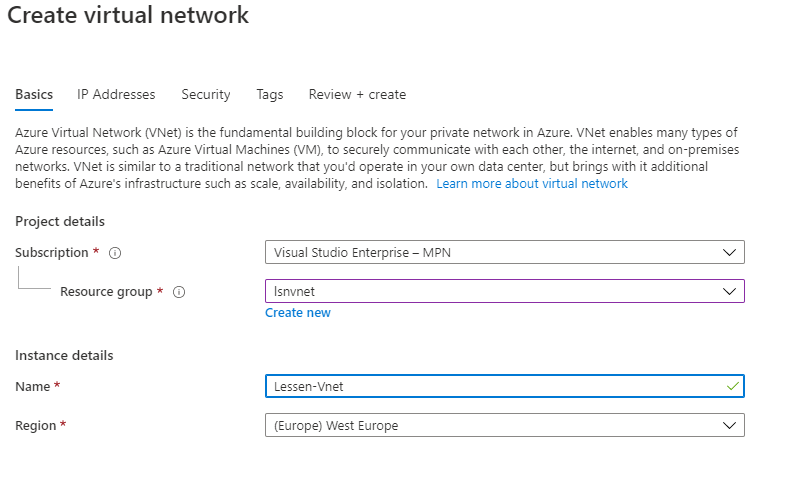
Select region for vnet and regions are region/zone because we have for example East US & East US 2
Select region for VPC
Subnet is created in vnet’s region.
Subnet is created in different zones of the region
GCP
coming soon..
Multi-cloud : Public IP
Azure
AWS
GCP
Static IP
Elastic IP
Dynamic IP
Multi-cloud
You can configure VPN between cloud providers (it’s straight forward) and it’s the same as VPN between on-prem and cloud with setting up the Gateway and then we have an encrypted tunnel for the traffic between cloud providers.
Azure, GCP, and AWS support IKEv2 in virtual private network
This document is the second part of on-boarding: Azure Infrastructure document. In the previous document “What should we know about ExpressRoute” has been explained. Here is explained how to configure ExpressRoute.
ExpressRoute peering requirements
BGP sessions for routing domains have to be configured (either by organization or expressroute provider)
For each expressroute circuite, mirosoft requires redundant BGP sessions between Microsoft’s router and your peering router.
Either organization or expressroute provider needs to translate on-prem private Ip addresses to public IP addresses by using a NAT service (Microsoft peering accepts only public IP addresses).
Reserve several blocks of IPs in network for routing traffic to microsoft cloud
two /30 subnets for primary and secondary circuites
first address in subnet for communicate with cloud services
second address to establish a BGP session
ExpressRoute peering schemes
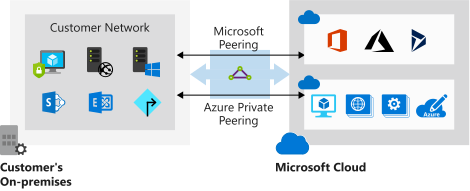
Private peering
to connect to Iaas and Paas that are developed in vnet. Resources must be deployed in vnet with private IP. We cannot access resources with public IP over private peering.
Microsoft peering
to connect to azure pass services e.g. office 365, dynamic 365
Most organizations choose to work with multiple cloud providers, because it’s a struggle for an enterprise to find only one public cloud infrustructure provider, which meet all their requirements. [refrence]
The following figure demonstrates that the multi-cloud solution is a sub concept for hybrid-cloud computing.
Multi-cloud solutions are sub topic of the hybrid-cloud computing.
Multi-cloud scenarios
1-Strategic advantages of partitioned complexity
To avoid committing to a single vendor, you spread applications across multiple cloud providers. Best Practice:weight the strategic advantages of a partitioned complexity this setup brings. Achieving workload portability and consistent tooling across multiple cloud environments increases development, testing, and operations work. [1]
2-For regulatory reasons
For regulatory reasons, you serve a certain segment of your user base and data from a country where a vendor does not yet have any presence. Best Practice:Use a multi-cloud environment only for mission-critical workloads or if, for legal or regulatory reasons, a single public cloud environment cannot accommodate the workloads. [1]
3-Choose the best services that the providers offer
For deploying application across multiple cloud providers in a way that allows you to choose among the best services that the providers offer. Best practice:Minimize dependencies between systems are running in different public cloud environments, particularly when communication is handled synchronously. These dependencies can slow performance and decrease overall availability. [1]
4-To have data autonomy
To have data autonomy in the future, therefore companies can take their data with them wherever they end up going.
Advantage of multi-cloud scenarios
To avoid vendor lock-in. The multi-cloud helps lower strategic risk and provides you with the flexibility to change plans or partnerships later. [1]
If the workload has been kept portable, you can optimize your operations by shifting workloads between computing environments. [1]
Hybrid-cloud scenarios
Hybrid-cloud description by National Institute of Standards
Hybrid cloud is a composition of two or more distinct cloud infrastructures (private, community, or public) that remain unique entities, but are bound together by standardized or proprietary technology that enables data and application portability. [2]
Cloud and on-premises, which were previously distinct entities and had cumbersome interaction configuration, are now converging to provide more efficient, less costly, and more flexible operation model for workflows.
1-Backup & Archive [2]
2-Data Protection [2]
3-Lifecycle Partitioning [4]
Lifecycle partitioning is the process of moving parts of the application development lifecycle to the cloud while the rest remains on premises. The most popular is the cloud deployment and testing but move to on-premises for the production deployment.
4-Application Partitioning [4]
A part of an application is running in the could and the other part runs on premises. For example, Sony PlayStation runs databases for individual games in the cloud but takes care of user authentication on-premises.
5-Application spanning [3]
Application spanning happens when the same application runs on-premises and in the cloud. “Best Buy” is an example of the application spanning. The entire online store application is running across multiple cloud regions and multiple on-premises data center to allow it to quickly adjust to demand.
Related words for the Service Fabric in Microservice Architecture:
Dockre
DC/OS
Mesos
Kubernetes
Microservices Development possibilities on Azure Cloud:
Azure function
Kubernetes Service
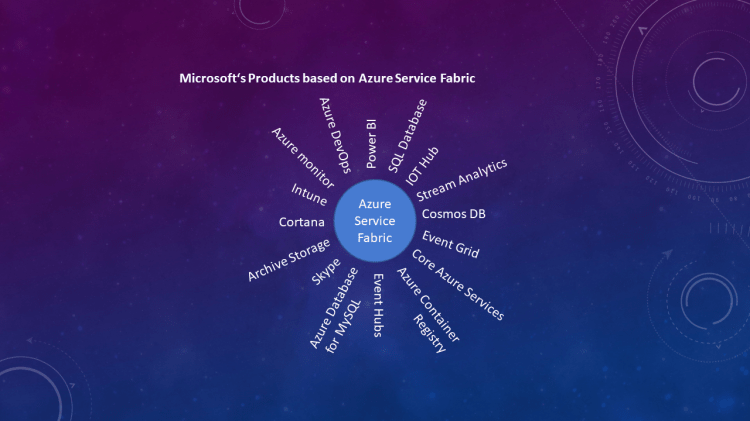
Service Fabric
Azure Function
Kubernetes Service
Azure Service Fabric
– They are micro-microservices. – reactes to an external change & event arrived on service bus. E.g. Blob created, message arrived on a queue or service bus queue. – They can be called as REST service from another application. – Azure function & Serverless computing is a great choice for types of applications that response to some events. – Good alternative for ASF (Azure Service Fabric) and AKS (Azure Kubernetes Service). – Doesn’t need infrastructure at all. – Suitable for background tasks with some upfront design.
– Microsoft implementation of open-source container orchestrator based on Docker => Docker Container – Container is faster => lighter virtual machine – Run Docker Container on Azure=> to manage environment (Upgrade, scale, versioning, expose network, load balance, and …) – Docker is a technology to manage and run multiple containers in production. -Azure supports Kubernetes natively & no installation need.
– Similar to containerization technologies. – Focuses on Microservices. – Kubernetes solves all the problem and developer should only develop the services-> it’s not easy to write scalable application, which runs on multiple & distributed clusters. – Container orchestration => Microserrvice Challenges: – Service Communication => service and instances of the services. – Service Discovery => How to talk to another Microservices, when there’s thousands on instances. – Monitoring Application => telemetry and collecting logs, provisioning and upgrading microservices. – Testing locally – Managing and recovering from downtime. – Scaling in & out.
For building a full flagged microserviceses solution.
It has focus on business objectives and no infrastructure.
For easy scalable architecture.
Programming model of Azure Service Fabric:
Reliable Service: They are like windows services or Linux daemon application. It’s like console application. These services divided to sub types: – Stateless Services – Statefull Services -> for co-locate compute and data.
Reliable Actors: It uses the Virtual Actor Design Pattern and built on state-full reliable service framework. For massive amount of requests.
Guest executable: for existing projects without charging too much.
Containers: is like quest executable and still run on the Host OS and is completely isolated piece of deployment.
Advantages of State-full Services:
Reducing latency
Provide resiliency by replication & persisting data across several different nodes.
Entry point from outside to back-end application is as follows:
Web API – has no state (Stateless Service) – Must scale
Microservice – Independent part of the business logic and is perfect for Actor model.
Advantages of Stateless Services:
They are application proxies and gateway
They are easy and chipper to scale
Start to work with the Azure Service Fabric:
Installing Service Fabric -> is necessary for local development
Start Visual Studio with “run as administrator” because of the “Service Fabric Cluster”. Because it needs low-privileged user called “Network Service”. The Network Service has no privileges on local system, therefore we need admin user.
Normal APP vs. Reliable APP
Normal App
Reliable App
– An Application – Easy to write (Established framework) – Great choice of libraries – No learning curve
– A reliable service – Easy to write (established framework) – Reliable service is like an exe file that can be run without service fabric. – Great choice of libraries (x64 only) – None to little learning curve – Access ASF API for microservice scaling, health reporting, discover other services. – we can use plugable communication model. (They are Azure Service Fabric Built-in) via HTTPS, TCP, Wensocket, Custome TCP – Access to reliable storage, stateful service, low latency, high speed, local storage, replicated across machines.
in large organizations it’s so important that not all the colleagues who are working together on a project to be able to release/ deploy the product in production environment.
There must be always a check list to get ready for deploying in production. Nowadays this check list is called continuous integration/deploy (CI/CD).
The check list before deploy the product on production environment
Therefore the project team try to grant permission according to the responsibilities and tasks or each colleagues to team. On of the tools which we can use to develop a project with the agile method is Azure DevOps.
There is also possible to assign built-in Access Level and Security Group to each member of team as explained in follows.
The users/ members in Azure DevOps always have an assigned DevOps Group and Access Level.
DevOps Built-in Access Level
Access Level defines the Azure DevOps Features that a user or group can use.
Access Levels
Description
Basic
Basic supports full access to all Azure DevOps Board features
Stakeholders
Provides partial support for viewing and modifying work items but not using all features.
Visual Studio Subscriber
Free access to a limited set of features.
DevOps built-in security Groups
Security Groups define what users of groups can do with each Azure DevOps features.
Azure DevOps has mainly two different level of built-in groups [Microsoft Doc]:
Collection-Level
Project-Level
The Team Administrator is the person who can grant permissions to specific features.
Note
Your Text Here
Project-Level Security Groups
Each project contains the following built-in groups:
Permission to view project information, the code base, work items, and other artifacts but not modify them.
Project Contributors
Permission to contribute fully to the project code base and work item tracking. They cannot manage or administrator resources.
Project Administrators
Permission to administer all aspects of teams and project. Although they cannot create team projects.
Combination Matrix of the Access Level and Security Group
in Project-Level
DevOps Security Groups
Access Levels
Description
Project Readers
Stakeholder
–
Project Readers
Basic
–
Project Readers
Visual Studio subscriber
–
Project Contributors
Stakeholder
Managers or users who don’t actively contribute to the code base but want to check project status or provide direction, feedback, feature ideas, and business alignment to a team.
Project Contributors
Basic
Full-time workers who contribute to the code base or manage project.
Project Contributors
Visual Studio subscriber
Code base contribution
Project Administrators
Stakeholder
The users, who are tasked to managing project resources. If them also need to contribute to the code base, then the Basic Access Level must be assigned to them.
Project Administrators
Basic
Managing project resources + Code base contribution
Project Administrators
Visual Studio subscriber
Code base contribution
Combination Matrix of the Access Level and Security Group
in Collection-Level
DevOps Security Groups
Access Levels
Description
Project Collection Administrators
Stakeholders
The users, who are tasked with managing organization or collection resources and if they need to be contributed to the code base then they must be assigned to Basic Access Level.
Project Collection Administrators
Basic
–
Project Collection Administrators
Visual Studio Subscriber
–
Azure DevOps Levels
DevOps can be configured at different levels:
Organization/Collection
Project
Object
The focus of this document is Project-Level and object-Level.
Object-Level Groups
Managing the permission on Git branches.
Using Azure ADD Group in Azure DevOps
For managing the
users the Azure DevOps can be connected to Azure AD. The AAD Groups can be used
in Azure DevOps as well. But the Active directory Group hierarchy is not usable
in Azure DevOps. It means the sub groups will not inherit the access level and
permission group of their parent group.
Each AAD parent
and sub group must be added separately to Azure DevOps and an Access Level and
a Permission Group must be assigned to each one separately them.
The users which
are assigned to the same AAD Group will have the same Access Level and
Permission Group, which has been assigned to this AAD group in Azure DevOps.
Note
Your Text Here
The Advantage is:
A newly
added user to AAD Group can login to Azure DevOps and there is no need for
additional configuration.







 Multi Cloud Solutions