Onboarding: Resilient and scaleable application

Key components for scaleable and resilient applications

  • Application Gateway
  • Azure Load balancer
  • Availability Set
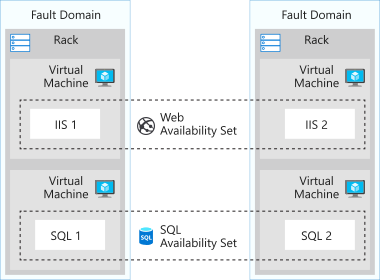
    • logical grouping for isolating VM resources from each other (run across multiple physical servers, racks, storage units, and network switches)
    • For building reliable cloud solutions
  • Availability Zone
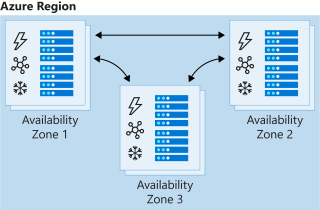
    • Groups of data centers that have independent power, cooling, and networking
    • VMs in availability zone are placed in different physical locations within the same region
    • It doesn’t support all VM sizes
    • It’s available in all regions
A diagram that shows an overview of availability sets in Azure
Availability Set [Source]
A diagram that shows an overview of availability zones in Azure
Availability Zone [Source]
  • Traffic Manager: provides DNS load balancing to your application, so you improve your ability to distribute your application around the world. Use Traffic Manager to improve the performance and availability of your application.

Application Gateway vs. Traffic Manager: The traffic manager only directs the clients to the IP address of the service that they want to go to and the Traffic Manager cannot see the traffic. But Gateway sees the traffic.

Load balancing the web service with the application gateway

Improve application resilience by distributing the load across multiple servers and using path-based routing to direct web traffic.

  • Application gateway works based on Layer 7

Scenario: you work for the motor vehicle department of a governmental organization. The department runs several public websites that enable drivers to register their vehicles and renew their driver’s licenses online. The vehicle registration website has been running on a single server and has suffered multiple outages because of server failures.
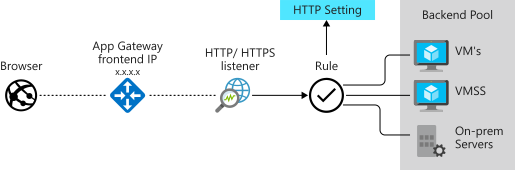
Application Gateway features

  • Application delivery controller
  • Load balancing HTTP traffic
  • Web Application Firewall
  • Support SSL
  • Encrypt end-to-end traffic with TLS

Microsoft Learn offers many different learning materials. This learning module is about Application Gateway Theory and this learning module is the Practical part of the learning module. Microsoft Learn for the Application Gateway and Encryption.

Source code

Link to a sample code
– Terraform implementation of Azure Application Gateway
– Terraform implementation of Azure Application Gateway’ Backend pool with VM
– Terraform implementation of Azure Application Gateway’s HTTPS with Keyvault as Ceritficate Store

Load balancing with Azure Load Balancer

  • Azure load balancer for resilient applications against failure and for easily scaling
  • Azure load balancer works in layer 4
  • LB spreads/distributes requests to multiple VMs and services (user gets service even when a VM is failed) automatically
  • LB provides high availability
  • LB uses a Hash-based distribution algorithm (5-tuple)
  • 5-tuple hash map traffic to available services (Source IP, Source Port, Destination IP, Destination Port, Protocol Type)
  • supports an inbound, and outbound scenario
  • Low latency, high throughput, scale up to millions of flows for all TCP and UDP applications
  • Isn’t a physical instance but only an object for configuring infrastructure
  • For high availability, we can use LB with availability set (protect for hardware failure) and availability zones (for data center failure)

Scenario: You work for a healthcare organization that’s launching a new portal application in which patients can schedule appointments. The application has a patient portal and web application front end and a business-tier database. The database is used by the front end to retrieve and save patient information.
The new portal needs to be available around the clock to handle failures. The portal must adjust to fluctuations in load by adding and removing resources to match the load. The organization needs a solution that distributes work to virtual machines across the system as virtual machines are added. The solution should detect failures and reroute jobs to virtual machines as needed. Improved resiliency and scalability help ensure that patients can schedule appointments from any location [Source].

Source code

Link to a sample code to deploy simple Nginx web servers with Availability Set and Public Load Balancer.

Load Balancer SKU
  • Basic Load Balancer
    • Port forwarding
    • Automatic reconfiguration
    • Health Probe
    • Outbound connections through source network address translation (SNAT)
    • Diagnostics through Azure log analytics for public-facing load balancers
    • Can be used only with availability set
  • Standard Load Balancer
    • Supports all the basic LB features
    • Https health probe
    • Availability zone
    • Diagnostics through Azure monitor, for multidimensional metrics
    • High availability (HA) ports
    • outbound rules
    • guaranteed SLA (99,99% for two or more VMs)
Load Balancer Types

Internal LB

  • distributes the load from internal Azure resources to other Azure resources
  • no traffic from the internet is allowed

External/Public LB

  • Distributes client traffic across multiple VMS.
  • Permits traffic from the internet (browser, module app, other resources)
  • public LB maps the public IP and port of incoming traffic to the private IP address and port number of the VM in the back-end pool.
  • Distribute traffic by applying the load-balancing rule
Distribution modes
  • Lb distributes traffic equally among vms
  • distribution modes are for creating different behavior
  • When you create the load balancer endpoint, you must specify the distribution mode in the load balancer rule
  • Prerequisites for load balancer rule
    • must have at least one backend
    • must have at least one health probe

Five tuple hash

  • default of LB
  • As the source port is included in the hash and can be changed for each session, the client might be directed to a different VM for each session.

source IP affinity / Session Affinity / Client IP affinity

  • this distribution is known as session affinity/client IP affinity
  • to map traffic to the server, the 2-tuple hash is used (Source IP, Destination IP) or the 3-tuple (Source IP, Destination IP, Protocol)
  • Hash ensures that requests from specific clients are always sent to the same VM.

Scenario: Remote Desktop Protocol is incompatible with 5-tuple hash

Scenario: for uploading media files this distribution must be used because for uploading a file the same TCP session is used to monitor the progress and a separate UDP session uploads the file.

Scenario: The requirement of the presentation tier is to use in-memory sessions to store the logged user’s profile as the user interacts with the portal. In this scenario, the load balancer must provide source IP affinity to maintain a user’s session. The profile is stored only on the virtual machine that the client first connects to because that IP address is directed to the same server.

Enhance service availability and data locality with Traffic Manager

Scenario:  a company that provides a global music streaming web application. You want your customers, wherever they are in the world, to experience near-zero downtime. The application needs to be responsive. You know that poor performance might drive your customers to your competitors. You’d also like to have customized experiences for customers who are in specific regions for user interface, legal, and operational reasons.
Your customers require 24×7 availability of your company’s streaming music application. Cloud services in one region might become unavailable because of technical issues, such as planned maintenance or scheduled security updates. In these scenarios, your company wants to have a failover endpoint so your customers can continue to access its services. 

  • traffic manager is a DNS-based traffic load balancer
  • Traffic Manager distributes traffic to different regions for high availability, resilience, and responsiveness
  • it resolves the DNS name of the service as an IP address (directs to the service endpoint based on the rules of the traffic routing method)
  • it’s a proxy or gateway
  • it doesn’t see the traffic that a client sends to a server
  • it only gives the client the IP address of where they need to go
  • it’s created only Global.
The location cannot be specified because it’s Global
Traffic Manager Profile’s routing methods
  • each profile has only one routing method
Weighted routing
  • distribute traffic across a set of endpoints, either evently or based on different weights
  • weights between 1 to 1000
  • for each DNS query received, the traffic manager randomly chooses an available endpoint
  • probability of choosing an endpoint is based on the weights assigned to endpoints
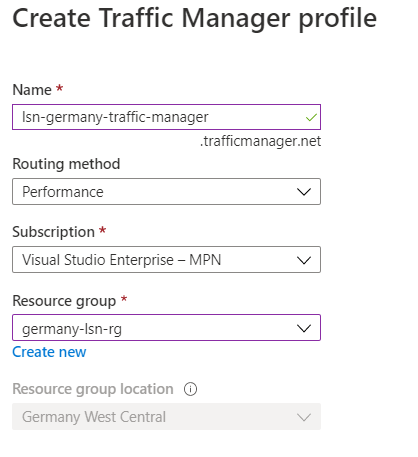
Performance routing
  • with endpoints in different geographic locations, the best performance endpoint for the user is sent
  • it uses an internet latency table, which actively track network latencies to the endpoints
Example of a setup where a client connects to Traffic Manager and their traffic is routed based on relative performance of three endpoints.
Geographic routing
  • based on where the DNS query originated, the specific endpoint of the region is sent to the user
  • it’s good for geo-fence content e.g. it’s good for countries with specific terms and conditions for regional compliance
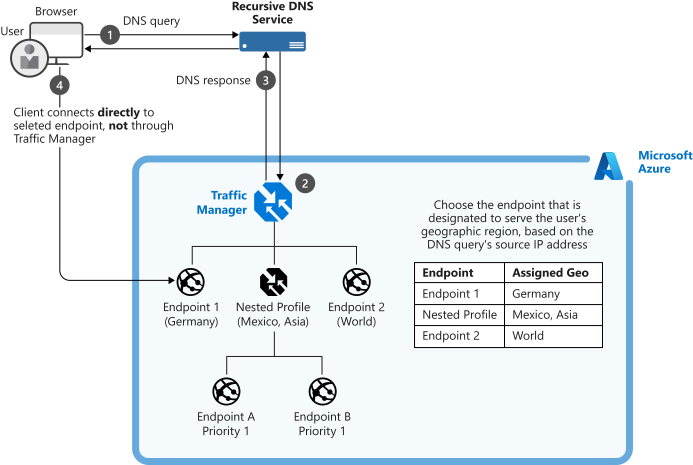
Example of a setup where a client connects to Traffic Manager and their traffic is routed based on the geographic location of four endpoints.
Multivalue routing
  • to obtain multiple healthy endpoints in a single DNS query
  • caller can make client-side retries if endpoint is unresponsive
  • it can increase availability of service and reduce latency associated with a new DNS query
Subnet routing
  • maps a set of user ip addresses to specific endpoints e.g. can be used for testing an app before release (internal test), or to block users from specific ISPs.
Priority routing
  • traffic manager profile contains a prioritized list of services
Example of a setup where a client connects to Traffic Manager and their traffic is routed based on the priority given to three endpoints.
Traffic Manager Profile’s endpoints
  • endpoint is the destination location that is returned to the client
  • Types are
    • Azure endpoints: for services hosted in azure
      • Azure App Service
      • public ip resources that are associated with load balancers, or vms
    • External endpoints
      • for ip v4/v6
      • FQDNs
      • services hosted outside azure either on-prem or other cloud
    • Nested endpoints: are used to combine Traffic Manager profiles to create more flexible traffic-routing schemes to support the needs of larger, more complex deployments.
Endpoints Types/Targets
  • Each traffic manager profile can have serveral endpoints with different types

Source code

Link to a sample code to deploy a Traffic Manager.

Source: https://docs.microsoft.com/en-us/learn/modules/distribute-load-with-traffic-manager/


Resources

AWS : Resiliency

  • Server-based Services such as
    • RDS
    • ElastiCache
    • ElasticSearch
    • Document DB
    • Elastic Map/reduce
  • DynamoDB
  • S3
  • Compute Services

To have a resilience platform all parts must be configured to befault tolerant. But first the level of redundancy and resilienc must be determined.

Fault Tolerant Server-based Services

Server bases services are those that are “instance” based. Services like RDS and ElastiCache are instanced based in that you can run one instance, but you will not have any fault tolerance. In order to gain high availability, you need to tell the service to provision a second instance for the primary instance to failover to, should there be an issue with it.

This model is similar to traditional data center environments. A good way to tell if a service is a server/instance based service or if the service is a pre-existing product that AWS has created a service with (MongoDB, Redis, MySQL, Postgres).

Most of the server based services have similar concepts for handling a hardware failover automatically. This functionality is the same that handles a single availability zone failure. By creating active/standby pairs of servers that replicate and by having each member of the pair in a different availability zone, you create the infrastructure that handles both of these failure modes.

ElastiCache

ElastiCache is one of these services. You will create an ElastiCache cluster that does not have a single point of failure, and that can handle an AZ outage.

  • First, create an ElastiCache subnet group in the default VPC using each available subnet and
  • then create a multi-AZ redis cluster.

Elasticache’s Subnet Groups

AWS > Elasticache page > Subnet Groups

The Subnet Groups option is availble on the service page

Then create a new Subnet Groups. Based on the region of the selected VPC the Availability Zone is listed.

We can have only one subnet in each availability zone. See the figure above, I tried to add more but it’s not possible.

As next we create the Redis Cluster. The created Subnet in the previous step, is selected in Subnet Groups.

DynamoDB

  • DynamoDB is a native AWS service for non-relational databases
  • It is Multi-AZ by default and can be made Multi-Region with DynamoDB Streams and by creating a Global DynamoDB table
  • Global table is multi-region and active/active (it means any changes to one table is propagated to sll other tables)
  • DynamoDB scales to extremely high loads with very fast response times
  • It also supports configuring a caching layer in front of the database.
  • DynamoDB Streams allow every change made to a DynamoDB table to be “streamed” into other services. These other services can then choose what actions to take on the different items or operations within the stream.
  • In DynamoDb each database cintains just one table
  • This table has just one primary key and optional sort keyby default
  • It’s possible to have multi primary key, sort key on the table.
  • Indeces as well
  • charge is based on operation in seconds
  • or pay on demand
  • Automatic scale up and down

DynamoDB Streams And Global Tables

DynamoDB Streams capture all changes made to a DynamoDB Table. This includes only actions that modify the table, not actions that only read from the table.

DynamoDB Global Tables take advantage of DynamoDB Streams the create Multi-Region active/active DynamoDB Tables. This allows you to modify a table in multiple regions and have those changes reflected in all regions.

Multi-Region, active/active data stores are a big deal and extremely useful for use cases that require it.

DynamoDB is a non-relational database. It is a fully managed service created by AWS. With DynamoDB you create tables, but unlike a relational database, each table is completely independent.

DynamoDB is not like the server-based services that AWS offers (RDS, ElastiCache, etc.), it is “serverless” in the sense that you do not have any control over the physical infrastructure that it runs on. You do not pay for the service when you are not using it (except used storage space). Because DynamoDB is different than server-based offerings, the mechanisms for redundancy are also different. DynamoDB offers multi-region, active/active service if you elect it. This is called DyanmoDB Global Tables.

Amazon DynamoDB is a fast NoSQL database service for all applications that need consistent, single-millisecond latency at any scale. It is a fully managed database and supports both document and key-value data models. Its flexible data model and reliable performance make it a great fit for mobile, web, gaming, ad-tech, IoT, and many other applications. [Source]


Fault Tolerant Operations

1- Subnet Groups

To get Multi-AZ availability, you need to configure a Subnet Group (contains subnets in different AZs) within the service. A subnet is attached to an AZ, and creating a grouping of subnets within the service and tells the service where it can place the primary and standby instances of a service.

Based on the service and data volumne, creating a new instance in secondary subnet, can takes diffrent duration.

2- Multiple instances

To reduce downtime to seconds, multi instances have to be created.

3- Multi-AZ checkbox

4- Multi Region Redundancy

Subnet Groups are key to creating Multi-AZ redundancy in server-based services. Subnet Groups define the different availability zones that your service will run in, and having multiple instances allow for fast failover if a single AZ were to go down.

Multi-Region redundancy is more tricky. Depending on the service, it is harder, or not possible to run a service with failover between regions.

Some services allow to have read replica in a second region, but later you have to activate it as primary e.g. Amazon RDS.

Some services don’t have multi region support e.g. Elastic Search.

Redundancy is not each somehow double the costs.

Advanced Redundancy for AWS native services

High Available Compute Services

Clouds : Virtual Network and Subnet

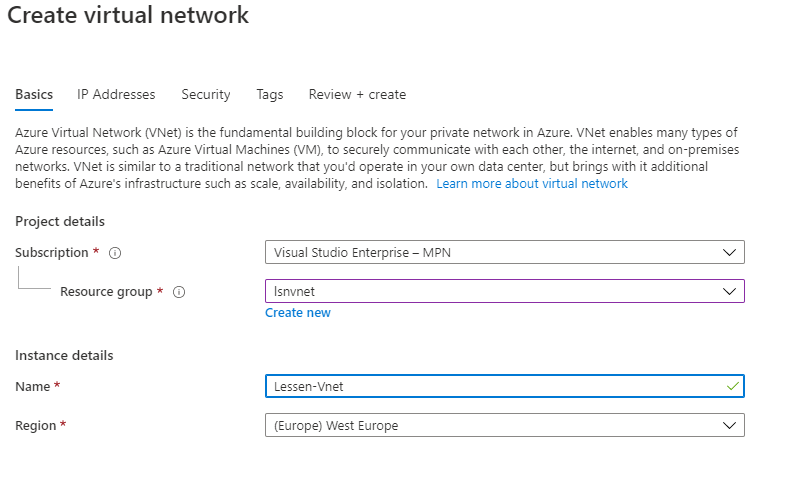
Azure: Create Vnet

Azure: Create Subnet

AWS: Create VPC

AWS: Create Subnet

Summary

AzureAWSGCP
Select region for vnet and regions are region/zone because we have for example East US & East US 2Select region for VPC
Subnet is created in vnet’s region.Subnet is created in different zones of the region

GCP

coming soon..

Multi-cloud : Public IP

AzureAWSGCP
Static IPElastic IP
Dynamic IP

Multi-cloud

You can configure VPN between cloud providers (it’s straight forward) and it’s the same as VPN between on-prem and cloud with setting up the Gateway and then we have an encrypted tunnel for the traffic between cloud providers.

  • Azure, GCP, and AWS support IKEv2 in virtual private network

AWS : Virtual Private Network (VPC)

  • Regions
  • Availability Zones (AZs)
  • Virtual Private Clouds (VPCs)
  • AWS VPC Networking

Regions and Availability Zones allow anyone to create worldwide infrastructure with ease. They also allow for many options for creating redundancy within your platform. By properly using these components, you can create world-class level systems in terms of both scale and reach.

A Virtual Private Cloud (VPC) is a isolated private network that you control within the larger AWS network. These private networks allow you to configure your network architecture the way you desire. A VPC is region specific. You decide if your VPCs connect to each other or if you keep them independent. If you connect your VPCs, it’s up to you to configure them according to regular networking guidelines.

VPC aspects

  • Security groups are the same as firewall but not exactly
  • Two VPCs can have peering, even if they are in different regions
  • One VPC per region has automatically multi-AZ
  • AWS create a default VPC in every region but can be deleted

Services in VPC

The instance oriented fetures

  • Amazon RDS
  • Elastic cache
  • Document DB
  • Elastic search
  • EC2
  • Load balancer
  • Net Tune

Services not in VPC

Service oriented features and global services that have access to internet

  • SQS
  • S3
  • DymoDb
  • SNS
  • Cloud front
  • SCS
  • API gateway

Network Ranges

A network range is a consecutive set of IP addresses.

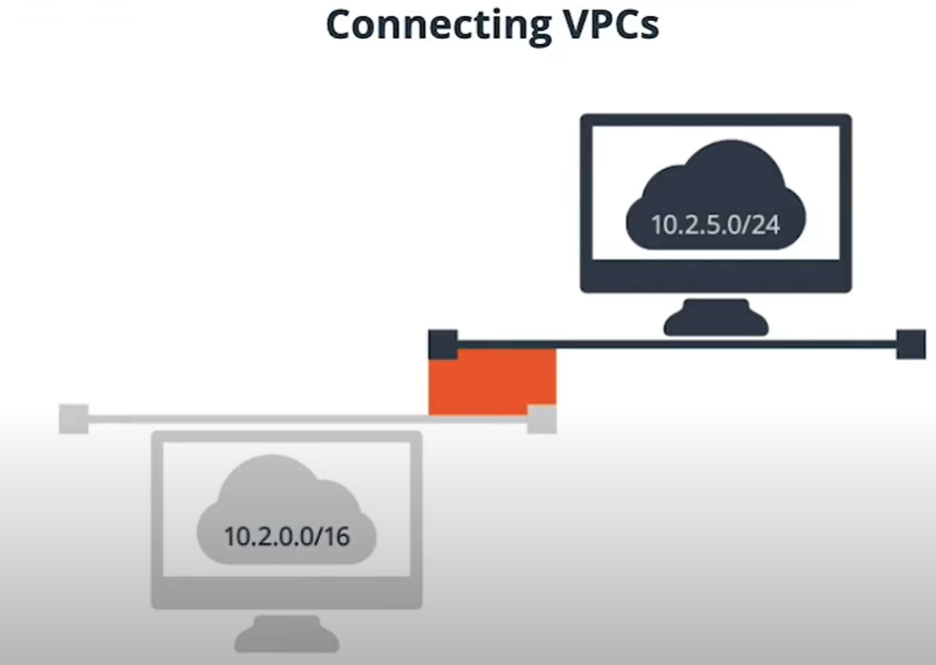
Network ranges are described using “CIDR” notation. CIDR notation consists of the first IP address of the network range, followed by a “slash”, followed by a number. That number describes how many consecutive address are in the range. A “/24” address has 255 addresses, while a “/16” has 65,536 addresses.

We cannot connect two VPCs with overlapping IP address ranges

Create VPCs

There are two ways in the AWS management console to create a new VPC.

You can create a very basic VPC by creating a new VPC from within the “Your VPCs” section of the VPC service. This option is best if you are an advanced VPC user and want to customize your VPC completely.

the second way is by using the VPC launch wizard.

Using the “Launch VPC Wizard,” create a new VPC. Select the “VPC with a Single Public Subnet” option. Name the VPC “Lesson-VPC” and keep the default options and create the VPC.

Review the new VPC, the routing tables that were created with it as well as the subnet and Internet Gateway.

Step1: create VPC

Step2: VPC created

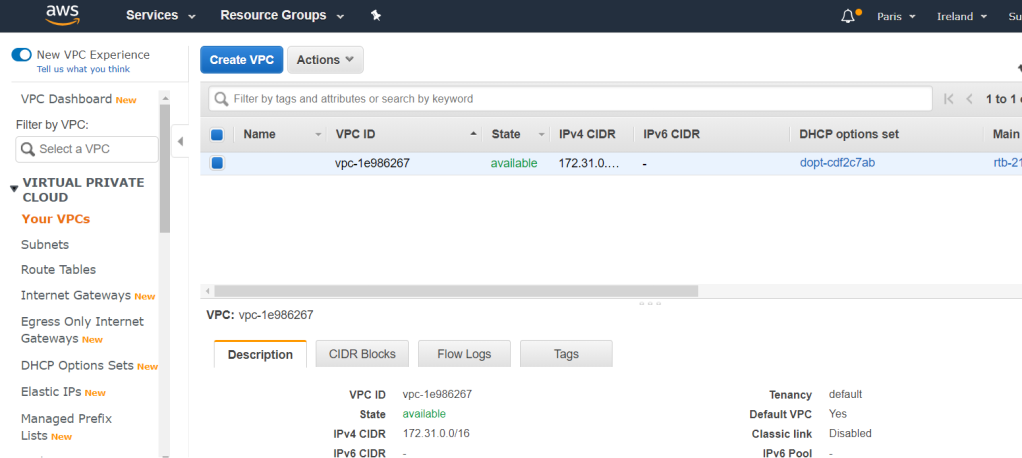
VPCs List
The ‘Lesson-VPC’ is my new VPC

Step3: Create subnet

The subnets can be created in any availability zones of the VPC’s region.

Network components

ComponentDescription
Subnetsis tied to Availability Zone (AZ) and all resources created in this subnet are located in this availability zone
Route tablesis attached to one or more subnets and can be shared between subnets in different AZ.
DNS
DHCP
IPv4/6
Internet Gateway (Network routing)is represented in Route Table of the subnet and the services created in the subnet can send traffic to internet with public IP. Internet can send traffic to instances as well.
NAT Gateways (Network routing)Services can send traffic out to internet but cannot receive from internet.
Security Groupis a statefull firewall, can attach to EC2, RDS database
Network ACLsNetwork Address Control List, is a kind of stateless firewall and is applied to subnet.

Network routing

OptionsDescription
Internet Gateways
NAT Gateways
No internet connectionsis for connecting two subnets in a VPC with each other
VPN connectionsencrypted connection to connect to on-prem
DirectConnectiondatacenter to AWS

Debugging VPC Network

VPC Flow Logs

Flow logs allow you to see higher level network debugging information like the source port and source IP, and destination port and destination IP of traffic flowing within your VPC.

Traffic Mirroring

Traffic mirroring is like traditional “packet sniffing” on specific ports.

Edge cases

  • Multicast networking : is not supported in AWS
  • Penetration testing
  • Running email server

AWS networking does have some limitations that your own data center network would not.

  • You cannot use multicast in a VPC
  • You cannot put network cards into “promiscuous” mode to sniff ethernet packets.
  • There are some restrictions on opening up ports for SMTP
  • You cannot have network scans run against your account without discussing with AWS

You can connect VPCs together to enable:

  • Cross VPC connections
  • Cross region connections
  • Cross account connections

Clouds : Virtual Network and subnet

Configure ExpressRoute

This document is the second part of on-boarding: Azure Infrastructure document. In the previous document “What should we know about ExpressRoute” has been explained. Here is explained how to configure ExpressRoute.

ExpressRoute peering requirements

  • BGP sessions for routing domains have to be configured (either by organization or expressroute provider)
  • For each expressroute circuite, mirosoft requires redundant BGP sessions between Microsoft’s router and your peering router.
  • Either organization or expressroute provider needs to translate on-prem private Ip addresses to public IP addresses by using a NAT service (Microsoft peering accepts only public IP addresses).
  • Reserve several blocks of IPs in network for routing traffic to microsoft cloud
    • two /30 subnets for primary and secondary circuites
    • first address in subnet for communicate with cloud services
    • second address to establish a BGP session

ExpressRoute peering schemes

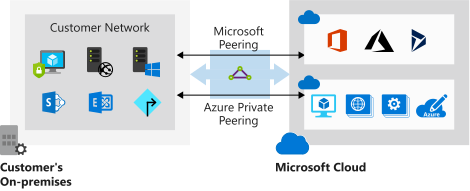
Private peering

  • to connect to Iaas and Paas that are developed in vnet. Resources must be deployed in vnet with private IP. We cannot access resources with public IP over private peering.

Microsoft peering

  • to connect to azure pass services e.g. office 365, dynamic 365
Azure peering

Create ExpressRoute Circuite and Peering

  • Creating by Azure UI, CLI, and Powershell
  • Circuite name, Provider, Peering location, Bandwidth, Sku, Billing model, subscription, Resource Group, Location
    • Sku Standard : for up to 10 vnet and connect to resources in the same geopolitical regions
Creating a circuit by using the Azure portal
  • Provider status must be provisioned and circuit status must be enabled
  • Service key must be shared with provider. It’s the only authentication method.
Provisioning a circuit by using the Azure portal

Clouds : Resource management

Azure

resource group is for managing resources in Azure.

How to create resource group: go to resource group by searching it > use add button > fill in the form and create a resource group.

AWS

Coming soon…

GCP

project is for managing resources in GCP.

How to create project: go to manage resource page by searching the page > and use create project button to create a new project > you can select the organization if you are not free trial user.

Resources

Visual Studio Code Online

Actually, I really like the visual studio code online!

Prerequisites

For using the Visual Studio Code Online an Azure subscription in necessary, because the IDE is being hosted on the Azure and a resource group is created for it.

Start with Visual Studio Code Online

The URL is : https://online.visualstudio.com/login

After sign-in to vs code, an environment must be created or the existing environment can be used. By creating an environment the URL to GitHub repository can be enter in the Git Repository field. The git is cloned in workspace once the IDE is hosted.

For the next time is not necessary to create an environment again, and the existing one can be used.


Experiences

I used the following tooling or extensions on the vs code online:

  • I installed the power shell 7 and developer the power shell scripts.
  • Connected the IDE to Azure and executed the power shell scripts.
  • I installed the azcli extension and developed the .azcli scipts.
  • Docker is available by default on the IDE machine.
  • I installed the docker-composer and ran the docker-composer file.
  • Installed the Azure App Service extension and deployed the docker image from local on the Azure App Service.
  • Clone the code from GitHub and work with Github.
  • Clone code from GitLab and work with GitLab.

Limitations and solutions