
Topics
- Key concepts
- Secure and isolate access to azure resources by using Network Security Group and Application Security Group
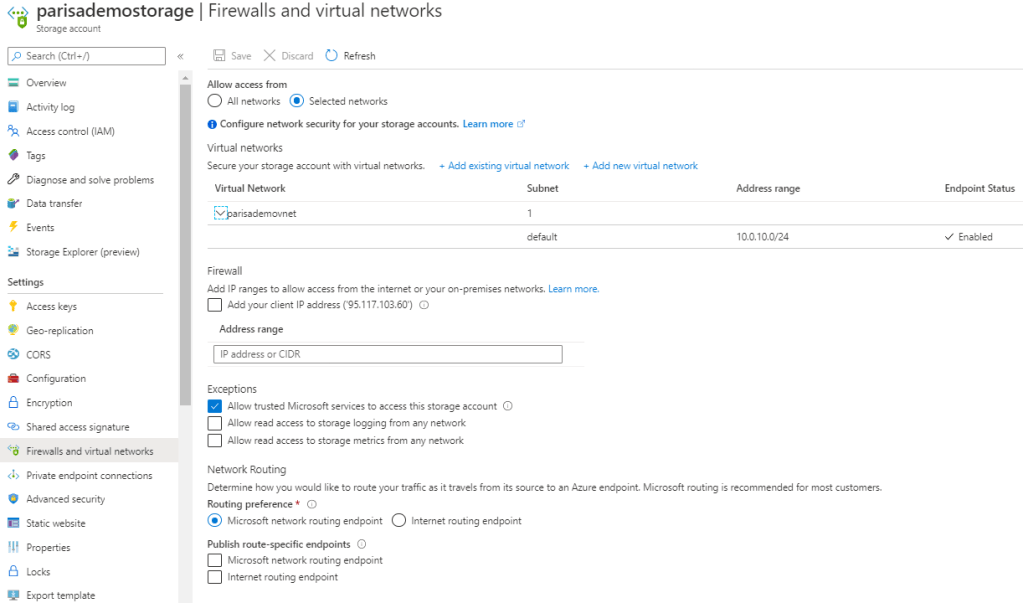
- Secure and isolate access to azure resources by using Service Enpoints
- Secure backend API by using API Management
Related topics
- Onboarding : Azure Infrastructure
- Onboarding : Azure Infrastructure deployment
- Onboarding : Azure API Performance

With Azure API Management Service we can:
- Secure our backends APIs/Services
- Expose the API/Service Products for external customers (exposes an OpenAPI endpoint)
- Includes a secure API gateway
- In case of Premium tier includes an Azure Traffic Manager
- Throtteling the requests to prevent resource exhaustion
- Set policies
- Set Cache
Key concepts
Secure and isolate access to azure resources by using Network Security Group and Application Security Group
This section is only “what should we know about NSG and ASG”. To see the configuration refer to “Configure NSG and ASG“.
By using Network Security Group (NSG) can be specified which computer can be connected to application server [Source].
– Network Security Group: is to secure network traffic for virtual machines
– Virtual Network Service Endpoint: is for controlling network traffic to and from azure services e.g. storage, database
– Application Security Group:
Network security group
- filter network traffic to or from azure resources
- contains security rules that are configured to allow or deny inbound and outbound traffic.
- can be used to filter traffic between virtual machines or subnets, both within a vnet and from the internet.
- The allowed IP addresses can be configured in NSG as well.
- NSG rules are applied to connection between on-prem to vnet or vnet to vnet.
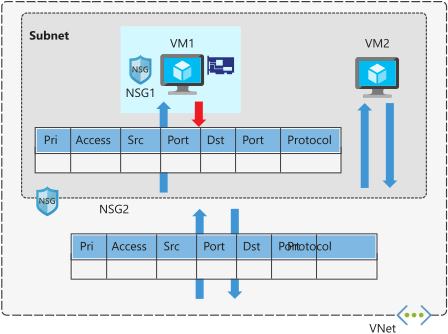
Network security group assignment
- NSG is assigned to a network interface or subnet
- NSG of a subnet is applied to all NIC in this subnet
- NSG of subnet and NIC are evaluated separately
- NSG on subnet instead of NIC reduces administration and management effort.
- Each subnet and NIC can habe only one NSG
- NSG supports TCP, UDP, ICMP, and operates at layer 4 of the OSI model.
- Vnet and NSG must be in the same region
Network security group security rules
- NSG contains one or more rules
- Rules are allow or deny
- Rule properites
- Name
- Priority 100..4096
- Source [Any, IP Addresses|Service Tag|Application Security Group]
- Source Port range
- Protocol [Any|TCP|UDP|ICMP]
- Destination [Any, IP Addresses|Service Tag|Application Security Group]
- Destination Port range
- Action [Allow|Deny]
- Rules are evaluated by priority using 5-tuple information (Source, SourcePort, Destination, DestinationPort, Protocol)
- The rule with lower priority will takeplace e.g. 200 (Allow 3389 RDP) and 150 (Deny 3389 RDP). 150 will takeplace.
- With NSG, connections are stateful. It means, return traffic is automatically allowed for the same TCP/UDP session e.g. inbound rule allows traffic on port 80 also allows the vm to response the request. A corresponding outbound rule is not needed.

- Service tag can allow or deny traffic to a spesific azure service either globally or per region. Therefore you don’t need to know the IP address and port os the service because azure does it for you.
- Microosft create the service tags (you cannot create your own)
- Some examples of the tags are:
- VirtualNetwork – This tag represents all virtual network addresses anywhere in Azure, and in your on-premises network if you’re using hybrid connectivity.
- AzureLoadBalancer – This tag denotes Azure’s infrastructure load balancer. The tag translates to the virtual IP address of the host (168.63.129.16) where Azure health probes originate.
- Internet – This tag represents anything outside the virtual network address that is publicly reachable, including resources that have public IP addresses. One such resource is the Web Apps feature of Azure App Service.
- AzureTrafficManager – This tag represents the IP address for Azure Traffic Manager.
- Storage – This tag represents the IP address space for Azure Storage. You can specify whether traffic is allowed or denied. You can also specify if access is allowed only to a specific region, but you can’t select individual storage accounts.
- SQL – This tag represents the address for Azure SQL Database, Azure Database for MySQL, Azure Database for PostgreSQL, and Azure SQL Data Warehouse services. You can specify whether traffic is allowed or denied, and you can limit to a specific region.
- AppService – This tag represents address prefixes for Azure App Service.

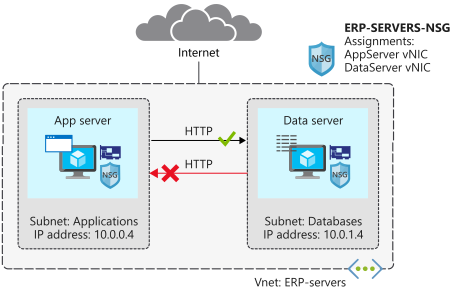
Scenario: We have a WebServer in Subnet1 and SQL Server in Subnet2. NSG must only allow 1433 for SQL.
Scenario: Suppose your company wants to restrict access to resources in your datacenter, spread across several network address ranges. With augmented rules, you can add all these ranges into a single rule, reducing the administrative overhead and complexity in your network security groups.
Network security group default rules
- default rules connot be deleted or changed but can be overriden

Application Security Group (ASG)
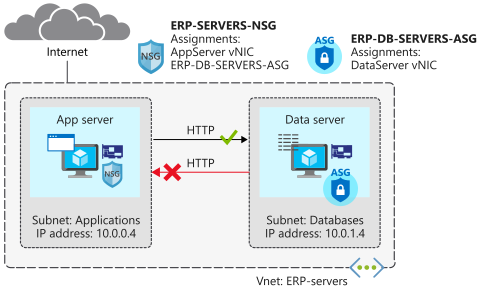
Scenario: your company has a number of front-end servers in a virtual network. The web servers must be accessible over ports 80 and 8080. Database servers must be accessible over port 1433. You assign the network interfaces for the web servers to one application security group, and the network interfaces for the database servers to another application security group. You then create two inbound rules in your network security group. One rule allows HTTP traffic to all servers in the web server application security group. The other rule allows SQL traffic to all servers in the database server application security group.
- Application security group let you configure network security for resources used by specific application.
- It’s for grouping Vms logically, no matter what ip address is or in which subnet assigned
- Using ASG within NSG to apply a security rule to a group of resources, after that should only the resources be added to ASG.
- ASG let us to group network interfaces together and the ASG can be used as Source or Destination in NSG.

Secure and isolate access to azure resources by using Service Enpoints
Coming soon…
Secure backend API by using API Management
Transformation Policies
- Companies that publish web APIs often need to control the behavior of those APIs without recoding them.
- Technical informations have to be removed from responses/header.
- with api management we can do it without changing the code and only with policies

Scenario: The agency has created an API to make recent and historical census data available. They want to prevent any unnecessary back-end information from being exposed that could be used in malicious attacks. They would also like to prevent abuse of the APIs in the form of a large volume of requests and need a mechanism to throttle requests if they exceed an allowed amount. They are serving their APIs on the Azure API Management service and would like to implement policies to address these concerns.
- add a policy to remove the X-Powered-By header from responses via adding a policy to outbound
<outbound>
   <set-header name="X-Powered-By" exists-action="delete" />
   <base />
</outbound>
List of some of the available policies
| Transform | Detail |
|---|---|
| Convert JSON to XML | Converts a request or response body from JSON to XML. |
| Convert XML to JSON | Converts a request or response body from XML to JSON. |
| Find and replace string in body | Finds a request or response substring and replaces it with a different substring. |
| Mask URLs in content | Rewrites links in the response body so that they point to the equivalent link through the gateway. by adding <redirect-content-urls /> in outbount section, all backend urls are replaced with apim endpoint url. |
| Set backend service | Changes the backend service for an incoming request. |
| Set body | Sets the message body for incoming and outgoing requests. |
| Set HTTP header | Assigns a value to an existing response or request header, or adds a new response or request header. |
| Set query string parameter | Adds, replaces the value of, or deletes a request query string parameter. |
| Rewrite URL | Converts a request URL from its public form to the form expected by the web service. |
| Transform XML using an XSLT | Applies an XSL transformation to the XML in the request or response body. |
Throttling policies
| Throttling | Detail |
|---|---|
| Throttle API requests | a few users over-use an API to the extent that you incur extra costs or that responsiveness to other uses is reduced. You can use throttling to limit access to API endpoints by putting limits on the number of times an API can be called within a specified period of time <rate-limit calls=”3″ renewal-period=”15″ /> and user receives 429 error when that limit was reached |
#  applies to all API operations
<rate-limit calls="3" renewal-period="15" />

# target a particular API operation
<rate-limit calls="number" renewal-period="seconds">
    <api name="API name" id="API id" calls="number" renewal-period="seconds" />
        <operation name="operation name" id="operation id" calls="number" renewal-period="seconds" />
    </api>
</rate-limit>

#it applies the limit to a specified request key, often the client IP address. It gives every client equal bandwidth for calling the API
<rate-limit-by-key calls="number"
                   renewal-period="seconds"
                   increment-condition="condition"
                   counter-key="key value" />

# limit rate limit by a requests IP Address
<rate-limit-by-key calls="10"
              renewal-period="60"
              increment-condition="@(context.Response.StatusCode == 200)"
              counter-key="@(context.Request.IpAddress)"/>
# When you choose to throttle by key, you will need to decide on specific requirements for rate limiting. For example, the table below lists three common ways of specifying the counter-key:
Value	                          Detail
context.Request.IpAddress	  Rates limited by client IP address
context.Subscription.Id	          Rates limited by subscription ID
context.Request.Headers.GetValue("My-Custom-Header-Value")	Rates limited by a specified client request header value
Note: The <rate-limit-by-key> policy is not available when your API Management gateway is in the Consumption tier. You can use <rate-limit>instead.
Authentication policies
Source: https://docs.microsoft.com/en-us/learn/modules/protect-apis-on-api-management/

 Multi Cloud Solutions