This document also explains how to prepare the environment in the GitHub Codespace instead of using the local machine. However, this technique can be used on local machines as well.
Install Terraform cli in GitHub Codespace by using the dev container
We use Terraform to deploy GCP resources. I used the GitHub workspace. In the GitHub workspace, I have used the Dev container to install Terraform cli in the environment. The figure below shows the dev configuration for installing the latest Terraform cli.
Configure SSL in GitHub Codespace
Configure the SSL key in GitHub Codespace to push the code to the repository. This method works only for cloning with ssh.
I have used these GitHub Docs for the following steps:
This is mandatory to have a project in GCP. The important is to know, that the project-id can never be changed after creation.
Creating a Service Account to use for Terraform deployment
Follow the steps below to create a service account for deploying GCP resources via Terraform. Terraform uses this account to authenticate.
The next is creating a key. Select the created service account and go to Manage Keys to generate a key.
Change to KEYS tab and by using Add Key button select Create new key item.
We should select a format for the new key. I used the JSON. I want to download the key as JSON and use it as a credential file.
After downloading the JSON file, I renamed it to credentials.json. and copied it to my development environment. Be careful not to push this file into the repository.
Provide credentials for Terraform
We have two options:
Option 1: Create an environment variable that contains the path to the credentials file.
This document gives us the definition of different cloud classifications and focuses on the Multicloud and Hybrid cloud and the organization’s tendency to adapt to the cloud, especially for multi-cloud. This document even refers to the challenges of multi-cloud at the management and technical level and the reasons for them, and in the last part of the document some services are introduced that can help in multi-cloud solutions.
Cloud classifications
This document classifies the cloud in the following pillars. The focus of this document is multi-cloud.
Figure 1: Definitions of different types of clouds
In fact, most enterprise adopters of public cloud services use multiple providers. This is known as multi-cloud computing, a subset of the broader term hybrid-cloud computing (Gartner) [3]
Multi-Cloud e.g., when some resources are on Azure, some on AWS and some on GCP, or some VMs on AWS and using Office 365 of Microsoft, or when you connect several cloud provider deployments with each other via VPN, they are considered as multi-cloud.
Organizations’ tendency for cloud
Almost all organizations have data and workloads, they must be stored and hosted. The organizations have two possibilities either a private data center or using the cloud.
If the organizations decide on an on-premises data center, they have to pay upfront, which requires capital expenditure (CapEx) with much software and hardware maintenance.
But if they decide on the public cloud, they will have only operational expenditure (OpEx), because it’s the model of the public cloud to pay as you go. Therefore, most organizations decided to use the public cloud. Organizations always tend to reduce expenditures and increase income, consequently, they are attracted to (having cost-efficient infrastructure) they intend to adapt to the multi-cloud. But of course, it’s not just this reason. More reasons are explained in the next section.
Organizations’ tendency for multi-cloud
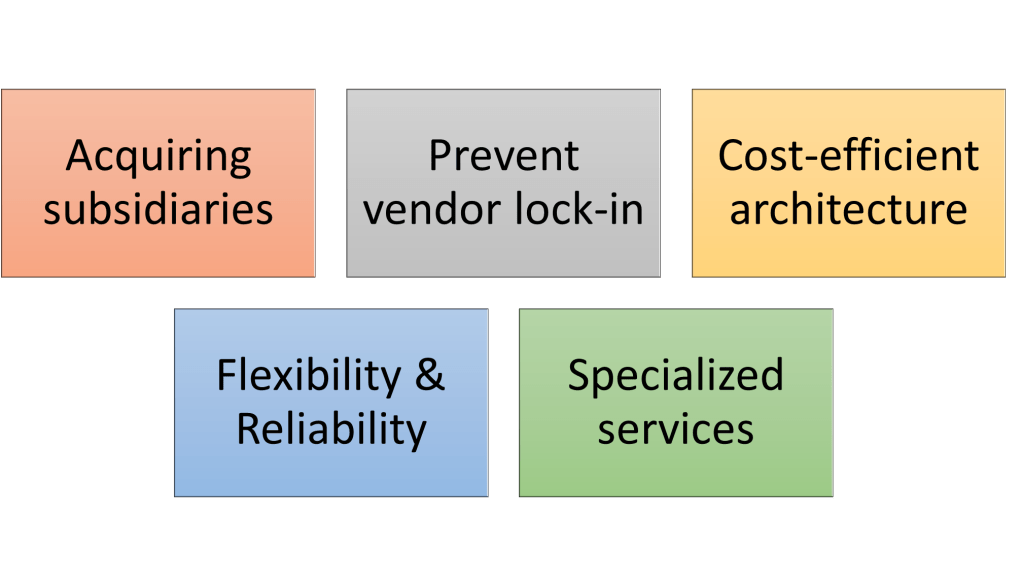
There are many tendencies to embrace a multi-cloud strategy, here some of them are listed.
The common reason is to reduce cloud computing overhead by designing a cost-efficient infrastructure by using cost-effective options from multiple cloud vendors.
Azure
VM instances
Container clusters
Hosted Apps
Serverless functions
AWS
AWS EC2
AWS EKS
AWS Elastic Beanstalk
AWS Lambda
Google
Google Compute Engine
Google Kubernetes Engine
Google App Engine
Google Cloud Functions
The second common reason is different services that are offered by different cloud vendors because some vendors offer specialized services. It might not be the most economically efficient service, but it fulfills the requirements of the workload better, and it’s not available on another vendor.
The third reason is, to improve the reliability and availability of cloud-based workloads because they spread across multiple clouds and disruptions to those workloads are less likely.
The fourth reason is when globally distributed enterprises / international companies acquire offices/subsidiaries in different countries, or they have to be merged with other companies, and they may have their resources in different clouds. Since a particular cloud provider doesn’t have a data center in a country.
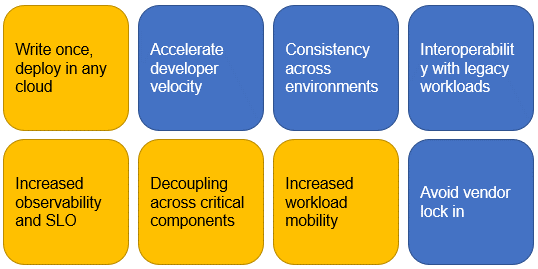
The fifth reason is, that the organizations want to avoid cloud provider lock-in. If the could provider changes the price of the services used in your workload, the entire workload is impacted. The solution is to architect the applications cloud-agnostic that can be run on any cloud. It does not mean that it would be cheaper or more efficient to run on more clouds, because the workflow can be optimized if a specific cloud is used, but it is better to have the option to be able to move the workload.
By using a single-cloud strategy you can also develop workloads that are able to move to another cloud without difficulty, but it happens really fast to get deeply dependent on the cloud vendor’s tools and services and encounter the following risks:
Migration is difficult and costly
Budget risk when the vendor raises the service costs
And the solution is:
Using multi-cloud strategy
Using tools that are cloud-agnostic and can be used in any clouds
The result of using a multi-cloud strategy is:
Easier migration/swap of a particular workload to another cloud
Not lock-in on a cloud vendor
Freedom to choose the cost-efficient services cloud provider
Avoid mirroring expenses
The reasons above are impacting the organizations’ infrastructure more and bring more benefit for projects because of being able to have multi-cloud architecture.
Basically, multi-cloud architectures are more expensive to implement because of the complexity (several toolsets for cloud management or cloud service broker, and each cloud provider has its own way of doing things). However, money can be saved considering the ability to pick and choose cloud services from multiple cloud vendors. In this case, the services that are not only the best but the services that are most cost-efficient. This is going to provide us a strategic advantage.
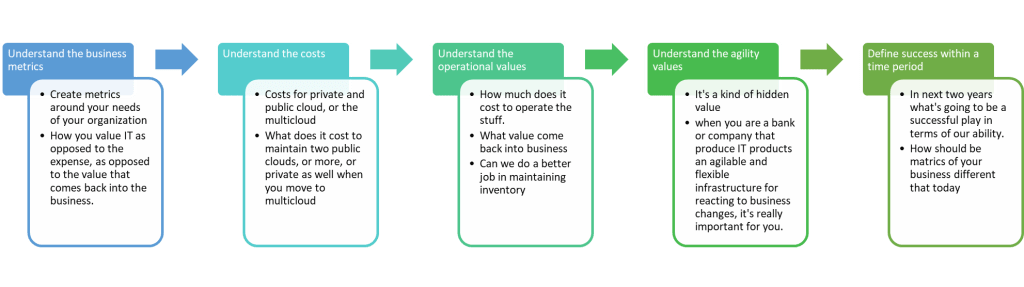
Another mandatory point is, to figure out the business case to understand costs vs. values, the organizations need some sort of value advantages of doing so, how can this value come back into the organization.
Single public cloud
Two public clouds
Two public clouds & Private Cloud
Initial costs
500,000 $
750,000 $
1,000,000 $
– In terms of getting things up and running – Getting things scaled up – In 3rd case is because of the software and hardware of the private part
Yearly costs
100,000 $
125,000 $
300,000 $
– For pay as you go -Maintain
Value of choice
0$
200,000 $
250,000 $
– Value of move information -How beneficial it can be
Value of agility
500,000 $
800,000 $
900,000 $
-Ability to change things as the needs of the business change (speed of need)
Value of choice: it is more business and asks about the impact of this decision on KPIs.
Value of agility: it is more technical and asks more about how I can react to business changes.
Therefore, we have to understand the business metrics to be able to understand the business value and then decide on the best solution for the project.
Always the business metrics / KPIs (Key performance indicators) have to be considered. The KPIs have an impact on the value of choice.
Sales revenue
Net profit margin
Gross margin
Sales growth year-to-date
Cost of customer acquisition
Customer loyalty and retention
Net promoter score
Qualified leads per month
Lead-to-client conversation rate
Monthly website traffic
Met and overdue milestones
Employee happiness
To have a successful multi-cloud infrastructure and deployment, it’s important to have a configuration of services, which is both compliant with the organization’s regulations and cost-efficient. Unless the deployment in production would be a big challenge.
Multi-cloud challenges and considerations
When an organization decides to adopt multi-cloud and use multi-cloud strategies, they have to prepare for the following items and have a strategy for them:
Integration
How do share data between workloads running on multi-cloud?
Management
How to manage resources from an abstract layer without making your hands dirty with different cloud vendors’ command lines and tools?
How do monitor resources?
Which cloud service brokers can be used?
Optimization
How should be the service configuration to have a cost-efficient infrastructure?
Compliance
How do keep the service configuration compliant with the regulatory outlines of the organizations?
Technical
They are adding complexity to the architecture and adding more risk but how it can bring more value back into the organization?
How can we do each of them?
For integration
Managing all workloads from a central monitoring hub
Using third-party tools for management and monitoring like Using a universal control plane, which abstracts the workload from the underlying cloud, where the workload is hosted. Cross-plane and Kubernetes are the tools that can be used for multi-cloud architecture. The drawback of this approach is,
Workloads that cannot be containerized
Lack of knowledge and experience with Kubernetes
For Management/Monitoring
Universal Control Plane can be used
Third-Party solution
A custom solution can be developed (using clouds’ APIs) but this solution is less centralized. The API approach also demands more hands-on effort from IT personnel, both upfront and for maintenance.
Management console of each of the clouds (navigating between tools for different clouds).
For Optimization performance
Compliance
Unifying all workloads within a common security and access-control framework
Figure 2: Multi-cloud toolset basic architecture for custom tools or third-party
The important point is
Cloud vendors don’t make it easy to integrate a workload running on one cloud with another workload hosted on a competitor’s cloud.
Most cross-cloud compatible tools provided by cloud vendors focus on importing workloads from another cloud rather than offering support for ongoing integration between workloads running across multi-clouds.
And finally, we have to pay for the services and tools of the third party.
Multi-cloud governance and security
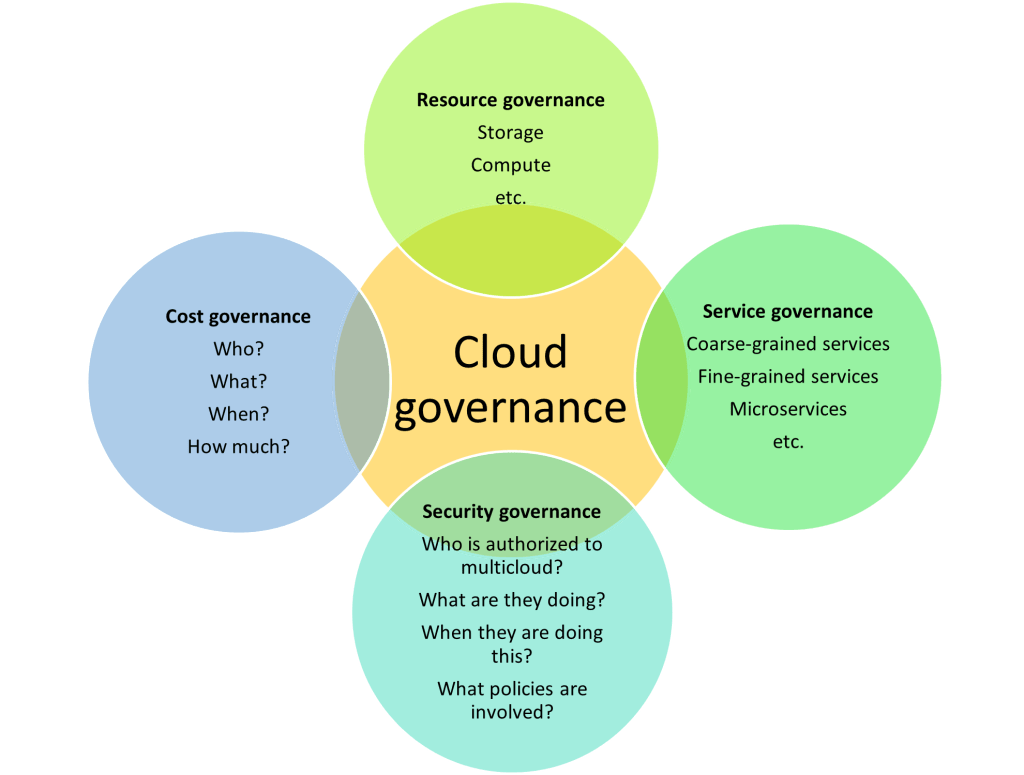
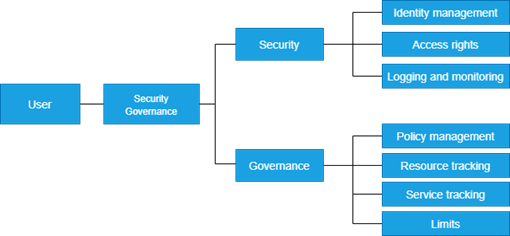
Security is not governance but has to be linked for multi-cloud. Governance is about putting limitations on the utilization of resources and services, in other words, governance is restrictions based on identity and policy. Security is about authenticating and authorizing the person and machine that use this resource, in other words, security is restrictions based on identity and access rights (Identity Access Management is an important requirement for multi-cloud). [4]
The hierarchy of security and governance is as follows.
For a successful multi-cloud infrastructure, it’s necessary to have a good governance and security outline.
Resources
Leveraged resources e.g., storage, compute, database, cloud server broker (CSB), etc. If they are still used or de-provisioned, how high is the charge, if they follow the usage rules e.g. only specific sizes of VMs are allowed to be used.
Services
Keep track of services e.g. data transfer services.
Cost
It’s about who’s using what and when, and how much they should be charged. This is about the policies for the utilization of resources and services. It must be done for a show back and chargeback (this is a part of the reimbursement process). It can be used for the health of the multi-cloud system. The other usage is putting limitations to manage the budget of the projects. It is one of the challenges that enterprises are encountering.
For doing governance a Cloud Management Platform (CMP) is needed. This provides a common interface to manage the resources and services across different clouds by providing a layer of abstraction to remove complexity.
CMP monitors the charge of provisioning, de-provisioning of resources, and usage rules of resources as well. The advantage is, because of the abstraction layer, it’s not necessary to be the expert on everything.
Multi cloud Requirements
As Many multi-cloud architectures are similar to hybrid cloud architectures and they have almost the same requirements and needs.
Figure 4: Multi and hybrid cloud expectations from a development perspective
Multi-cloud workloads categories
The common workloads that can use the multi-cloud strategy are as follows:
Deploying the same workload on two or more clouds simultaneously e.g., a business might store copies of the same data in both AWS S3 and azure storage. By spreading data across multiple clouds, that business would gain greater availability and reliability (without paying higher costs for mirroring data, because the mirroring is expensive e.g., multi-region is expensive in AWS)
Running multiple workloads at once, with some workloads running in one cloud and the others in another cloud (this approach provides cost efficiency and cloud agnosticism but doesn’t make individual workloads more reliable than using a single cloud)
It’s to keep multi-tier applications in the same cloud and region (then you can use the cloud provider’s backbone for internal traffics.)
The same applies to multi-cloud architecture for hybrid deployments
Whereas you can purchase dedicated bandwidth between on-prem and Azure (for example), can’t easily do the same between public cloud providers.
The workload might have regulatory requirements, which means that you might be in a Geo, that has a particular piece of legislation, and that particular piece of legislation might specify where data can go, or the security configuration might be a set of standards.
Multi cloud for workloads with complex regulatory requirements
Each cloud has diverse ways of assessing compliance with regulatory standards.
While cloud providers themselves are compliant with standards, the configuration for your organization’s workload may not be.
What should the technical lead know before starting with multi-cloud
The compute offering on the cloud is lying along a spectrum from IaaS (when you manage your servers, storage, networking, firewalls, and security on the cloud) to PaaS ( when you use platform-specific tools for scaling, versioning, and deployment). PaaS can help to go to production faster.
Azure
VM instances
Container clusters
Hosted Apps
Serverless functions
AWS
AWS EC2
AWS EKS
AWS Elastic Beanstalk
AWS Lambda
Google
Google Compute Engine
Google Kubernetes Engine
Google App Engine
Google Cloud Functions
In the first column, we have more low-level access to hardware, underlying operating system, and machine, with virtual machines we have abstraction over hardware. At the right end, you have hosted apps and serverless functions, that give you fewer ops and less administrative overhead and you don’t have to provision your own machine. We focus on the code and the platform takes care of the rest. However, this means you have less control and more platform lock-in.
As you see in the table above no matter which cloud provider you use, you have almost the same services.
If you want to have less administrative overhead and more platform support and don’t worry about provisioning, then you have to use platform-specific tools. On one side platform-specific tools offer convenience and on the other side lock you into a particular platform and the code that you write is not portable.
You can choose more control, then you have less platform support and you end up using open-source tools. This is a balance that you need to get to.
The balance between embracing platform capabilities and enduring vendor lock-in: search for your own sweet spot.
This sweet spot companies have found often involves the use of containers.
Containers offer the right trade-off between IaaS and PaaS offerings. Containers are just a unit of software, which basically package your application and all of its dependencies into an isolated unit. Containers are a key technology when you’re planning for a hybrid or multi-cloud.
A single container does not offer scalability, load balancing, fault tolerance, and all other bells and whistles that you need when you’re building at scale. What you need is a cluster of containers. Once you have a cluster, you need an orchestrator, that’s where Kubernetes comes in.
Kubernetes is an orchestration technology for containers and allows you to convert isolated containers running on different hardware into a cluster. Kubernetes embrace platform capabilities while maintaining the portability and flexibility of your code. The cool thing about Kubernetes is, no matter what cloud platform you’re on. All of them support Kubernetes.
A successful multi-Cloud solution/deployment
Elements of successful multi-cloud deployments would be as follows:
A consistent set of tools to manage workloads across clouds (several tools for maintenance across multi-cloud might not be a good idea, for example, if we have to use something like PowerShell to manage each cloud, then we have to know the different command lines of Azure, AWS, and GCP, and this is cumbersome). A good solution is to have only one tool for managing all VMs and pay for this service. These expenses are for efficient maintenance.
A consistent way of monitoring the security of workloads across clouds.
Easy to manage and monitor costs for each cloud in the multi-cloud deployment.
Ability to migrate workloads between clouds as necessary (to avoid the lock-in issue)
Multi cloud identity
Manage identity and access management for cloud [3] admins, app developers, and users. For cloud-based solutions, identity management and access management (IAM) must be always available.
When a policy is set on an organization/ top node all descendants of that node inherit this policy by default. If you set a policy at the root organization node/ root account, then the configuration of restrictions defined by that policy will be passed down through all descendant folders, projects, services, and resources.
My opinion
AWS Advantage: In some scenarios is necessary to have only one VPC for the whole organization and the projects must use this VPC but from different Accounts. It’s possible in AWS because we have cross-account shared services.
In Azure and GCP we cannot share a VPC or a VNet between two Subscriptions or Projects.
Knows as Rate Limiting. We place a throttle in front of the target service or process to control control the rate of the invocations or data flow into the target.
We can use the cloud services to apply this design pattern. This can be useful if we have an old system and we don’t want to change the code.
On each cloud vendor we have a service which does the throttling for us.
We have to break up logic into smaller steps (Pipes & Filter Design Pattern) and deploy it as higher/lower priority queues.
Note: It you have to handle long-running tasks, use queue, or batch.
Autoscaling & Throttling
They are used together and in combination. They affect the system architecture in great measure. Think about them in the early phase of the application design.
The security in “Bring Your Enterprise on Cloud” topic is a very hug job. But it’s implementation is not impossible. This topic is based on the related links.
The conceptual check list for security is as follows
Enterprise Infrastructure Security
Network security
Data encryption
Key and secret management
Identity & Access Management
Duty segregation
Least Privileges
Zero trust
Defense in depth
Platform policies
Vulnerability check/management
Compliance Monitoring
Enterprise Application Security
Database
Storage
Container image registry
Container service
Kubernetes service
Serverless functions
App Service
Queue services
Event services
Cache services
Load balancers
CDN services
VMs
VM Disks
Approach
These are the topics, which must be considered in “Bring Your Enterprise on Cloud” topic. In the following links I’ll provide an exact check list based on cloud provider.
To make the job easier it’s better to go through the conceptual check list in a layered way as demonstrated in the sample below. This can help to do the job Agile.
Layer 1: We explain how should be e.g. the network.
Layer 2: We explain how we can have e.g. a resilient network (we decide which platform service or a 3th party service or tool can to realize it)
Layer 3: We explain how we can have e.g. a high available network (we decide which platform service or a 3th party service or tool can to realize it)
We cannot generalize a migration way to the cloud for all the companies & enterprises. But I have provided a check list of topics which can help to have a good start without wasting the time with staring from scratch.
Enterprise Infrastructure
On-Prem <-> Cloud
Azure
VPN
Express Route
AWS
…
DNS
Azure
DNS private, public
AWS
Route 53 private, public
Network
Azure
Vnet, Subnet, NSG, ASG, UDR
Subnet Endpoint, Private Endpoint, Service Endpoint
Configure the access to the resources e.g. servers
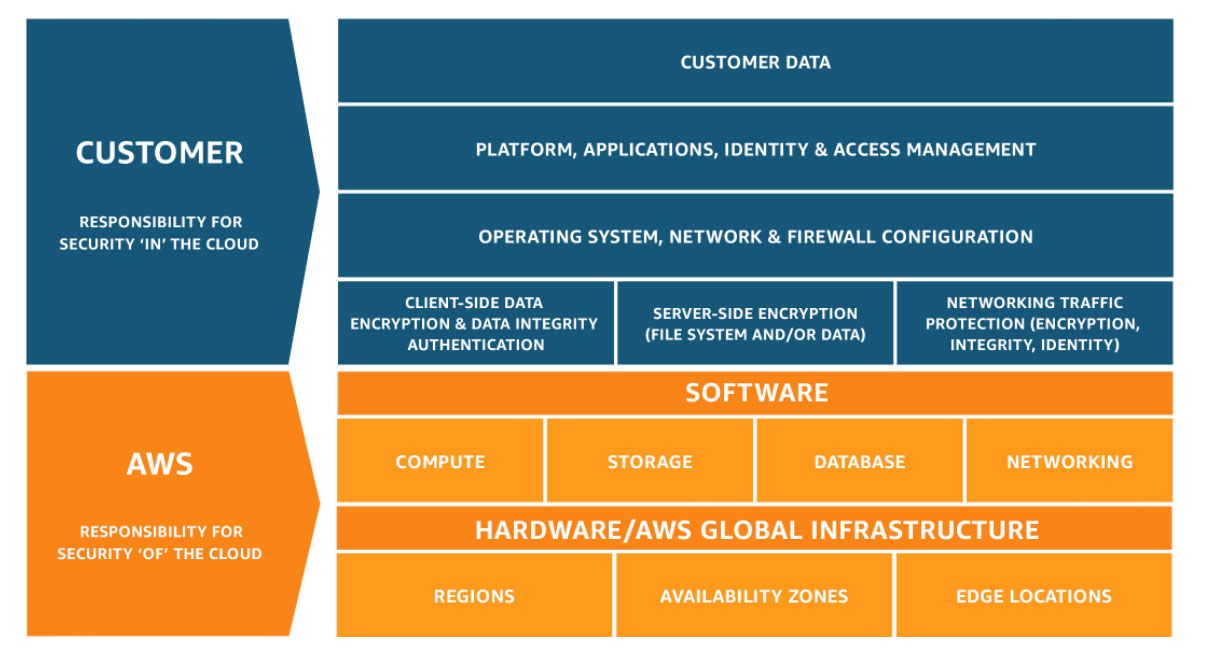
Responsible for operating system hardening of the servers
Ensure the disk volume has been encrypted
Determine the identity and access permissions of specific resources
ooo
Who should take care of security?
In companies where they up and run services/application on the cloud, the responsible teams have to have enough knowledge about the security on the cloud.
Developers and Enterprise architect
Ensure cloud services they use are designed and deployed with security.
DevOps and SRE Teams
Ensure security introduced into the infrastructure build pipeline and the environments remain secure post-production.
InfoSec Team
Secure systems
In which step of the project the security have to be applied?
We should ask this questions ourselves by architecting a solution by designing its monitoring solution
how would you diagnose issues with an application
how would you understand it’s health
what are it’s choke points
how would you identify them and what would you do when something breaks
Like the firefighting maneuver that must be executed half-yearly or yearly in each company, we have to use “chaos engineering” technique to intentionally cause breakage in the environments in a controlled manner to test monitoring, alerts, react of the architecture and resiliency of our solution.
Decide for the right resource and architecture for youe product
Choose the appropriate architecture based on your requirements
Know which compute options is right for your workload
Identify the right storage solution that meets your needs
Decide how you’re going to manage all your resources
Select region for vnet and regions are region/zone because we have for example East US & East US 2
Select region for VPC
Subnet is created in vnet’s region.
Subnet is created in different zones of the region
GCP
coming soon..
Multi-cloud : Public IP
Azure
AWS
GCP
Static IP
Elastic IP
Dynamic IP
Multi-cloud
You can configure VPN between cloud providers (it’s straight forward) and it’s the same as VPN between on-prem and cloud with setting up the Gateway and then we have an encrypted tunnel for the traffic between cloud providers.
Azure, GCP, and AWS support IKEv2 in virtual private network















 Multi Cloud Solutions