Using Terraform to deploy GCP services

This document also explains how to prepare the environment in the GitHub Codespace instead of using the local machine. However, this technique can be used on local machines as well.

Install Terraform cli in GitHub Codespace by using the dev container

We use Terraform to deploy GCP resources. I used the GitHub workspace. In the GitHub workspace, I have used the Dev container to install Terraform cli in the environment. The figure below shows the dev configuration for installing the latest Terraform cli.

Configure SSL in GitHub Codespace

Configure the SSL key in GitHub Codespace to push the code to the repository. This method works only for cloning with ssh.

I have used these GitHub Docs for the following steps:

  1. Generating a new SSH key
  2. Adding a new SSH key to your account
  3. Testing your SSH connection

Create a project in GCP

This is mandatory to have a project in GCP. The important is to know, that the project-id can never be changed after creation.

Creating a Service Account to use for Terraform deployment

Follow the steps below to create a service account for deploying GCP resources via Terraform. Terraform uses this account to authenticate.

The next is creating a key. Select the created service account and go to Manage Keys to generate a key.

Change to KEYS tab and by using Add Key button select Create new key item.

We should select a format for the new key. I used the JSON. I want to download the key as JSON and use it as a credential file.

After downloading the JSON file, I renamed it to credentials.json. and copied it to my development environment. Be careful not to push this file into the repository.

Provide credentials for Terraform

We have two options:

Option 1: Create an environment variable that contains the path to the credentials file.

export GOOGLE_APPLICATION_CREDENTIALS="./credentials.json"

Option 2: configure the credentials in Terraform google resource.

provider "google" {
  project     = var.gcp_project
  region      = var.location
  credentials = "/workspaces/codespaces-blank/credentials.json"
}

Azure Kubernetes Service (AKS) with Terraform deployment

  1. AKS components
  2. AKS security (service principal or managed identity)
  3. AKS operation (scaling and autoscaling)

AKS components

I assumed that you are familiar with the Kubernetes Cluster concepts (elementary level). Therefore I didn’t do any deep dive into the elementary components. The focus of this post is the following topics:

  • Azure-related Kubernetes components
  • Deploying AKS with Terraform

The control plane (Kubernetes core component)

It’s the core of the Kubernetes Cluster and doesn’t matter on which cloud provider platform you are provisioning a cluster. The main OS for AKS is Linux based.

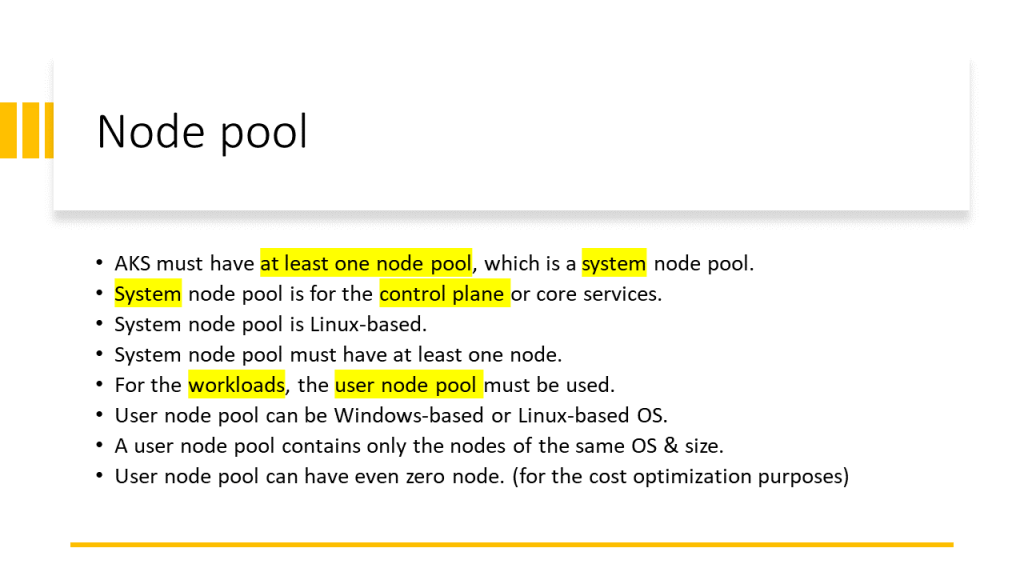
Node pool (AKS component)

AKS has two types of Node pools:

  • System Node Pool: contains the nodes on which the control plane is running. For the control plane’s high availability is recommended to have at least 3 nodes in the System Node Pool.
  • User Node pool: contains the nodes on which my applications, APIs, APPs, or Services are running. This node pool can have one of the following host’s OSs.
    • Linux
    • Windows

An AKS Cluster can have both Windows and Linux -based User Node Pools in parallel. We can use nodeSelector in the YAML file to specify on which User Node Pool my application should be deployed. See more in the video below.

Note:
The importance is that all the nodes in a Node pool (doesn’t matter System or User) have the same VM size. Because we can specify one VM size for one Node Pool.

Node components

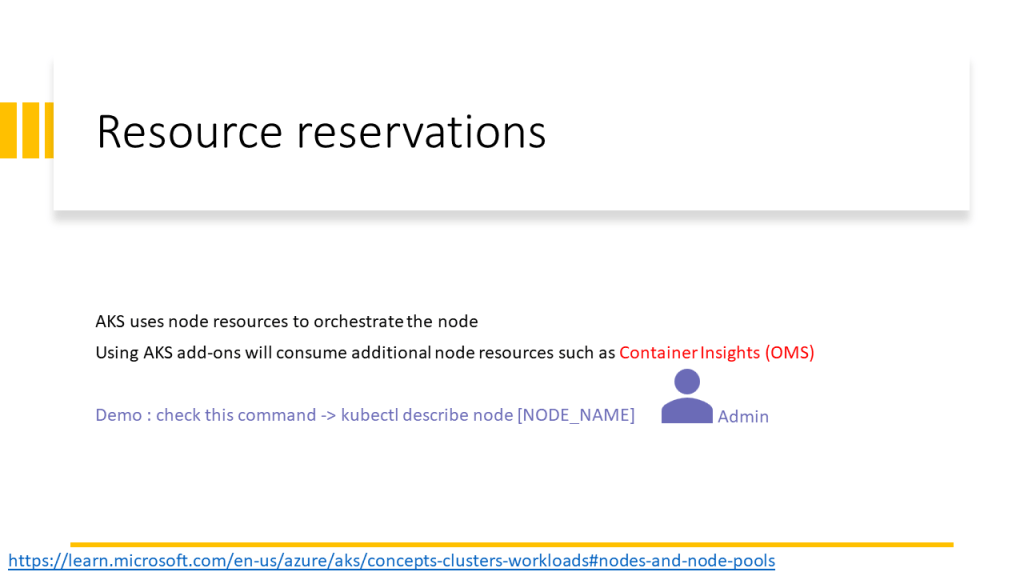
Each node in the Node Pool is a VM. Kubernetes uses the following components to orchestrate the nodes and pods that are running on the nodes.

  • Kubelet: manages deployments
  • Kube-Proxy: manages the nodes’ networking
  • Container runtime: up and run container images

This video walkthrough the AKS core concept and components and its implementation in Terraform.

The PowerPoint slides of the video are available here.

Shared slides: https://www.slideshare.net/parisamoosavinezhad/aks-components

GitHub: https://github.com/ParisaMousavi/enterprise-aks

For a nodeSelector sample code see the sample YAML file here: https://github.com/ParisaMousavi/solution-11-aks-apps/blob/main/sample-win/sample.yaml it’s a ASP.Net Application that will be deployed on windows node.


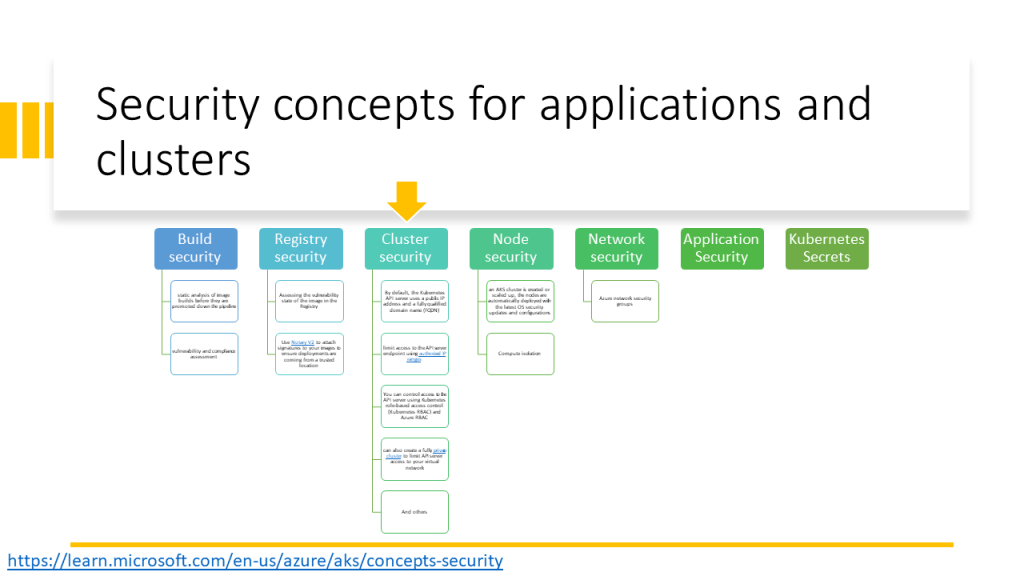
AKS security (service principal or managed identity)

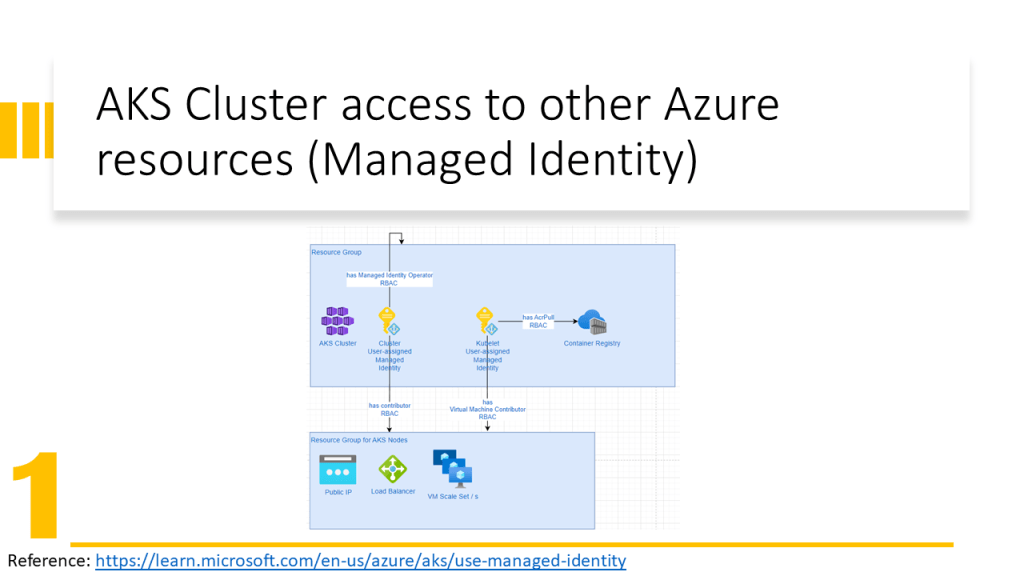
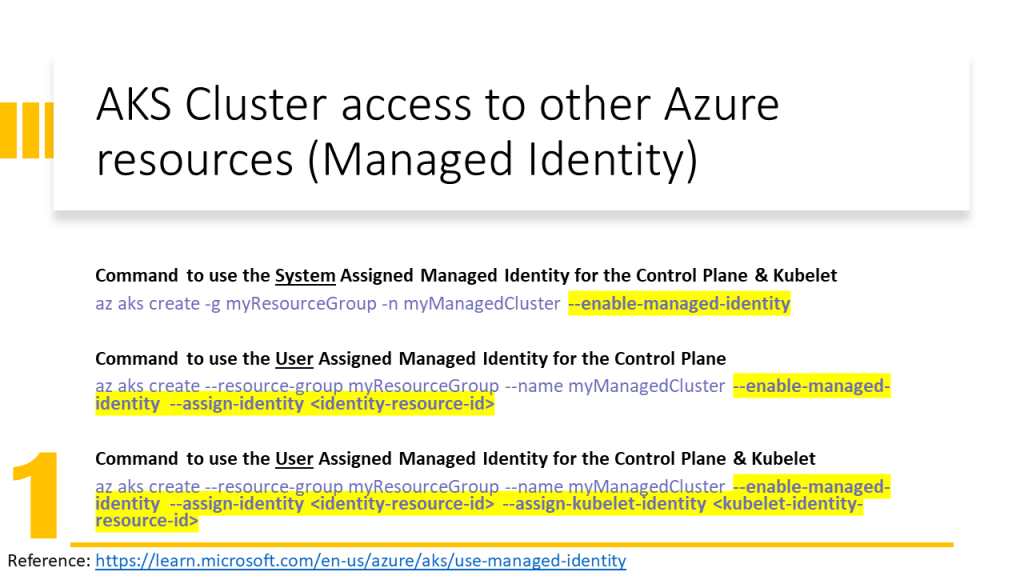
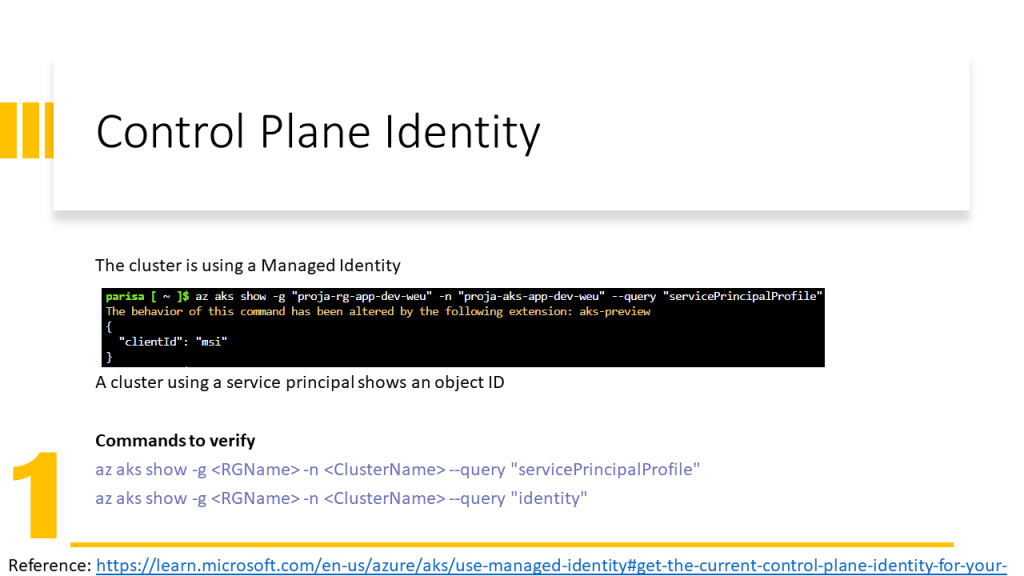
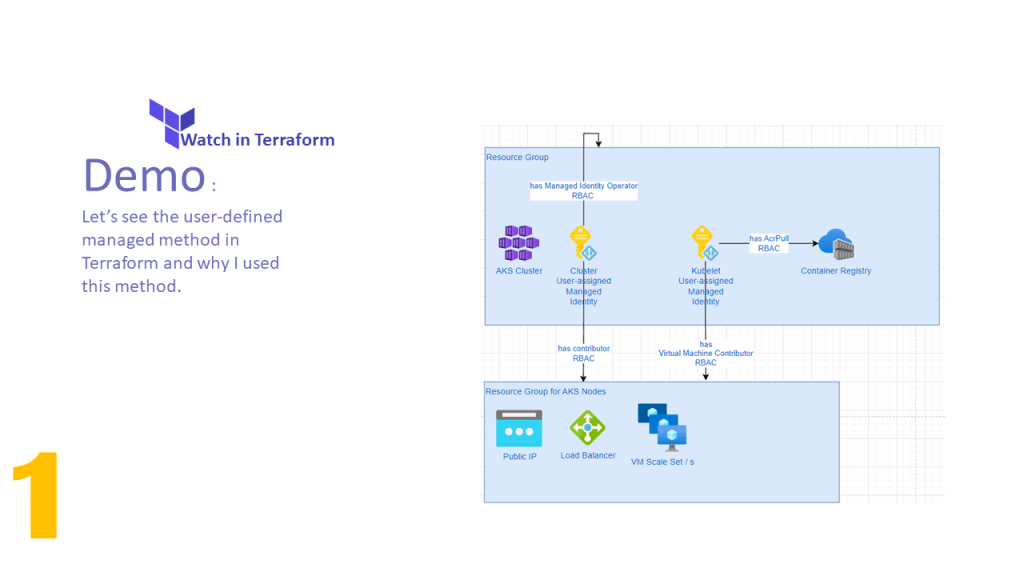
AKS Cluster needs access to other Azure resources e.g. for autoscaling must be able to expand the VM Scale Set and assign an IP Address to the VM. Therefore the AKS Cluster needs Network Contributor RBAC Role.

Kubele needs to pull images from Azure Container Registry, therefore it needs AcrPull RBAC Role.

Only an identity can obtain a role. In Azure, we have two possibilities:

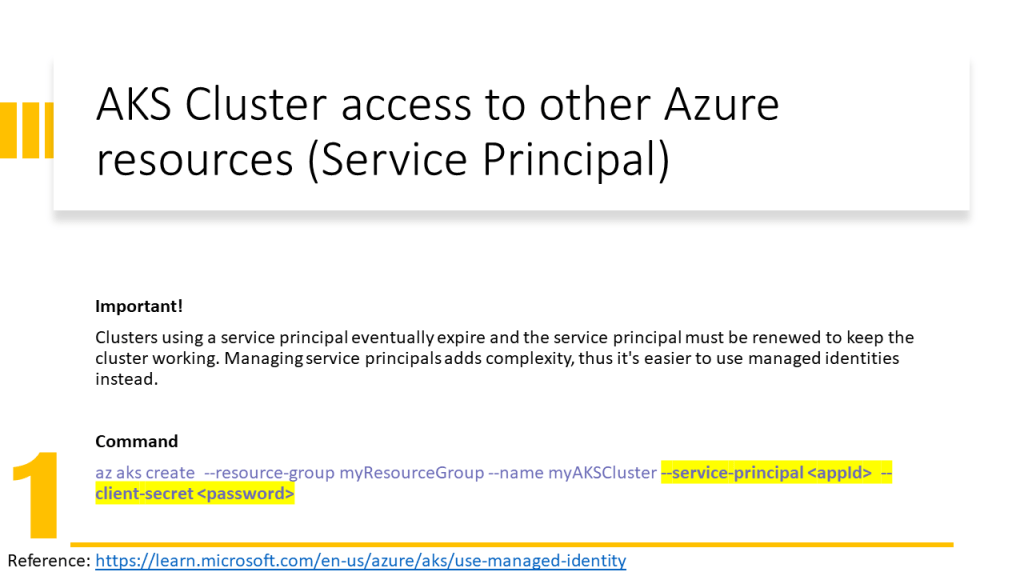
  • Associate a Service Principal to a Service (old solution in 2022) and give RBAC roles to the service principal.
  • Assign an identity to a service (new solution in 2022) and give RBAC roles to this identity. Here we have two types of identities:
    • System Managed Identity: is created automatically and assigned to a service and is deleted when the service is deleted
    • User Managed Identity: is created by the user and the user should assign it to a service and is not deleted when the service is deleted.

In this video, I have explained how to configure the Terraform implementation to assign the User Managed Identity to AKS Cluster and Kubelet. In addition, has been explained how to assign RBAC roles to them and which RBAC role for which purpose should be assigned.

The PowerPoint slides of the video are available here.

Shared slides: https://www.slideshare.net/parisamoosavinezhad/aks-scurity-cluster-kubelet-access-to-services

GitHub: https://github.com/ParisaMousavi/enterprise-aks/tree/2022.10.24

AKS operation (scaling and autoscaling)

Throttling Design Pattern

Knows as Rate Limiting. We place a throttle in front of the target service or process to control control the rate of the invocations or data flow into the target.

We can use the cloud services to apply this design pattern. This can be useful if we have an old system and we don’t want to change the code.

On each cloud vendor we have a service which does the throttling for us.

Approach

  • Reject too frequent requests
  • We have to break up logic into smaller steps (Pipes & Filter Design Pattern) and deploy it as higher/lower priority queues.

Note: It you have to handle long-running tasks, use queue, or batch.

Autoscaling & Throttling

They are used together and in combination. They affect the system architecture in great measure. Think about them in the early phase of the application design.

Develop frontend for backend via Vue

Let’s have fun with developing a sample together

Related topics

Scenario: When the caller and called application are not in the same origin the CORS Policy doesn’t allow the called application / backend to response the caller application.

It’s strongly recommended to specify the allow origin in your backend. In the following video I explain how we can do it.

Solve CORS policy

After developing the website, use the Security Header to test the security of your website.


You owe your dreams your courage.

Koleka Putuma


Authentication methods

Azure Authentication via Active Directory

Disadvantage of Active Directory
If a company has use the Active Directory of the authentication and the personals are allowed to do home office, therefore they need to use VPN Connection to authenticate to the company’s Active Directory. This isn’t so secure.

Manage and authentication for mobile and modern devices

Classic active directory cannot manage modern devices with the following features:

  • Group policies
  • Kerberos or NTLM (works poorly)
  • Session based security

What can help us to manage the modern devices:

  • Mobile device management
  • OpenID connect and OAuth
  • Access token and refresh token

Forms-based Authentication

Protocols

WS-Federation

It’s a redírect-based flow. we go to a site and site says we are anonymous, and it redirects us to a authentication provider.

The user can pick an authentication provider and we provide the credential and then we get SAML post back.

SAML looks like XML and it contains what they call a SAML assertion and that establish your identity.

SAMLp

More flexible and supports more structured way to do SAML, more attributes.

OpenID Connect

OpenID Connect & OAuth are not synonymous.

OAuth is about a delegation protocol. For example I say, I’m allowing you to access my application if you match certain criteria. In this case I don’t know about the identity but if you have brown eyes and brown hairs, you are allowed to work with my software.

OpenID Connect says that you have to have minimum set of protocols that also establish your identity. OpenID is not only for web / mobile application. It can be applied to anything.

The following figure demonstrates the OpenID Connect usage for Web Application.

Insert photo here!

Single Page Application

Single Page Application is typically written in JavaScript (OAuth 2.0 Implicit Flow). Using OAuth 2.0 implicit flow and Single Page Application don’t have a secure way of storing long-lasting refresh token.

In OAuth 2.0 implicit flow, we assume that with closing the browser the user is logged out. Therefore OAuth 2.0 is suitable for Single Page Application.

Native Application

Like the applications running on a Mac OS, Linux OS or Windows OS, we use the Authorization Code Grant Flow. Here we have capability of storing long-lasting refresh tokens in a secure, encrypted manner offline.

Azure AD Authorization features

Azure AD V1 endpointAuthorization Code Grant Flow
It has used authorization code grant flow for mobile apps and desktop applications as well.
Azure AD V2 endpointAuthorization Code Grant Flow
It prefers not to use authorization code grant flow for mobile app but only for desktop applications.
Proof of key exchange (PKCE) flow
It’s for mobile application.
In practice’s Scenarios
Web Browser talks to Web App
It can be developed with WS-Federation, SAMLP, OpenID Connect.
Sigle Page Application talks to Web API
It can be developed with OAuth to implicit flow, so ADAL.JS, MSAL.JS.
Native App talks to Wen API
Web Application talks to Web API
It uses user credential delegated credentials, or using application’s identity.
Daemon
If there’s no authentication opportunity. Daemon can call API registered in Azure AD.
In practice Implementations

Create a .Net core MVC project via the PowerShell.

# Create .NetCore MVC Project
$ProjectName="DotNetCorePipeline"

cd C:\YOUR PATH\AuthenticationForDevelopers

new-item -Name $ProjectName -ItemType directory

cd C:\YOUR PATH\AuthenticationForDevelopers\$ProjectName

dotnet new  mvc --auth SingleOrg  --client-id YOUR CLAINT ID  --tenant-id YOUR TENANT ID  --domain YOUR DOMAIN NAME --no-https

After creating the project go to project folder and open the project file in Visual Studio and run the project. [More Info about ID Tokens]

Business to Consumer (B2C)

for scenarios, in which the external users are the focus.

  • Identities not known ahead time
  • Social login may be required ( can be simple username, password authentication, with/without MFA) -> other identity provider like social accounts
  • Custome user experience and brand promotion is important -> via collecting information from market
  • Keep evrything secure and standard compliance.
In Practice
  • Create a B2C Directory (it has two steps. First create a new one. Second assing to Subscription.)
  • Register and configure an application
  • Create an application that uses Azure AD B2C

Token-based authentication to SQL resources

SQL resources are the following SQL database, SQL warehouse and SQL server. The authentication is possible via AD.

Multi-Factor Authentication

Certificate-based authentication

Resources